
Disclosure: WebFin is reader-supported. If you buy hosting through links on this page, we may earn a commission at no extra cost to you. Commissions vary between providers and our ratings do not — here’s our full disclosure.
Most guides to installing an SSL certificate start by explaining certificate authorities. The useful first step is simpler: check whether your host has already issued one.
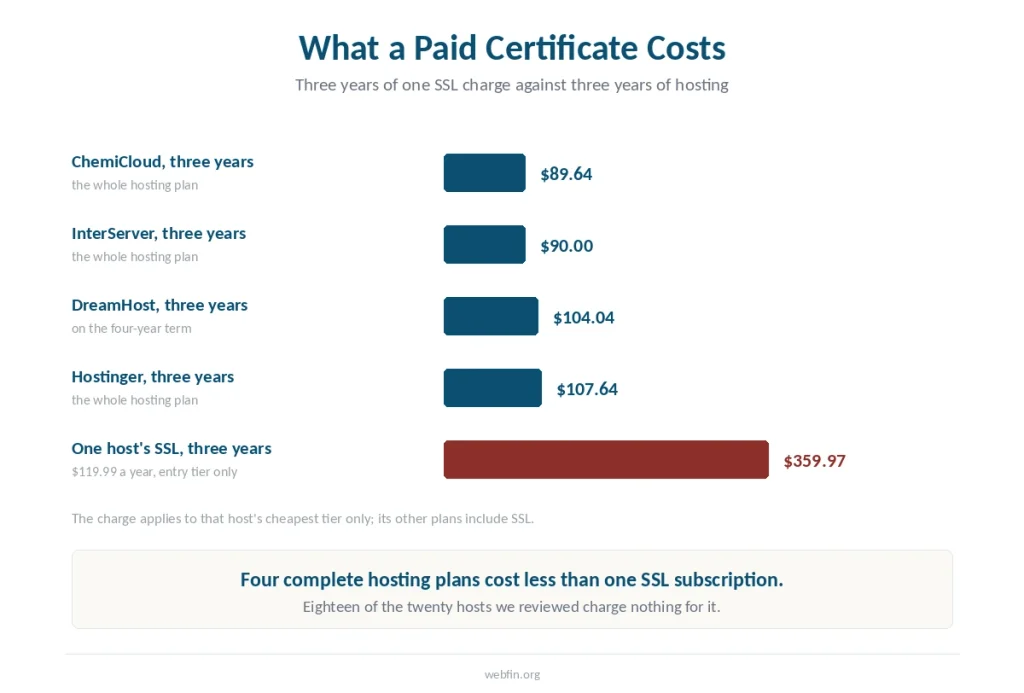
Eighteen of the twenty hosts we have reviewed include SSL at no charge. One charges $119.99 a year on its cheapest plan, which is more than three times what several complete hosting plans cost across three years.
The Short Answer
Open your hosting control panel and look for SSL, SSL/TLS Status, or Let’s Encrypt. If a certificate is listed as active, you are done with the hard part.
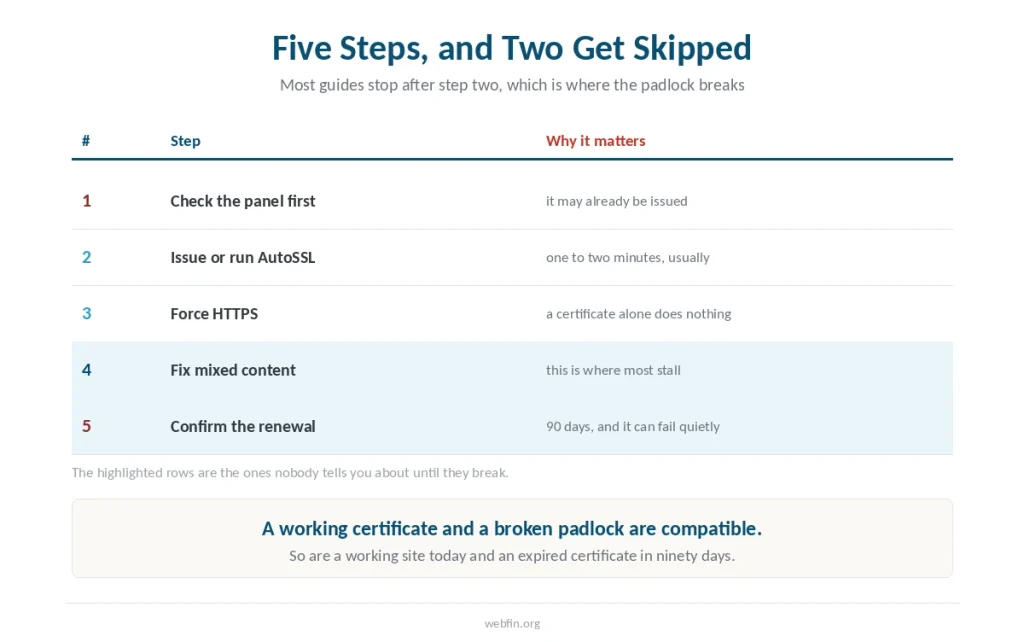
Then do three things most guides treat as optional: force HTTPS, fix mixed content, and confirm the renewal is automatic. Certificates last 90 days, so a renewal that silently fails becomes a broken site three months later.
Step 1: Check What You Already Have
First, log into your control panel and find the SSL section. On cPanel it appears as SSL/TLS Status or Let’s Encrypt SSL under Security. Custom panels label it differently but every host has one.
If a certificate is issued and current, skip to step three. If the domain is listed without a certificate, click Issue or Run AutoSSL and wait.
Issuance usually takes one to two minutes. On a domain added within the last day it can take up to four hours, because the certificate authority waits for DNS to settle first.
Step 2: Where It Is Not Free
⚠️ Two hosts in our reviews charge for certificates, and the amounts are worth knowing before you assume yours is included.
One charges $119.99 a year on its entry plan after the first year, while including SSL for the life of the plan on every other tier. That charge lands specifically on the customers least able to absorb it — we set out the full catalog there.
Another lists a standard certificate at $75 a year and a wildcard at $150, though its shared accounts get free AutoSSL through cPanel covering up to a thousand domains.
Across three years, $119.99 a year comes to $359.97. Four of the fifteen plans we have priced cost less than that across the same period.
If your host charges, the answer is not usually to pay. Browsers trust free certificates from the same authorities exactly as they trust paid ones, and any host that will not issue one is telling you something about the plan you bought. Our page on free against paid SSL covers the three arguments for paying that do not hold.
Step 3: Force HTTPS
Of course, a certificate does nothing on its own. Until the site redirects, visitors keep arriving over HTTP and the padlock never appears.
In WordPress, open Settings then General and change both the WordPress Address and Site Address to begin with https. Many hosts also offer a Force HTTPS toggle in the panel, which is safer because it works at the server rather than in the application.
⚠️ Clear every cache afterwards: the hosting cache, any caching plugin, and your content network if you use one. A cached HTTP version will keep serving the old page for as long as it lives — caching layers behave differently by host.
Step 4: Fix Mixed Content
This is where most installations stall. The certificate works, the site loads, and the padlock stays broken because something on the page still loads over HTTP.
The usual culprits are images with absolute URLs saved in the database, hardcoded links in a theme, and scripts loaded from external domains. A browser console lists every one of them under mixed content warnings. Our page on moving away from an EIG brand covers why the invoice is the reason to leave, not the reputation.
A search and replace across the database fixes the stored URLs in one pass. Plugins such as Really Simple SSL automate the rest, though they solve the symptom rather than the stored data underneath.
Step 5: Confirm the Renewal Will Happen
Let’s Encrypt certificates expire after 90 days, and the authority recommends renewing 30 days before expiry.
⚠️ Automated renewal usually works and occasionally does not. In May 2026 a change to Let’s Encrypt’s certificate chain broke renewals on servers with older trust stores, and site owners found out when certificates stopped installing rather than when they were warned.
Set a calendar reminder for 60 days out and check the certificate date once. If it has moved forward, the automation is working and you can stop thinking about it.
When Issuance Fails
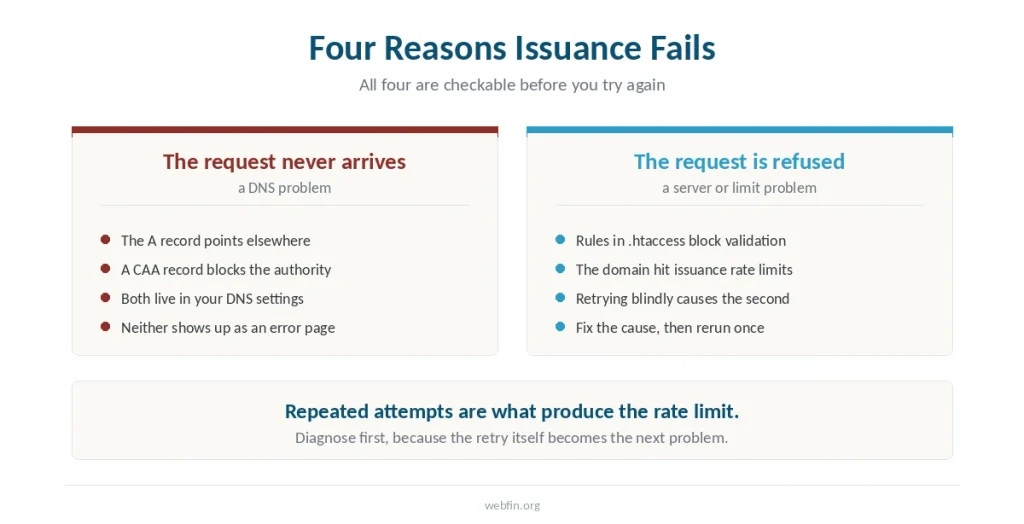
In practice, four causes account for most failures, and all four are checkable.
The domain’s A record may not point at your hosting server, which means the validation request never arrives. A CAA record in your DNS may restrict which authorities can issue for the domain. Rules in .htaccess may block the validation file the authority tries to read. Or the domain may have hit the authority’s issuance rate limits after repeated attempts.
Fix the cause and rerun issuance rather than retrying blindly, because repeated attempts are what produce the fourth problem.
What SSL Does and Does Not Do
It encrypts traffic between the visitor and the server, and it removes the browser warning that costs you visitors before they read anything.
It does not protect against malware, brute-force logins, vulnerable plugins or anything happening on the server itself. A padlock is a statement about the connection rather than about the site.
How We Research
Certificate behaviour and issuance timings come from published 2026 guidance and from the certificate authority’s own documentation. The pricing figures come from our own reviews, where each is attributed to the host that published it. We run no tests of our own.
Our criteria are on our About page.
Frequently Asked Questions
Almost never. Eighteen of the twenty hosts we have reviewed include one at no charge, usually through Let’s Encrypt or cPanel AutoSSL. Browsers treat those free certificates exactly as they treat paid ones.
One to two minutes in most cases. On a domain added within the last day, issuance can take up to four hours because the certificate authority needs DNS records to propagate before it can validate ownership.
Mixed content. Something on the page still loads over HTTP, usually an image with an absolute URL stored in the database or a hardcoded link in a theme. The browser console lists every offending resource.
Let’s Encrypt certificates last 90 days and renew automatically about 30 days before expiry. Automation usually works, though a change to the certificate chain in May 2026 broke renewals on some servers with older trust stores.
The connection between visitor and server, and nothing else. It does not stop malware, brute-force login attempts or vulnerable plugins. A padlock says the traffic is encrypted, not that the site is secure.
The Verdict
Check before you buy. Eighteen of the twenty hosts we have reviewed issue a certificate at no charge, and the panel usually has one waiting.
Where a host charges, the annual figure can exceed what the hosting itself costs. That is worth knowing before the renewal notice arrives rather than after.