Disclosure: WebFin is reader-supported. If you buy hosting through links on this page, we may earn a commission at no extra cost to you. Commissions vary between providers and our ratings do not — here’s our full disclosure.
A website backup service earns its keep on the day your host fails, your site is hacked or an update breaks the checkout. On that day, a copy stored on the same server is no help. The best website backup service is therefore the one that keeps a copy somewhere else and lets you restore it quickly.
This website backup service guide compares three widely used WordPress tools on how often they copy and where they store the copies. For the setup itself, our guide on setting up automatic backups goes step by step.
The Short Answer: Which Website Backup Service
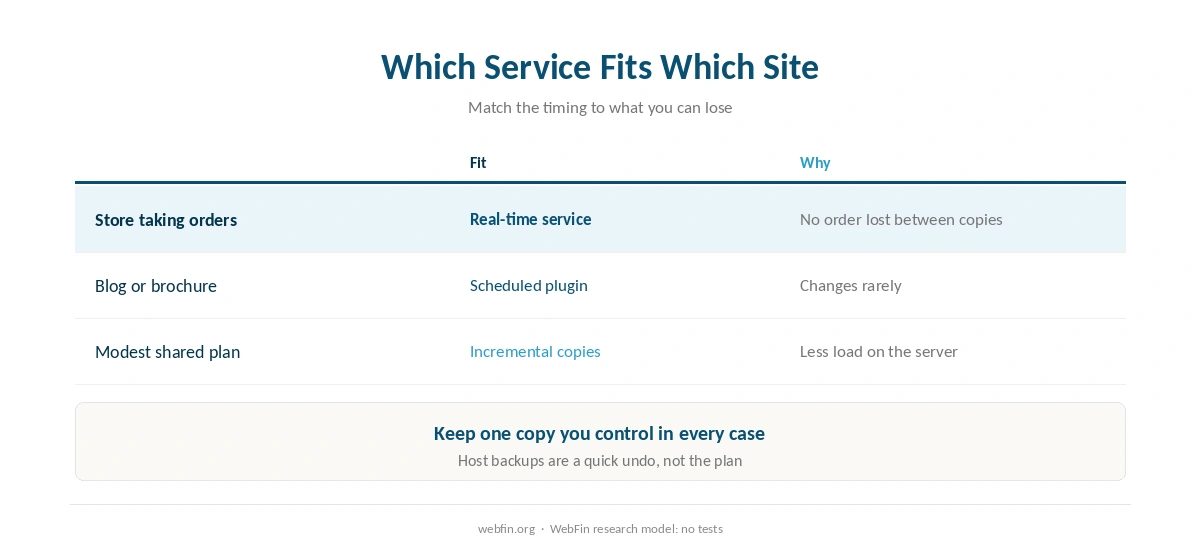
On a blog or brochure site, a scheduled plugin that sends copies to cloud storage, such as UpdraftPlus, is usually enough. For a store or a site that changes all day, however, a real-time service such as Jetpack VaultPress Backup loses less between copies. BlogVault sits between them, with incremental copies kept on its own storage.
A Copy on Your Host Is Not a Backup
Many hosts take backups, and that is useful for a quick undo. Still, those copies usually sit with the same company, so a billing dispute, an account suspension or a provider failure can take them away with the site.
A widely used rule of thumb, the 3-2-1 rule, answers this. Keep three copies of your data, on two kinds of storage, with one copy somewhere else. For a website, that means the live site, the host’s copy and one off-site copy you control.

UpdraftPlus: Scheduled Copies to Your Own Cloud
UpdraftPlus is a plugin rather than a hosted service. It copies the site on a schedule and sends the copy to storage you already have, such as Google Drive, Dropbox or Amazon S3, according to WPBeginner’s comparison and others.
⚠️ Sources disagree on the free version. Most comparisons we read say it schedules backups and sends them to remote storage; one, from Themeisle, says the free version lacks both. Check the plugin’s own page before you rely on the free tier.
Its weak point is timing. A schedule copies the site once a day or once an hour, so anything that changes between runs, such as a new order, is at risk.
Jetpack VaultPress Backup: Real-Time Copies
Jetpack VaultPress Backup copies the site in real time, saving each change as it happens rather than on a schedule. It stores the copies on Automattic’s own storage, and the comparisons we read agree that it has no free tier.
That timing suits a store, because an order placed a minute before a failure still exists in the backup. On the other hand, the copies sit with one provider, so an off-site copy of your own still completes the 3-2-1 rule.
BlogVault: Incremental Copies on Its Own Storage
BlogVault takes incremental backups, copying only what changed since the last run, and keeps them on its own storage. Incremental copies put less load on the server, which matters on a modest shared plan.
Several comparisons also note staging and one-click migration alongside the backups. Be aware, though, that BlogVault publishes some of the comparisons that praise it, so weigh those accordingly.

Test the Restore, Not Just the Backup
A backup you have never restored is a hope, not a plan. Once a quarter, restore a copy to a staging site and check that pages, images and orders come back. Our guide on setting up a staging site shows how.
The test also tells you how long a real restore takes. If it takes hours, plan for that before you need it, rather than during an outage. Our guide on fixing a website that is down covers the rest of that day, and uptime monitoring tells you when it starts.
When You Need a Website Backup Service Most
Three moments matter most. First, before a large update or a theme change. Second, before moving hosts, as our guide on migrating web hosting explains.
Third, after a break-in, when you need a clean copy from before the attack. Our guide on recovering a hacked website explains why an older backup is sometimes the safer one.
For a store, the stakes are higher still, which is why our guide to WooCommerce hosting compares hosts built for stores.
Backups and Your Hosting Contract
Read what the host promises about its own backups before you count on them. Some keep copies for a short window only, and some charge to restore. Our guide on reading a hosting agreement shows where to look.
Backup add-ons sold at checkout are one of the charges our page on hidden hosting fees covers. Likewise, cancel any you do not need before the renewal, as our guide on canceling hosting and getting a refund explains.
A managed host often includes backups in the plan, which removes one add-on. Our guide to managed hosting covers what else those plans include, and our small business hosting guide compares the options.
How We Research
We run no tests. The service descriptions come from published comparisons by WPBeginner, Themeisle, PureThemes and others, read in October 2026. Where they disagree, we show both versions.
We do not print prices for these services, because the sources disagree and we do not track them in our tables. The criteria behind our host scores are on our about page.
Website Backup Services: FAQ
It depends on the site. A scheduled plugin such as UpdraftPlus suits a blog, while a real-time service such as Jetpack VaultPress Backup suits a store.
Not on its own. A copy kept by the same company can disappear with the account, so keep one off-site copy you control.
A rule of thumb: three copies of your data, on two kinds of storage, with one copy kept somewhere else.
Sources disagree. Most say the free version schedules backups to remote storage; Themeisle says it does not. Check the plugin’s own page.
Once a quarter is a sensible habit, restoring to a staging site so the live site is not touched.
The Verdict
The right website backup service depends on how much you can afford to lose between copies. A daily schedule suits a site that changes rarely, while a store needs real-time copies.
Whatever you choose, keep one copy away from your host and test a restore before you need it. Those two habits matter more than the brand of the plugin.