Disclosure: WebFin is reader-supported. If you buy hosting through links on this page, we may earn a commission at no extra cost to you. Commissions vary between providers and our ratings do not — here’s our full disclosure.
This Google Cloud review looks at it as a place to host a website. New customers get $300 in free credit, and an always-free tier includes one small e2-micro server a month, according to Google’s own free-tier page.
However, Google Cloud is infrastructure, not hosting: you build and run the server yourself, and you pay by the resource. We score it 3.4 for site owners: a strong platform with a generous free tier, but complex to run and to budget.
Google Cloud Review: The Short Answer
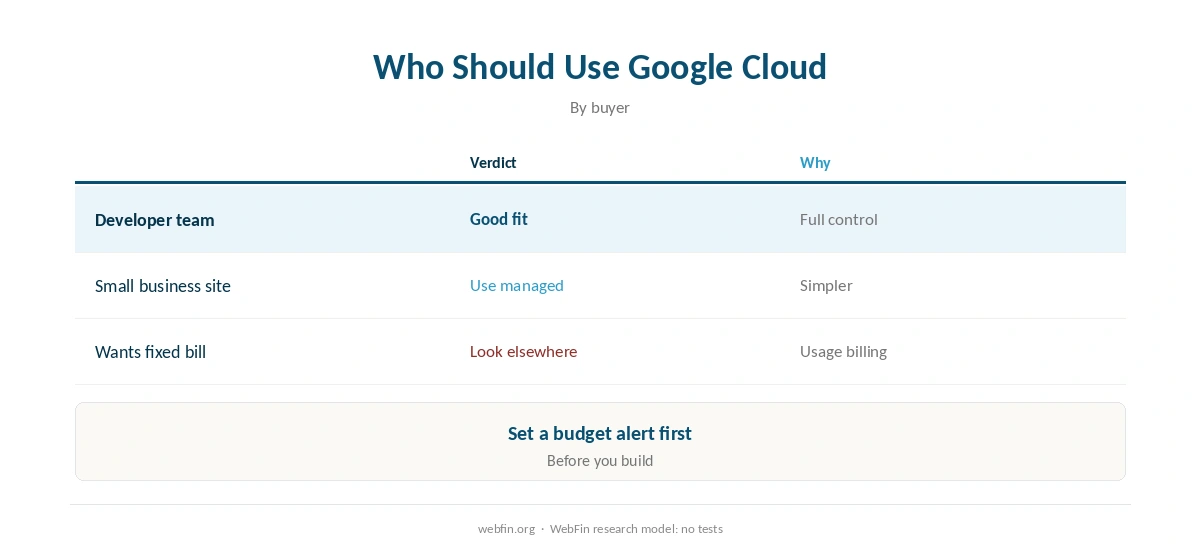
In short, this Google Cloud review finds it suits developers and teams who can build on raw infrastructure. If you want a website on Google’s network without running servers, a managed host such as Kinsta, which runs on Google Cloud, fits better.
Google Cloud at a Glance
| Point | Google Cloud | Note |
|---|---|---|
| Our score (for site owners) | 3.4 | Strong platform, complex to run |
| New-customer credit | $300 | 90 days, per guides published in 2026 |
| Always-free server | 1 e2-micro a month | Three US regions only |
| Billing | Pay as you go | Priced by resource |
| Management | You build and run it | No hands-off option for sites |
What You Get for Free
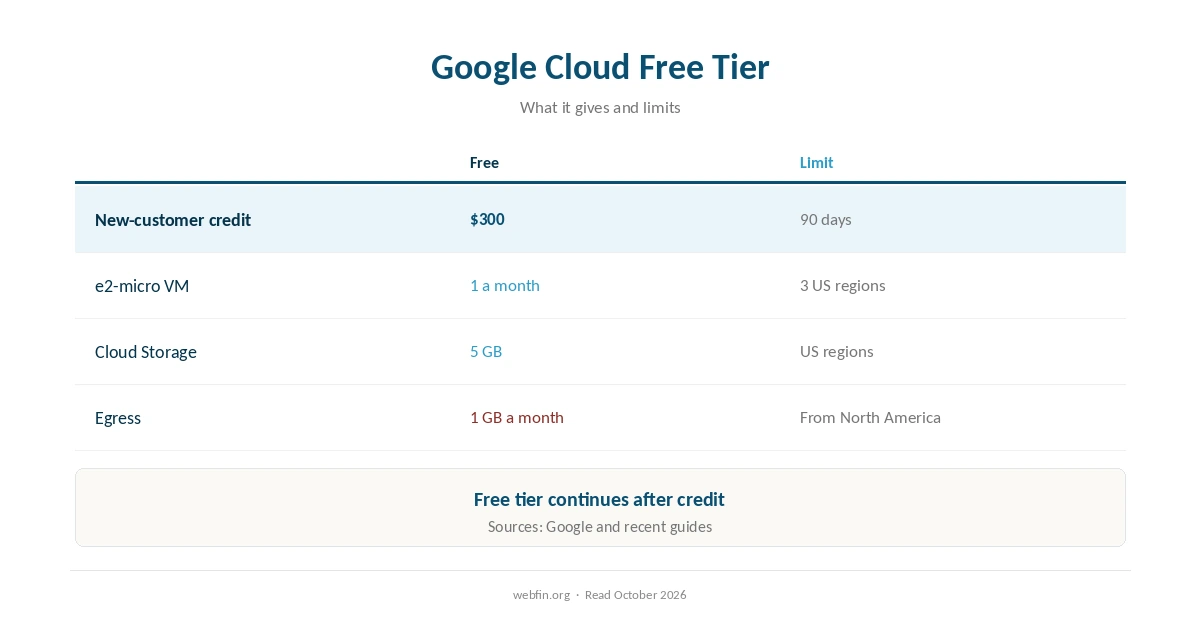
According to Google’s free-tier page, new customers get $300 in free credit, and more than 20 products have a free allowance, including one e2-micro instance a month.
The details matter, though. For instance, the e2-micro server and 5 GB of Cloud Storage count as free only in US regions, and free egress is 1 GB a month out of North America for Compute Engine, according to FreeTier.co’s 2026 comparison. The always-free tier keeps running after the credit ends.
| Host | Rating | Renewal price |
|---|---|---|
| Hostinger | ⭐ 4.2 | $10.99/mo after 48 months |
| InterServer | ⭐ 4.1 | $2.50/mo, never changes |
| Cloudways | ⭐ 4.1 | $14.00/mo, never changes |
| WP Engine | ⭐ 4.1 | $35.00/mo after 12 months |
| Kinsta | ⭐ 4.1 | $35.00/mo, never changes |
Infrastructure, Not Hosting
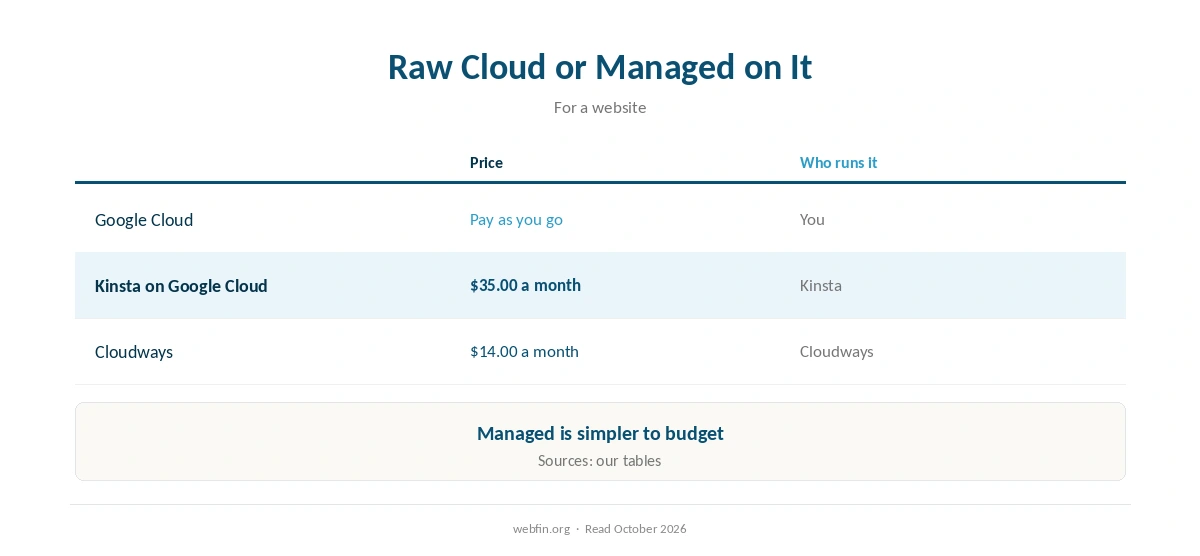
On Google Cloud, you choose machines, storage and networking. Then you install and secure the web server yourself. Billing follows usage, so a busy month or a misconfigured service can raise the bill.
That flexibility suits developers, as our guide to cloud hosting explains. For site owners, by contrast, our managed vs unmanaged guide shows what you would be taking on. Our guide to VPS hosting explains the virtual machines underneath.
Google Cloud Without Running Servers
Kinsta runs its whole managed WordPress platform on Google Cloud, using C2 and C3D machines and the Premium Tier network, according to Kinsta’s own description.
As a result, a site owner can get Google’s network without building on it. Our Kinsta pricing guide covers the cost, and our best cloud hosting picks compare it with Cloudways. For more server options, see our best VPS picks.
Where Google Cloud Is Weakest for Site Owners
In this Google Cloud review, the weak spots are complexity and budgeting. There is no fixed monthly plan for a website, so costs depend on configuration and traffic, and the free server sits only in three US regions.
If a predictable bill matters, a flat-priced host costs less effort, as our guide to cheap VPS hosting and our best shared hosting picks show.
Using the Free Tier Safely
First of all, set a budget alert before you build, so a mistake cannot run up a bill. Our page on hidden hosting fees explains why. Then keep a backup outside the project, as our guide to backups explains.
Finally, watch the free egress allowance, since serving visitors outside North America uses it quickly. Our guide to what Cloudflare is explains one way to cache traffic in front. Meanwhile, uptime monitoring warns you if the server stops.
Similarly, these guides may be useful next: FatCow Review and Oracle Cloud Review. Related reading also includes Hover Review.
How We Research
We run no tests. The credit and free allowances come from Google’s free-tier page; region limits, egress and the 90-day window from the guides FreeTier.co and NicheeLab published in 2026; Kinsta’s infrastructure from Kinsta’s description. We recorded them in our TablePress tables in October 2026.
Our score of 3.4 rates Google Cloud for site owners, following the criteria on our about page: strong infrastructure and free tier, but complex to run and to budget.
Google Cloud Review FAQ
Partly: an always-free e2-micro server runs in three US regions, and new customers get $300 in credit.
90 days, according to guides published in 2026; the always-free tier continues after it.
Usually not on its own; a managed host on Google Cloud, such as Kinsta, is simpler.
Only in us-west1, us-east1 and us-central1, according to guides published in 2026.
3.4 for site owners: strong platform, complex to run and budget.
Google Cloud
Our score: 3.4 of 5
This Google Cloud review finds it suits developers and teams who can build on raw infrastructure. If you want a website on Google’s network without running servers, a managed host such as Kinsta, which runs on Google Cloud, fits better.
The Verdict
Overall, our Google Cloud review finds serious infrastructure with a generous free tier, ideal for developers who can build and secure their own servers.
For a website owner, though, a managed host on Google Cloud gives the same network without the work. Choose raw Google Cloud only if you want to run the stack yourself.