Disclosure: WebFin is reader-supported. If you buy hosting through links on this page, we may earn a commission at no extra cost to you. Commissions vary between providers and our ratings do not — here’s our full disclosure.
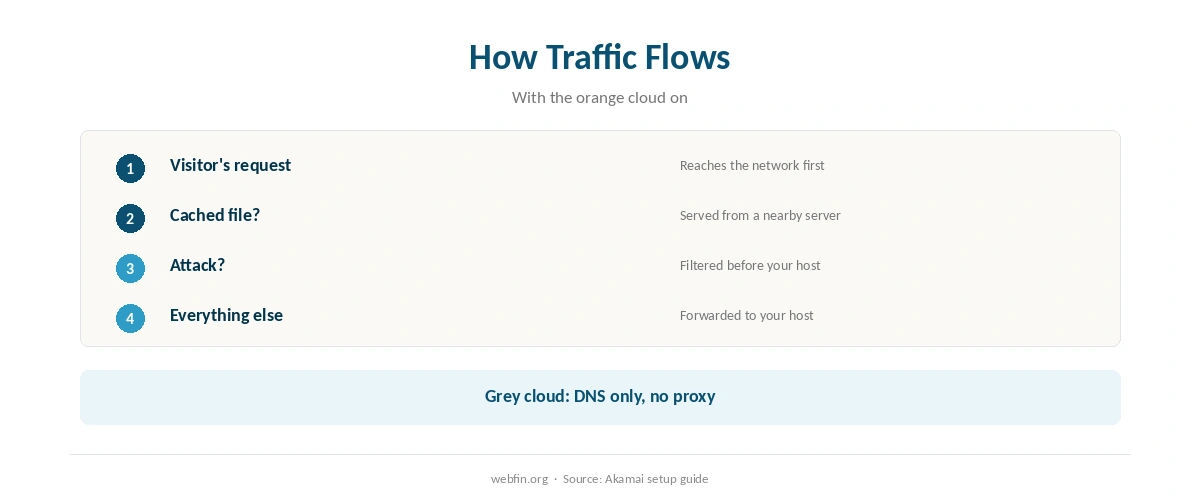
What is Cloudflare? It is a network that sits between your visitors and your hosting server. Once you move your domain’s DNS to it, visitors reach its servers first, which can serve cached files, absorb attacks and handle HTTPS before passing the rest to your host.
Much of this is free, which is why so many small sites use it. This guide explains how it works, what the free plan covers and what to watch when you switch it on.
What Is Cloudflare: The Short Answer
In short, Cloudflare is a reverse proxy with a content delivery network, DNS and security tools on top. For most small sites, the free plan adds caching, DDoS protection and a free certificate at no cost.
How It Works: DNS First, Then the Proxy
According to Akamai’s setup guide, the service takes control of your domain’s DNS records once you sign up. Each record then shows an orange cloud, meaning traffic goes through the network, or a grey cloud, meaning it bypasses it.
With the orange cloud on, the network caches content and filters traffic before it reaches your server. With the grey cloud, by contrast, it acts only as a DNS provider. Our guide to the domain name system explains the DNS part.
What the Free Plan Covers
| Feature | Free plan | Note |
|---|---|---|
| DNS hosting | Included | Every plan includes DNS |
| Caching (CDN) | Included | Static files served from the network |
| DDoS protection | Included | Attacks absorbed before your server |
| Universal SSL | Included | Certificate between visitors and the network |
| Web application firewall | Paid plans | According to Liquid Web’s guide |
Our free vs Pro comparison covers what the paid plans add, and our best CDN guide compares other networks.
| Host | Rating | Renewal price |
|---|---|---|
| Hostinger | ⭐ 4.2 | $10.99/mo after 48 months |
| InterServer | ⭐ 4.1 | $2.50/mo, never changes |
| Cloudways | ⭐ 4.1 | $14.00/mo, never changes |
| WP Engine | ⭐ 4.1 | $35.00/mo after 12 months |
| Kinsta | ⭐ 4.1 | $35.00/mo, never changes |

Two Certificate Details to Get Right
The free plan serves a Universal SSL certificate between visitors and the network, according to Akamai’s guide. However, the link from the network to your server needs its own certificate, such as a free Let’s Encrypt one from your host.
Akamai’s guide also notes that certificates from the service’s own Origin CA are trusted only inside its network. So if you ever switch the proxy off, your site needs a normal certificate. Our guide on installing an SSL certificate covers that.
Does It Make a Site Faster?
For cached pages and files, Cloudflare usually helps, because visitors get them from a nearby server. For uncached pages, such as carts and checkouts, the request still travels to your host, so the host’s speed still matters.
Our guide to time to first byte explains the difference, and our guide on configuring caching covers the host side.
Test before and after, using the tools in our guide to website speed test tools. Our guide on reducing TTFB covers the server fixes.
Who Gains Most
With Cloudflare, sites with visitors far from the server gain most from caching. Sites that attract attacks, meanwhile, gain from the protection, as our guide to WordPress security plugins explains alongside other layers.
A store should exclude carts and checkouts from caching, just as with any cache. Our guide to setting up a CDN covers the switch-on steps, and our WooCommerce hosting guide covers the store side. Our guide on recovering a hacked website covers the worst case.

In addition, this guide may help: How to Set Up Cloudflare.
How We Research
We run no tests. How the service works, the orange and grey clouds and the certificate details come from Akamai’s setup guide; DNS on every plan comes from Cloudflare’s learning center; the firewall on paid plans comes from Liquid Web’s guide. We read every source in October 2026.
Features change, so check the current plan page. The criteria behind our host scores are on our about page.
What Is Cloudflare: FAQ
A network that sits in front of your website, handling DNS, caching and attack protection before traffic reaches your host.
Its free plan includes DNS, caching, DDoS protection and a Universal SSL certificate; the web application firewall is on paid plans.
Orange routes a hostname’s traffic through the network; grey bypasses it and uses DNS only.
Yes. It sits in front of your host; it does not replace it.
For cached pages, usually. Uncached pages such as checkouts still depend on your host.
The Verdict
So what is Cloudflare in practice? A network in front of your site that adds DNS, caching, attack protection and a free certificate, much of it on the free plan. For most small sites, that is a sensible free layer.
Get the certificate on your own server right, exclude store pages from caching and remember that your host still decides uncached speed.