
Disclosure: WebFin is reader-supported. If you buy hosting through links on this page, we may earn a commission at no extra cost to you. Commissions vary between providers and our ratings do not — here’s our full disclosure.
This Azure review looks at Microsoft’s cloud as a place to host a website. New accounts get $200 of credit for 30 days. App Service, Azure’s web platform, also has an always-free tier for up to 10 web apps, according to Azure’s free-services page.
However, that free tier allows only one hour of compute a day, and the rest of Azure bills by the resource. We score it 3.4 for site owners: a powerful platform with useful free tiers, but complex to run and to budget.
Azure Review: The Short Answer
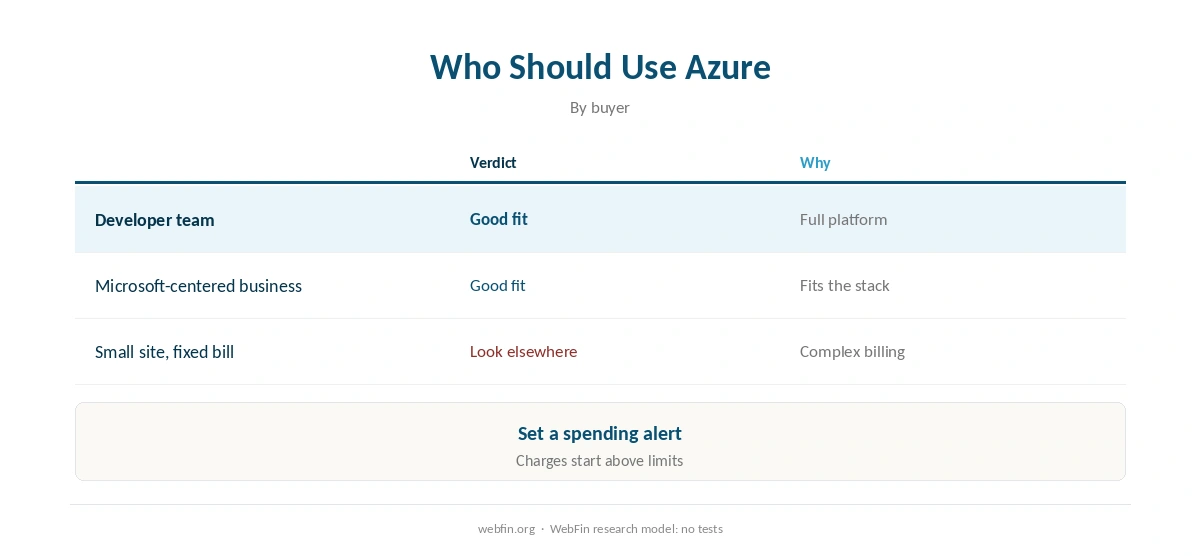
In short, this Azure review finds it suits developers and Microsoft-centered teams who can build on cloud services. For a website that must stay up all day without server work, a managed host fits better.
Azure at a Glance
| Point | Azure | Source |
|---|---|---|
| Our score (for site owners) | 3.4 | Strong platform, complex to run |
| Trial credit | $200 for 30 days | Unused credit is lost |
| 12-month free services | New customers only | Move to pay as you go to keep them |
| Always-free App Service | 10 apps, 1 GB, 1 hour a day | Azure free-services page |
| Billing | Pay as you go | Charges start above free limits |

What You Get for Free
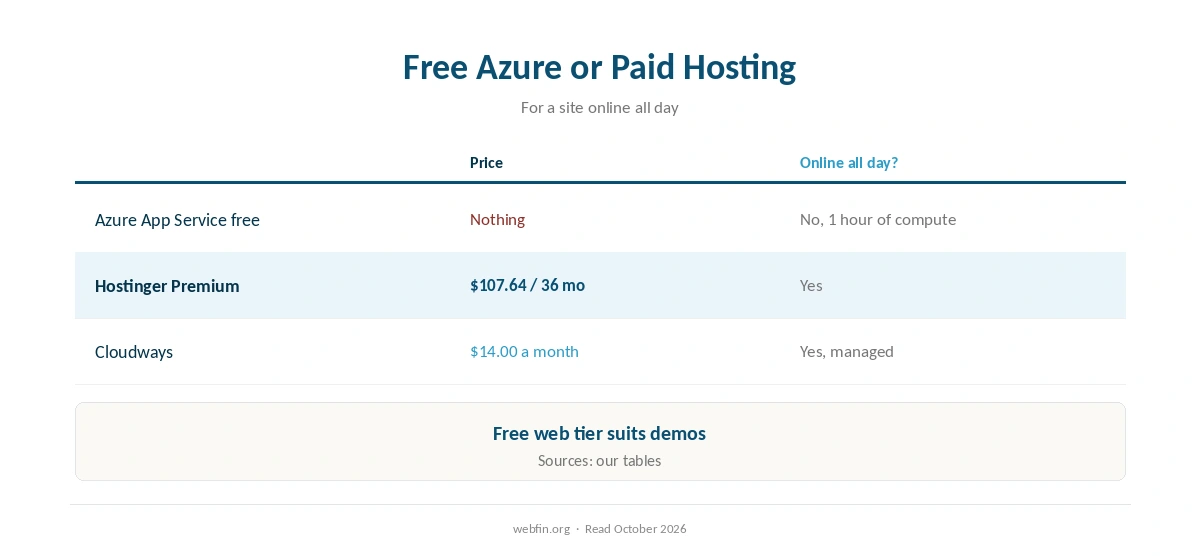
According to Azure’s free-services page, App Service is free always for 10 web, mobile or API apps with 1 GB of storage. Compute is limited to one hour a day. Popular services are also free for 12 months for new customers.
The $200 credit works for 30 days. Microsoft’s own documentation, on Microsoft Learn, notes that you lose unused credit after that. You must also move to pay as you go to keep the 12-month services.
The One-Hour Limit
For a website, the free App Service tier’s daily compute limit is the key catch. A site that must answer visitors all day outgrows it quickly. It suits demos and hobby apps that can sleep, as a 2026 guide notes.
Beyond the free limits, charges start straight away rather than pausing, according to agentdeals’ 2026 Azure guide. So set a budget alert before you build.
| Host | Rating | Renewal price |
|---|---|---|
| Hostinger | ⭐ 4.2 | $10.99/mo after 48 months |
| InterServer | ⭐ 4.1 | $2.50/mo, never changes |
| Cloudways | ⭐ 4.1 | $14.00/mo, never changes |
| WP Engine | ⭐ 4.1 | $35.00/mo after 12 months |
| Kinsta | ⭐ 4.1 | $35.00/mo, never changes |
Azure Against Google Cloud
Both offer credit and always-free tiers, as our Google Cloud review shows. Google’s credit is larger, at $300, while Azure’s App Service tier is friendlier to simple web apps.
Either way, both are infrastructure rather than hosting, as our guide to cloud hosting explains.
Where Azure Is Weakest for Site Owners
Complexity and budgeting are the weak spots. There is no fixed monthly plan for a typical website, and the free web tier sleeps after its daily hour.
If a predictable bill matters, a flat-priced host costs less effort, as our best shared hosting picks and our guide to cheap VPS hosting show.
Alternatives to Azure for a Website
If a free Azure web app falls short, several routes cost little. For instance, our guide to free hosting covers other no-cost options, and our best VPS picks list servers that stay online all day.
For the full budget, our guide to website costs sets out every line.
Moreover, a managed host removes the server work entirely, as our guide to managed hosting explains. Our Hetzner review covers a cheap European option.
Using Azure Safely
First of all, set a spending alert, since charges start above the free limits. Then keep a backup outside the subscription, as our guide to backups explains.
Our managed vs unmanaged guide explains the work involved, and our guide to what Cloudflare is covers a free layer in front.
In addition, these guides may help: iPage Review and Pressable Review.
How We Research
We run no tests. The free tiers and credit come from Azure’s free-services page and Microsoft Learn; the billing behavior from agentdeals’ guide published in 2026. We recorded them in our TablePress tables in October 2026.
In this Azure review, our score of 3.4 rates it for site owners, following the criteria on our about page. It reflects a strong platform and useful free tiers, but complex running and budgeting.
Azure Review FAQ
Partly: App Service is free always for 10 apps with 1 GB, but only one hour of compute a day.
$200 for 30 days; unused credit is lost after that.
Yes, charges start above the free limits, according to a 2026 guide.
Its free web tier is friendlier to simple apps; Google’s credit is larger. Both are infrastructure.
3.4 for site owners: strong platform, complex to run and budget.
Microsoft Azure
Our score: 3.4 of 5
This Azure review finds it suits developers and Microsoft-centered teams who can build on cloud services. For a website that must stay up all day without server work, a managed host fits better.
The Verdict
Overall, our Azure review finds a powerful platform with $200 of credit and a useful free web tier. It suits developers and Microsoft-centered teams best.
For a site that must answer visitors all day, though, the one-hour free tier will not do, and paid Azure needs careful budgeting. A managed host is simpler.