
Disclosure: WebFin is reader-supported. If you buy hosting through links on this page, we may earn a commission at no extra cost to you. Commissions vary between providers and our ratings do not — here’s our full disclosure.
Every shared hosting page sells the same word, and every hosting agreement takes it back. That much is widely known and slightly boring.
The interesting part is what the limit actually is. It is not storage and it is not bandwidth. It is the number of files on your account, a figure most buyers have never heard of and cannot find before paying. And two of the hosts WordPress.org currently recommends document that figure in opposite ways: one prints three different numbers in a single help article, the other prints none at all.
What Does “Unlimited” Web Hosting Actually Mean?
It means unmetered storage and bandwidth, with the real ceiling moved somewhere else — usually the inode count, which is the total number of files and folders on your account. Hit that ceiling and you cannot create a new file, even with disk space to spare. What that means for client downloads is covered in hosting for photographers.
The Meter You Are Actually On
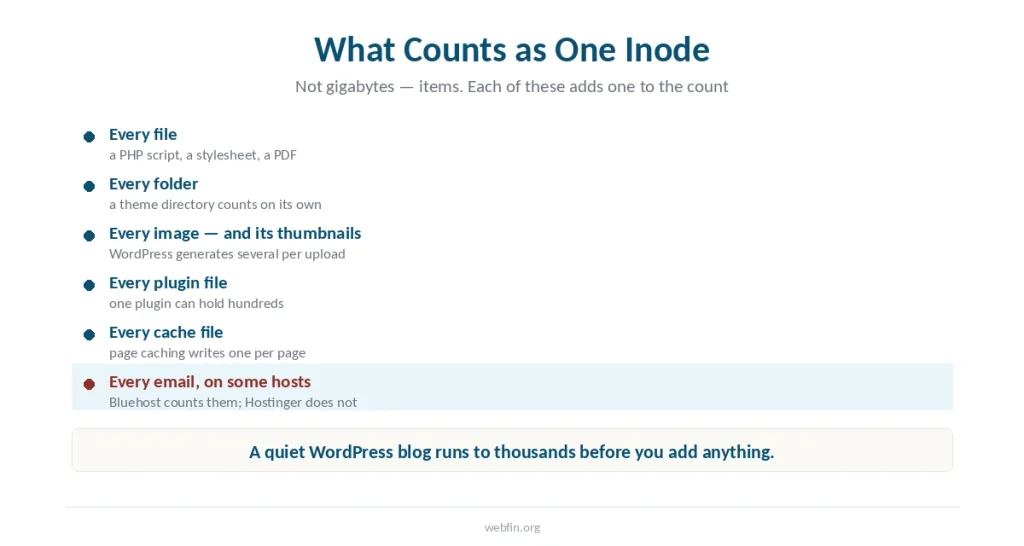
An inode is one record in the server’s filesystem, representing one file or one folder. Your inode count is simply how many files and folders you have. What that means for an image archive is in the best hosting for portfolio sites.
A WordPress install is not one file. It is thousands. Add a theme, a dozen plugins, an image library with the thumbnails WordPress generates automatically, and a caching plugin that writes a file per page, and the count climbs quickly without the site feeling large.
So a plan can advertise unmetered storage honestly and still stop you, because the two things are measured differently. Bluehost’s own documentation puts it plainly: once you hit the limit you cannot create new files or receive email.
What Bluehost’s Own Help Pages Say
Here is where it gets strange, and this is a first-party source rather than a review-site summary.
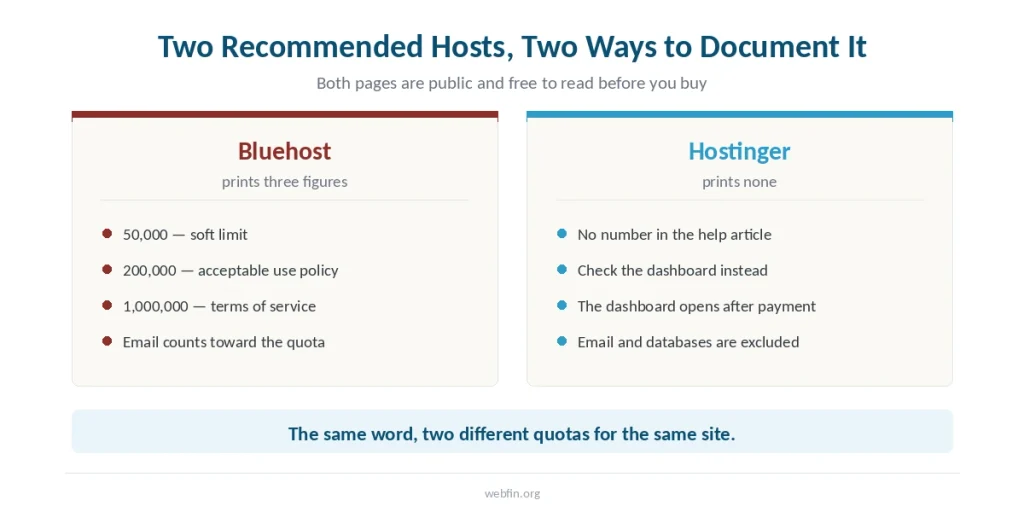
The article titled Hosting Inode Limit, last updated 6 July 2026, contains three different figures in one document:
- 50,000 — described as a soft limit, the point where Bluehost sees optimal performance, with uploads still permitted past it
- 1,000,000 — the figure named in that article as the Terms of Service violation line
- 200,000 — the figure named further down the same article, pointing at section B of the Acceptable Use Policy
A second Bluehost article, Server Resource Limitations, states a maximum of 200,000 inodes per account. It also sets database ceilings that never appear on a pricing page: up to 5,000 tables or 10GB across all databases, and 5GB for any single one. Where an account’s real limits appear is covered in understanding cPanel.
A third, Account Limits Summary, describes the categories and sends you to the other two for the numbers.
None of this is hidden. All three are public help pages, indexed and free to read. They simply do not agree, and nothing on the checkout page suggests you should go looking. Nor does the WordPress.org listing that sends beginners here in the first place.
What Hostinger’s Say
The opposite failure, and arguably the more common one.
Hostinger’s inode article was updated on 28 August 2026, three days before we read it. It explains what an inode is, how to check your usage, and how to bring it down. It publishes no number at all. The instruction is to open your hosting dashboard and look at the graphic — a dashboard you get after you pay.
⚠️ WebFin runs on Hostinger. We pay for the plan ourselves and bought it before this site existed, which does not change what their help page does or does not print.
The Same Word, Two Different Meanings
This is the part that makes cross-shopping unreliable.
Bluehost counts email toward your inodes. Its article lists emails alongside files and folders as things that consume the count. Hostinger does not. Its article states that emails, databases and automated backups are stored separately and do not touch the inode quota.
So an identical site on two “unlimited” plans produces two different numbers, under the same word, for reasons neither pricing page mentions. A mailbox-heavy account is far closer to the ceiling on one than on the other.
Ownership does not explain it either. The two brands are unrelated — Bluehost belongs to Newfold Digital, as we traced in a separate piece — so this is simply two companies defining a term however they like.
What Actually Runs Out First
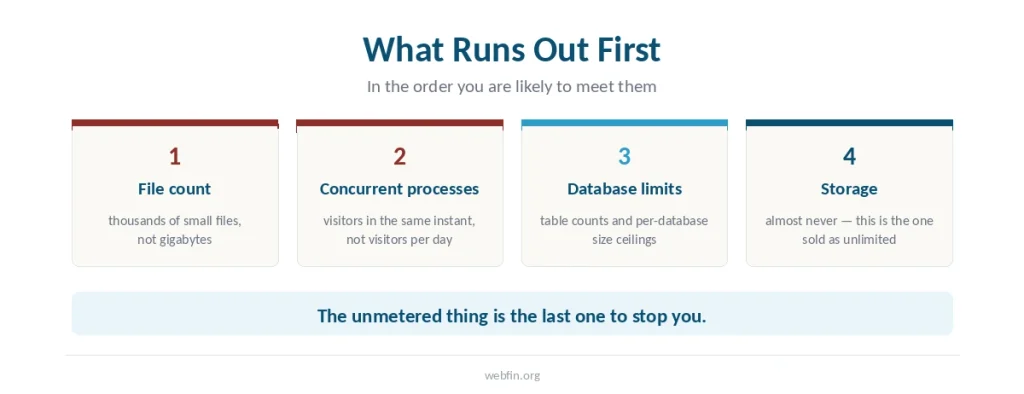
Storage almost never. In practice three things arrive earlier.
File count, as above. Concurrent processes, which is how many visitors the server will serve at the same instant rather than per day; exceed it and visitors get a resource error while nothing is actually broken. Database size and table count, which Bluehost publishes and most hosts do not.
A quiet blog will meet none of these. A store with a few thousand products and their thumbnails can meet the first, and an account used as a file archive will meet it fast.
How to Read an “Unlimited” Plan Before You Buy
Four checks, ten minutes, all before payment.
Search the host’s help centre for “inode”. If a number comes back, that host is telling you what you are buying. If nothing comes back, you are being asked to trust a word.
Check whether email counts. It changes the figure materially, and it is stated in the same article as the limit itself.
Look for database ceilings. Table counts and per-database size limits are real and rarely mentioned outside help pages, and the same is true of the add-on renewal rates.
Then use the refund window as a measurement tool. Install what you actually plan to run, open the resource page, and read your real number in week one. That is the only figure that matters, and it costs nothing to obtain while the refund is still live.
How We Research
The Bluehost figures came from that company’s own help articles, read on 31 August 2026, and we name which article carries which number rather than blending them. The Hostinger position came from its own support article, updated three days before we read it. Where a host publishes nothing, we say so instead of substituting a number from a review site.
We do not run our own tests of any kind. Our method and the criteria behind every score are on our About page.
Frequently Asked Questions
No, and the hosts do not claim it is. Storage and bandwidth are unmetered, while the file count, concurrent processes and database size all carry ceilings. Those ceilings live in help articles and acceptable use policies rather than on the pricing page.
An inode is one record representing one file or folder, so your inode count is the total number of files and folders on your account. Every image, thumbnail, plugin file and cache file adds one. On some hosts every email does too.
You cannot create new files or directories, even with disk space remaining. Sites can stop working correctly and the file manager starts returning errors. On Bluehost, exceeding the higher threshold also puts the account in violation of its terms.
A bare install runs to a few thousand. Themes, plugins, an image library with generated thumbnails and page caching push it up quickly, so a modest content site can reach tens of thousands without feeling large. Check your own figure rather than estimating.
Because it is accurate about the thing it describes. Storage and bandwidth genuinely are unmetered on most shared plans. The word is not a lie so much as an answer to a question buyers were not asking.
The Verdict
“Unlimited” describes the billing, not the capacity. Storage and bandwidth are unmetered; the file count is not, and that is the number that stops you. Audio is the clearest case of this, as hosting for podcasts explains.
The useful signal is not whether a host uses the word. Every shared host uses it. The signal is whether the host prints the actual figure where you can find it before paying — and on that test, one host on the WordPress.org list prints three conflicting numbers while another prints none. Our page on dedicated against cloud hosting covers when a whole machine still earns its price.
Buy with a refund window, install what you actually intend to run, and read your own number in week one — then check what the plan renews at before the window closes.