
Disclosure: WebFin is reader-supported. If you buy hosting through links on this page, we may earn a commission at no extra cost to you. Commissions vary between providers and our ratings do not — here’s our full disclosure.
WebFin runs on Hostinger, which appears below. We pay for the plan ourselves and have received no discount or other consideration, and that does not change how it scores.
The best hosting for portfolio sites is chosen on storage and file count, not on traffic. A photographer’s or designer’s site rarely sees a crowd, but it stores thousands of large images, and WordPress turns each upload into several resized copies. That is where a plan sold as unlimited meets its real ceiling. After that come the two things every long-lived site needs: a renewal you can live with, and images that load quickly for a client on another continent. Photographers also deliver client galleries, which hosting for photographers covers.
Best Hosting for Portfolio Sites: The Short Answer
InterServer for a large image library on a small budget: unlimited storage on one plan at $2.50 a month, locked. Hostinger for a portfolio shown to clients abroad, on its Business tier with a content network. DreamHost for a low price held for four years, with domain privacy included.
Why Images Fill a Plan Faster Than Traffic Does
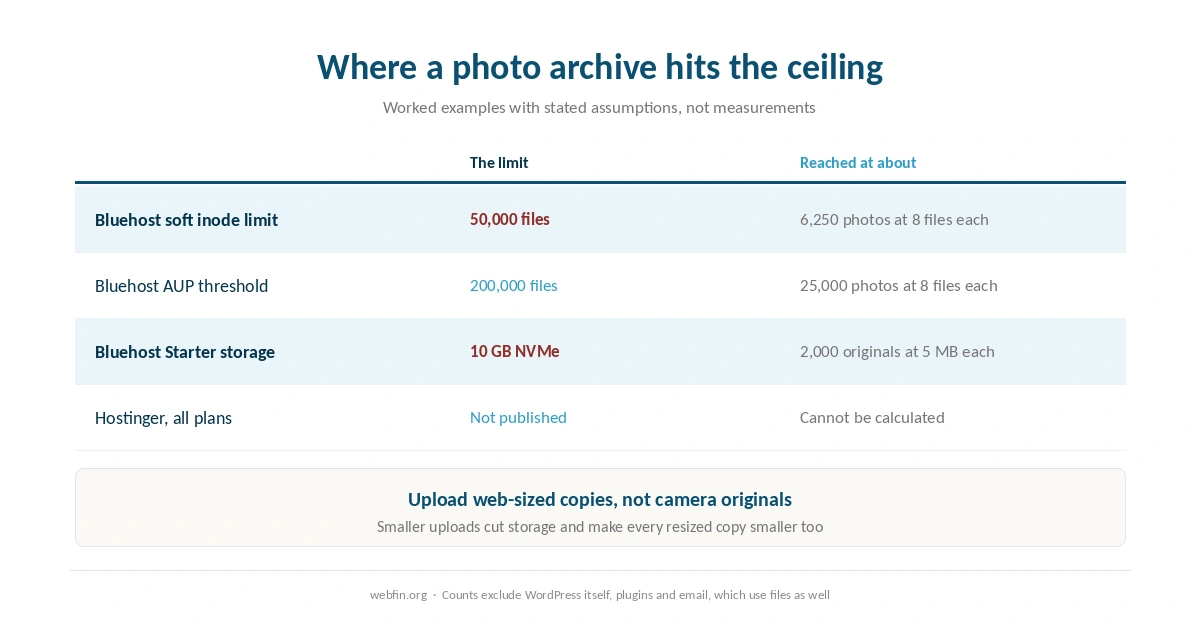
When you upload a photo, WordPress keeps the original and creates resized copies for thumbnails, galleries and different screens. With its default sizes, one large upload can become up to eight files, and themes can register more. Every one of those files counts against a plan’s file limit where the host sets one, measured in inodes.
Bluehost is one of the few hosts that publishes the figure. Its own help pages give 50,000 inodes as a soft limit, 200,000 as the acceptable use threshold and 1,000,000 as a terms of service violation. As an example, at eight files per photo the soft limit is reached at about 6,250 images, before counting WordPress itself, its plugins and any email.
⚠️ Storage runs out too. Bluehost Starter lists 10 GB of NVMe storage. As another example, if each original is 5 MB, that holds about 2,000 photos before the resized copies. Hostinger does not publish its limits at all, which our table records as not published. Our piece on what unlimited hosting means covers the gap between the word and the terms.
The simplest way to stretch any plan is to upload web-sized copies rather than camera originals. A gallery cannot show an image wider than the visitor’s screen, so a file a fraction of the original size looks the same to a visitor, takes less storage, and produces smaller resized copies. Keep the full-resolution originals on your own drive, where they belong anyway, and treat the site as the display copy rather than the archive.
| Host and plan | Limit | Where it's stated |
|---|---|---|
| Bluehost shared | 50,000 inodes — soft limit | Hosting Inode Limit article |
| Bluehost shared | 200,000 inodes — AUP threshold | Server Resource Limitations |
| Bluehost shared | 1,000,000 inodes — TOS violation | Hosting Inode Limit article |
| Bluehost shared | 5,000 tables or 10 GB, all databases | Server Resource Limitations |
| Bluehost shared | 5 GB per single database | Server Resource Limitations |
| Bluehost Starter | 100 MB per mailbox | Shared hosting prices page |
| WP Engine Startup | 25,000 monthly visits, then overage handling | Plan pages |
| WP Engine, by tier | 25,000 to 400,000 monthly visits | Plan pages |
| Rocket.net Starter | 25,000 monthly visits, 1 site, 10 GB storage | Plan pages |
| Namecheap EasyWP | 50,000 / 200,000 / 500,000 monthly visits by tier | Plan pages |
| Kinsta Starter | 25,000 monthly visits | Plan pages |
| Scala Hosting VPS | Priced per unit: $3 per core, $1 per gigabyte | Plan pages; adjustable anytime |
| HostGator shared | Weekly backups described as a courtesy, not guaranteed | Hosting terms |
| Liquid Web | Dedicated resources at every tier; no shared plan | Plan pages |
| InterServer Standard | Unlimited storage, bandwidth, email and websites | One plan, no tiers |
| GreenGeeks Lite | One website only | Plan pages |
| IONOS Plus | One email account bundled per plan | Plan pages |
| Hostinger, all plans | Not published | Hostinger support article, 28 Aug 2026 |
| Bluehost Starter | 10 GB NVMe storage | Plan pages, as listed in a 2026 audit |
| InMotion Core | One site, 10 email accounts, SSD storage; NVMe from Launch | TechRadar and a 2026 review |
| SiteGround shared | Shell access by tier — not recorded | Not stated on the plan pages we read, 20 Sep 2026 |
| Bluehost shared | Shell access by tier — not recorded | Not stated on the plan pages we read, 20 Sep 2026 |
| Hostinger, all plans | Shell access by tier — not recorded | Not stated on the plan pages we read, 20 Sep 2026 |
| Cloudways servers | Search service (OpenSearch, Elasticsearch) — not recorded | Not stated on the plan pages we read, 20 Sep 2026 |
InterServer: The Largest Library for the Least Money
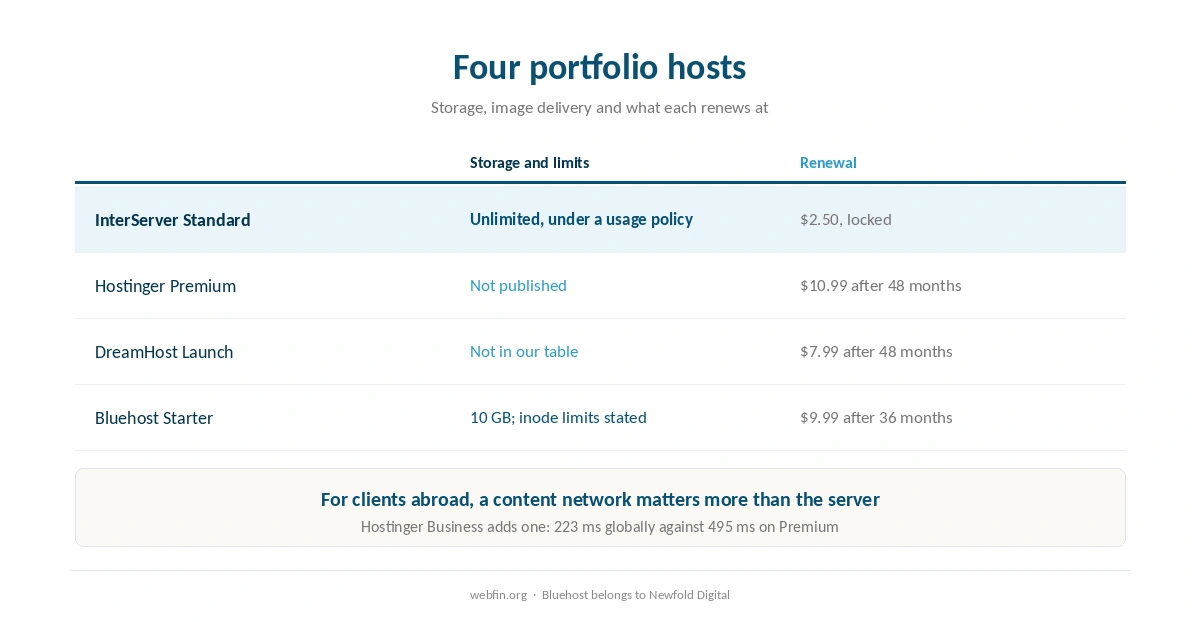
InterServer Standard costs $2.50 a month and the price is locked, so three years come to $90.00 and year ten costs the same as year one. One plan holds unlimited storage, bandwidth, email and sites, under an acceptable use policy like every plan sold that way.
Strengths. The cheapest home for a large archive over years. No tier to outgrow. Phone, chat and tickets around the clock, and standard cPanel.
Weaknesses. No content network bundled, so distant clients load images from the origin. Its measured record is thinner than the larger brands’.
Choose it if the portfolio is large and the budget is fixed. Skip it if your clients are mostly on other continents. Our InterServer review explains the lock.
Hostinger: For Clients Abroad
Hostinger Premium costs $2.99 a month on a 48-month term and renews at $10.99. Its Business tier adds its own content network, and the benchmark project we cite records Business at 223 ms globally against 495 ms for Premium. For a portfolio viewed from several countries, that network is what keeps a gallery quick.
Strengths. The longest promotion, four years. Measured uptime of 99.99% across 2025. A panel built for people who have never used cPanel.
Weaknesses. Resource limits are not published, which matters for an image archive in particular, because the file count is what grows. No phone line; support starts with an AI assistant. The content network sits on Business, not Premium.
Choose it if clients view your work from abroad. Skip it if you need to know the file limit in advance. Our Hostinger review prices both tiers.
DreamHost: Cheap for Four Years, Privacy Included
DreamHost Launch holds $2.89 a month for 48 months on its longest term and renews at $7.99. It includes WHOIS privacy for the life of the domain, which several hosts bill every year, and four sources quote its refund window at 97 days, though one says 30.
Strengths. Cheaper than most at every stage. Privacy included. An independent, employee-owned company.
Weaknesses. No phone line, and its own control panel rather than cPanel. A thinner measured record than the largest brands.
Choose it if you want a low price held for years. Skip it if you learn from cPanel tutorials. Our DreamHost review covers the refund dispute.
Bluehost: Published Limits and a Strong Record
Bluehost Starter costs $3.99 a month for 36 months and renews at $9.99. It is the host that tells you its file limits, three different ways, and its cached global delivery averages 224 ms through its network in the benchmark project we cite. Bluehost belongs to Newfold Digital.
Strengths. Limits you can plan around. Strong measured performance. Phone and chat around the clock.
Weaknesses. 10 GB of storage on Starter is modest for a photo archive, and the dashboard sells add-ons most portfolios do not need. Starter keeps weekly backups.
Choose it if you want to know the ceiling before you hit it. Skip it if your archive is already large. Our Bluehost review lists every limit.
Four Portfolios, Four Answers
A photographer with a large archive. InterServer, for unlimited storage at a price that never changes. Offload originals you do not display, and watch the file count.
A designer showing work to clients abroad. Hostinger Business, for the content network that keeps galleries quick far from the server.
A freelancer who wants the lowest bill for years. DreamHost, for $2.89 held for 48 months and privacy included on the domain.
Anyone who wants the ceiling in writing. Bluehost, whose own help pages state the file limits, even if they state them three ways. Our guide to setting up email on your domain matters here too, because clients reply to the address on the site.
What to Check in the First Month
Upload a representative batch of images and see how many files and how much space it uses, then scale that to your archive. Check how the gallery loads from a network far from you. And confirm the refund window while you still have time to use it, because a portfolio host you outgrow in month two is cheaper to leave than one you outgrow in year three.
Keeping a Portfolio Fast
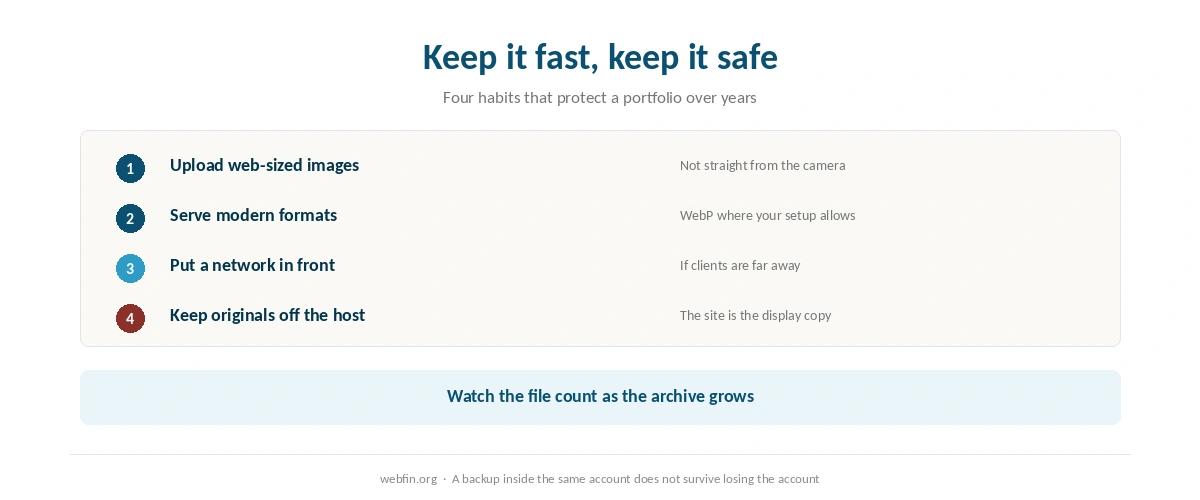
Most of the weight on a portfolio page is images, so image handling matters more than the server. Upload at the largest size your layout actually displays rather than straight from the camera. Serve modern formats such as WebP where your setup allows. And put a content network in front of the site if clients view it from far away.
If your plan includes a network, turn it on; if not, a free one may be all you need. Our guide to setting up a CDN covers the steps, and our guide to reducing TTFB covers the server side.
Protecting the Archive
A portfolio is years of work, and the host is not the place to keep the only copy. Keep your originals on your own storage, and back up the site, including the uploads folder, somewhere off the host. A backup kept inside the same account protects you from mistakes, not from losing the account.
Watch the file count as the archive grows. cPanel shows it in the statistics column, as our guide to understanding cPanel explains, and our guide to backing up a WordPress site covers the routine.
How We Research
We run no tests. File and storage limits come from the hosts’ own pages and help articles, and the Bluehost inode figures from three of its own support pages. Response and uptime figures come from Hostingstep’s 2026 benchmarks. Prices come from the providers’ own pages, read on 20 September 2026.
The photo and storage figures are worked examples with stated assumptions, not measurements. The criteria behind our scores are on our about page, and a similar long-lived case is covered in our list of hosting for bloggers.
Portfolio Hosting FAQ
Storage and file count, then image delivery and renewal. WordPress turns each upload into several resized copies, so a large archive reaches a file limit long before it reaches a traffic limit. After that, a content network helps clients far away.
It depends on the file limit. As a worked example, with up to eight files per upload, Bluehost’s published soft limit of 50,000 inodes is reached at about 6,250 images, before WordPress itself and plugins are counted.
No plan is. Unlimited plans run under an acceptable use policy that caps resources in practice. InterServer sells unlimited storage on one plan, and Bluehost publishes its file limits; Hostinger does not publish its limits at all.
If clients view your work from other countries, it helps a great deal. Hostinger Business includes a network and records 223 ms globally against 495 ms on Premium without one. On other hosts, a free network may be all you need.
InterServer, at $2.50 a month with the price locked, which is $90.00 across three years. DreamHost holds $2.89 for 48 months and then renews at $7.99, and Hostinger holds $2.99 for 48 months and then renews at $10.99.
The Verdict
Pick a portfolio host on how much it lets you store and how it treats your images, not on how much traffic it can take. InterServer is the best value for a large archive, Hostinger Business the best choice for clients abroad, and DreamHost a low price held for years with privacy included.
Whatever you choose, keep the originals yourself, watch the file count, and put a network in front of the site if your audience is far away. A portfolio outlives most promotions, so price the renewal before the intro. Our roundup of cheap web hosting covers the budget field.