
Disclosure: WebFin is reader-supported. If you buy hosting through links on this page, we may earn a commission at no extra cost to you. Commissions vary between providers and our ratings do not — here’s our full disclosure.
WordPress.org names three recommended hosts, and the page describing that list calls its own selection arbitrary. So the official endorsement is a weaker signal than it looks, and a shortlist built on it alone will miss the things that decide the bill.
So here is our ranking of the five hosts we have reviewed, judged on what WordPress specifically needs rather than on price alone.
The Short Answer
Hostinger for most WordPress sites, at 4.2. In practice, LiteSpeed caching runs at the server rather than through a plugin, and three years costs $107.64.
Kinsta if you run client sites, at 4.1. In that case Cloudflare Enterprise, performance monitoring and container isolation ship on every plan.
What WordPress Actually Needs From a Host
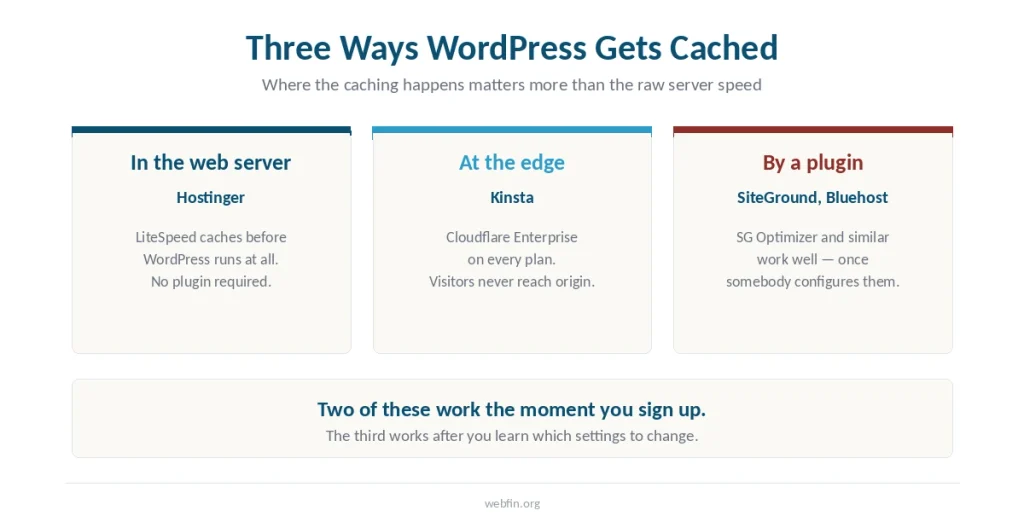
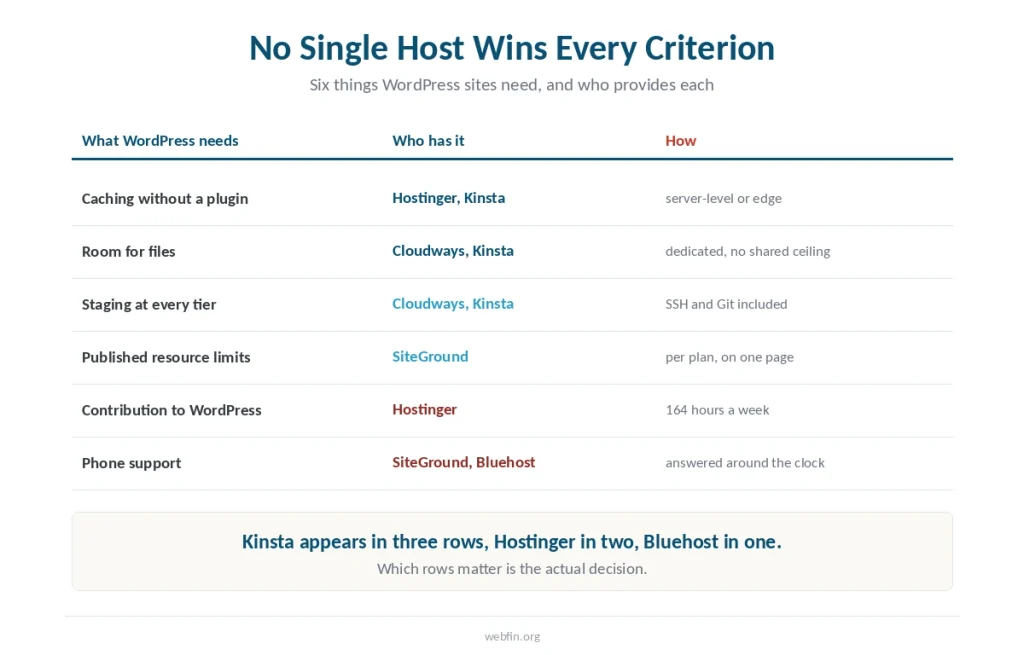
Caching that works without a plugin. WordPress builds every page from a database query unless something caches the result, and where that caching happens matters more than the raw server speed.
Then, room for files rather than gigabytes. After all, a WordPress install is thousands of files before you add a theme, and image thumbnails multiply that. The ceiling most sites meet is the file count, not the disk — we wrote about that separately.
Besides that, a way to test changes. In particular, staging separates a broken update from a broken site, and plugin updates break sites regularly.
An owner who contributes back. WordPress runs on volunteer and sponsored labor, and the hosts profiting from it contribute at wildly different rates.
1. Hostinger — 4.2
LiteSpeed servers with caching built into the web server, so a caching plugin becomes optional rather than essential. Independent monitoring ranks it 5th of 34 hosts — the full review is here.
Moreover, it sponsors 164 hours a week of WordPress contribution, more than three times what the other listed host commits.
Three years costs $107.64, the lowest figure in our five reviews. However, the resource ceiling is the weakness. Hostinger publishes no inode figure at all.
Choose it if you want caching that works out of the box at the lowest three-year cost. Skip it if you need a telephone line or published limits.
2. Kinsta — 4.1
Managed WordPress specifically, and the tooling shows it. Cloudflare Enterprise ships on every plan, edge-cached response runs 25 to 42 milliseconds in Europe and North America, and application monitoring is built into the dashboard — the full review is here.
In addition, containers are isolated per site, so one compromised install cannot reach another. Staging and free malware removal are included.
Still, three years costs $1,260.00 — nearly twelve times the Hostinger figure.
Worth it if you host client sites and your visitors are North American or European. Look elsewhere if this is a personal blog.
3. Cloudways — 4.1
A virtual server rather than a shared account, with SSH, WP-CLI, Git deployment and staging at every tier. For a developer managing several WordPress installs that combination is hard to beat at the price — the full review is here.
Meanwhile, uptime measured across five cloud configurations ran between 99.996% and 99.999%.
Three years costs $504.00. Email is not included, there is no phone support, and you are administering a server rather than an account.
Take it if a resource limit has already bitten you. Skip it if this is your first website.
4. Bluehost — 4.0
Listed on the WordPress.org recommended hosts page since 2005, and more tutorials assume Bluehost than assume any other host. That matters more than it should when something breaks late at night.
In fact, hardware scores 9.6 of 10, the highest figure among the five hosts we reviewed, and cached global delivery runs at 224 milliseconds — the full review is here.
Therefore three years costs $143.64, provided you decline the add-on catalog. Its WordPress contribution runs 50 hours a week, and its own documentation states four different figures for one resource limit.
Choose it if you want the most documented path and a phone line. Skip it if you say yes at checkout — the catalog is priced here.
5. SiteGround — 3.9
Every resource ceiling published per plan on a single page, which no other host in our five reviews manages. A telephone line answered around the clock with a reported 90 percent first-contact resolution rate — the full review is here.
SG Optimizer handles caching, though it needs configuring rather than working by default. By contrast, LiteSpeed hosts cache without setup.
Three years costs $251.64 on the 24-month term and $467.64 bought annually. Global response was the slowest figure we recorded, and WordPress.org removed it from the recommended list in 2023.
Worth it if support quality decides hosting for you. Look elsewhere if your visitors are spread worldwide.
The Recommendation Nobody Checks
WordPress.org lists Pressable, Bluehost and Hostinger, and states that some listed hosts return part of your fee when you click through from that page.
Of course, the first criterion it names is contribution to WordPress.org. Bluehost sponsors 50 hours a week and Hostinger sponsors 164.
In short, neither of those is a reason to buy or avoid either host. It is a reason to treat the listing as one weak signal rather than an endorsement — we read the page in full.
Which One for Which Site
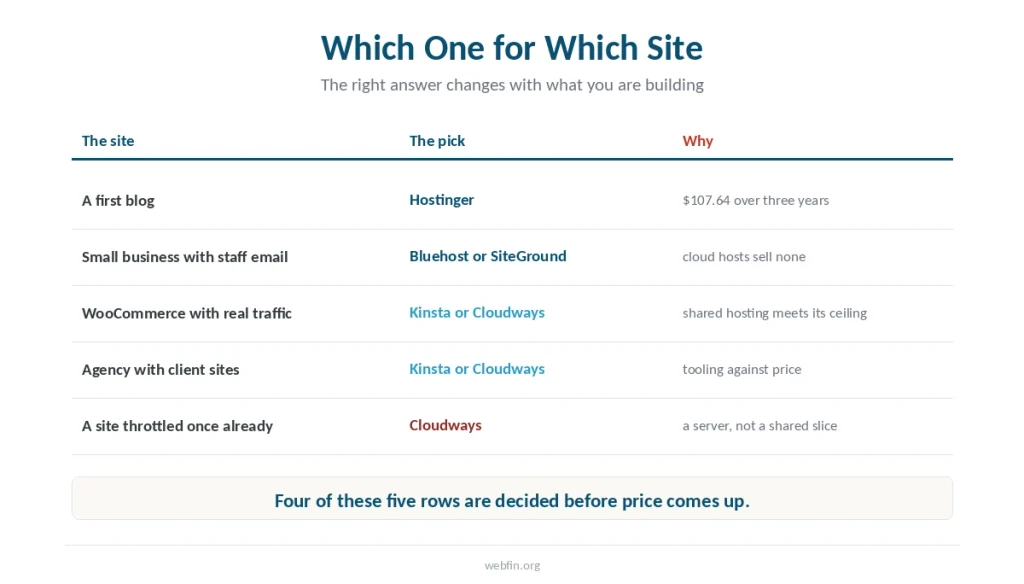
A first blog. Hostinger. Caching works without configuration and the three-year figure is under $110.
A small business with staff email. Bluehost or SiteGround, since neither cloud host includes mailboxes.
A WooCommerce store with real traffic. Kinsta or Cloudways. Shared hosting meets its ceiling here rather than anywhere else.
An agency with client sites. Kinsta for the tooling, Cloudways for the price.
A site that has been throttled once. Cloudways, because the ceiling is the problem and only a dedicated server removes it.
How We Research
Every figure comes from the five underlying reviews, where each is attributed to a named source with its window stated. Prices and limits come from each company’s own pages. We run no tests of our own.
Our five criteria and how each score is reached are on our About page.
Frequently Asked Questions
Hostinger, among the five hosts we have reviewed, scoring 4.2. LiteSpeed caching runs at the server rather than through a plugin, and three years costs $107.64. Kinsta scores 4.1 and suits agencies rather than personal sites.
WordPress.org lists Pressable, Bluehost and Hostinger, but the page calls its own selection arbitrary and states that some listed hosts return part of your fee. Treat it as one weak signal rather than an endorsement.
Not for a blog, a portfolio or a brochure site. Managed hosting earns its price when a resource ceiling has already caused problems, when you run client sites, or when performance is directly tied to revenue.
It depends what is measured. Kinsta records 25 to 42 milliseconds edge-cached because it includes an enterprise CDN. Hostinger ranks 5th of 34 hosts on origin response, and Bluehost delivers 52 milliseconds in Frankfurt.
Not on LiteSpeed hosts, where caching happens in the web server, or on hosts that include an enterprise CDN. On hosts using SG Optimizer or similar, caching works but needs configuring rather than running by default.
The Verdict
Hostinger for a personal site or a small business, at a fraction of the premium options and with caching that works out of the box.
Kinsta for an agency in North America or Europe, where the tooling replaces separate purchases and edge delivery is measured in tens of milliseconds.
Bluehost if you want the most documented path and a telephone line, provided you decline everything at checkout. And if the official list is what brought you here, read what it actually promises before treating it as a verdict. Our page on shared against managed WordPress covers what the premium actually buys.