Disclosure: WebFin is reader-supported. If you buy hosting through links on this page, we may earn a commission at no extra cost to you. Commissions vary between providers and our ratings do not — here’s our full disclosure.
Cloudflare SSL is free. In fact, Cloudflare issues a publicly trusted Universal SSL certificate to every active domain. However, the encryption mode you choose decides whether the connection to your own server is secure too. If Cloudflare itself is new to you, our guide to what Cloudflare does starts there.
This guide therefore explains the four Cloudflare SSL modes and which one to pick. It also covers the two errors that catch most owners: endless redirects and error 526.
Cloudflare SSL: The Short Answer
In short, choose Full (strict) whenever your server has a valid certificate, which most hosts now issue for free. Cloudflare’s own documentation recommends Full (strict) for the best security wherever possible.
The Four Cloudflare SSL Modes
| Mode | Visitor to Cloudflare | Cloudflare to your server | Use when |
|---|---|---|---|
| Off | Not encrypted | Not encrypted | Never; Cloudflare advises against it |
| Flexible | Encrypted | Not encrypted (HTTP) | Only if the server cannot hold a certificate |
| Full | Encrypted | Encrypted, certificate not validated | As a temporary step |
| Full (strict) | Encrypted | Encrypted and validated | Whenever possible |

Cloudflare’s page on Full (strict) mode sets out the certificate rules, while its page on Flexible mode explains the trade-off.
Why Flexible Mode Is a Trap
In Flexible mode, visitors see a padlock, yet Cloudflare fetches pages from your server over plain HTTP. Therefore anyone between Cloudflare and the server could read or change the traffic. Cloudflare itself advises Full or Full (strict) for logins and personal data.
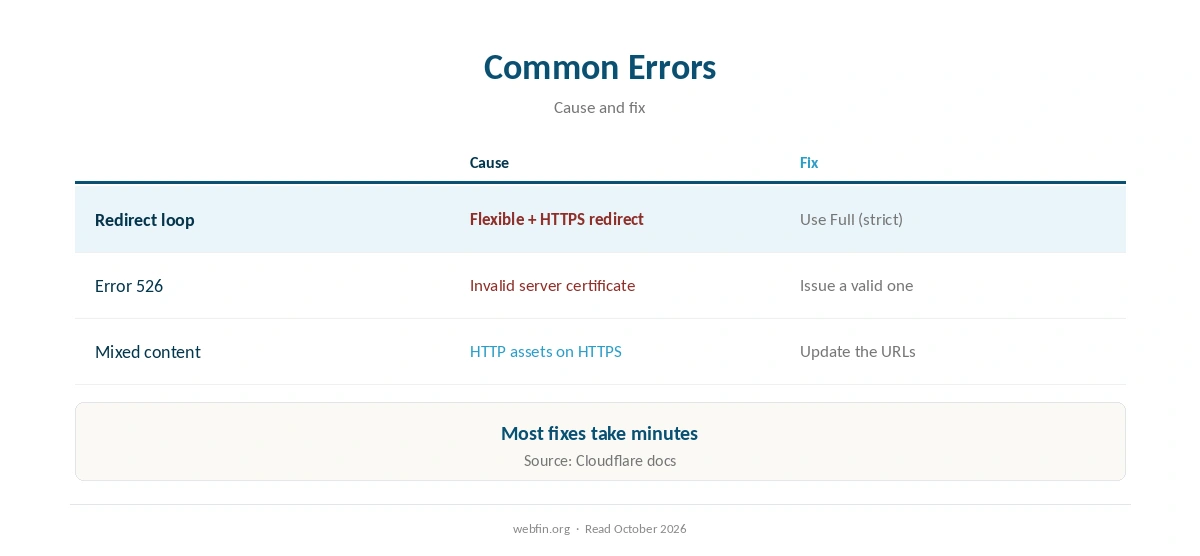
Flexible also causes the most common Cloudflare SSL error: a redirect loop. If your server forces HTTPS while Cloudflare connects over HTTP, the two bounce each request back and forth until the browser gives up. As a result, the fix is to switch to Full (strict), not to remove the server’s redirect.
What Full (Strict) Requires
For Full (strict), the certificate on your server must be unexpired and must match the hostname. In addition, a publicly trusted authority or Cloudflare’s own Origin CA must issue it. Finally, the server must accept HTTPS on port 443.
If any condition fails, visitors see error 526. In practice, the quick way out is to issue a free certificate on the server, then switch back to Full (strict). Meanwhile, Full mode can bridge the gap for a few hours, although it does not check the certificate. If the site stays down, our guide to fixing a website that is down helps.
| Host | Charge | Cost per year |
|---|---|---|
| Bluehost | Premium SSL, single domain | $89.88 (optional; Let's Encrypt is free) |
| Bluehost | Domain privacy | $15.00 (free year one on Business and up) |
| Bluehost | SiteLock Essentials | $95.88 |
| Bluehost | SiteLock Prevent | $239.88 |
| Bluehost | Yoast SEO Premium | $99.99 |
| Bluehost | Early cancellation, free domain | $15.99 one-off, deducted from refund |
| GoDaddy | SSL on Economy after year one | $119.99; other tiers include it for the plan's life |
| GoDaddy | Pre-checked extras at checkout | $345.39 counted by one review, unverified |
| HostGator | CodeGuard daily backups | $35.88 (weekly copies are a courtesy, not guaranteed) |
| HostGator | SiteLock, pre-selected at checkout | $23.88 |
| HostGator | Dedicated IP | $59.40 |
| HostGator | Professional migration | $149.99 one-off |
| Hostwinds | Standard SSL | $75.00 (free AutoSSL on shared via cPanel) |
| Hostwinds | Wildcard SSL | $150.00 |
| Scala Hosting | Processor core, added or removed anytime | $36.00 per core |
| Scala Hosting | Memory, added or removed anytime | $12.00 per gigabyte |
| Hostinger | WHOIS privacy | Included |
| Hostinger | Domain renewal, .com | $15–$20, no first-party figure published |
| DreamHost | WHOIS privacy | Included for the life of the domain |
| Namecheap | Domain privacy | Included for the life of the domain |
| InterServer | Everything on the one plan | Included; no tiers to upgrade to |
| AWS Lightsail | Transfer overage | $0.09 a GB in most regions (Toolradar, Sep 2026) |
| AWS Lightsail | CDN | 50 GB of CDN distribution free for one year (AWS pricing page) |
| Bluehost | .com renewal after the free year | $12.99 (DomainOffer guide to free domains, 2026) |
| Bluehost | Managed VPS cPanel license at checkout | $540 per instance, though the plan page lists cPanel as included; 36-month renewal about $83.99 vs $98.99 listed (HostAdvice 2026) |
| Cloudflare Registrar | .com at cost, registration = renewal | $10.11 (PriceWorld, Feb 2026) to $10.44 ($10.26 Verisign + $0.18 ICANN; DevToolPicks, StartupOwl 2026); transfer $10.46 (user report, Feb 2026) |
| Cloudways | Rackspace email add-on | $1.50 a mailbox a month from Sep 1, 2026 (was $1.00); 25 GB; up to 10,000 emails a day; aliases and forwarding free; email migration $10 a mailbox (Cloudways blog and support) |
| Cloudways | Titan email add-on | Three plans; Titan Pro $1.99 a mailbox a month, up to 100 GB; $1.50 for Rackspace customers (Cloudways blog, Aug 2026) |
| Contabo | Setup fee and Windows | Setup fee on Cloud VPS 10 at times (LearnWithHasan) vs none (Toolradar, Sep 2026); Windows license about €4.99 a month |
| Dedicated servers | Extra IPv4 | Often $2–$5 a month each (Valebyte 2026) |
| DigitalOcean | Droplet backups | 20% of the Droplet's monthly price (Kuberns, 2026) |
| DigitalOcean | New-customer credit | $200 for 60 days in most 2026 sources; $5 per DigitalOcean's pricing-page FAQ read 19 Aug 2026 (Findstack) |
| DigitalOcean | Transfer overage | $0.01 a GiB (Kuberns, 2026) |
| Domain name, typical yearly cost | $10 to $20 a year | Hostinger's own guide to domain costs, Mar 2026 |
| Domains at hosts, .com renewal | DreamHost $9.95; Hostinger about $16.99 | 2026 domain-offer guide (domainoffer.net); conflicts with Hostinger's $15–$20 range |
| DreamHost | .com domain (tracker) | $9.99 registration (since Jan 2, 2026; $4.99 before), $19.99 renewal, $9.99 transfer (DomainOffer, May 2026); conflicts with DomainOffer guide ($9.95 renewal) |
| Dynadot | .com domain | $8.99 registration, $10.88 renewal, 39% below a $14.64 market average; .net $12.52 flat; .llc $10.92 → $35.20 (DomainOffer, May 2026) |
| GoDaddy | .com domain | $11.99 first year, $21.99 renewal; five years $96.95 (Findstack, Oct 2026, from published 2026 comparisons) |
| GoDaddy | WHOIS privacy | $9.99 a domain a year (Findstack, Oct 2026) |
| GoDaddy | Website Builder Commerce payments | 2.7% + $0.30 a card transaction (Website Builder Expert, 2026) |
| GoDaddy Reseller | Wholesale rates, Basic / Pro | Domain .com $13.19 / $11.59; Professional Email $2.01 / $1.61 a month; Managed WordPress $8.01 / $7.01 a month; SSL from $36.73 / $31.73 (GoDaddy help center, official) |
| GoDaddy vs Namecheap | Cheap new extensions (.site, .online, .website) | $0.99 first year; renew $39.99–$54.99 at GoDaddy vs $20.98–$34.98 at Namecheap (DomainOffer, 2026) |
| Hetzner | Traffic, IPv4 and backups | 20 TB EU, 1 TB US, 0.5 TB Singapore; overage €1/TB (€7.40 Singapore); IPv4 +€0.50; backups 20% (LearnWithHasan, BetterStack 2026) |
| HostGator | cPanel email (paid add-on) | Free 0–2 mailboxes; Basic $2.99 a month ($35.88 a year) 3–10; Plus $5.99 ($71.88) 11–20; Premium $8.99 ($107.88) unlimited; tied to the hosting plan (HostGator help center) |
| HostGator | Professional Email (Titan) | One-month trial, then $2.99 a month (CloudsPress 2026) |
| HostGator | .com domain | $12.99 first year, $23.99 renewal, $12.99 transfer (ProfileTree; whtop); privacy an optional paid extra; free domain year one on 12/24/36-month Shared, WordPress or Cloud plans; non-refundable domain fee may apply on first-year cancellation (CloudsPress) |
| Hostinger | SSL | Free Let's Encrypt certificates, unlimited, installed and renewed automatically (Hostinger compare page; Bitcatcha; Truehost) |
| Hostinger | Business Email | Starter $0.99 → $1.59 a mailbox a month (10 GB); Premium $2.99 → $3.99 (50 GB), 48-month terms (TechRadar); hosting plans include a free trial that auto-renews as paid Starter (Hostinger support) |
| Hostinger | .com domain (tracker) | $9.99 registration, $19.99 renewal, $9.99 transfer (DomainOffer, May 2026) |
| Hover | .com domain | $18.99 registration and renewal, 30% above a $14.64 market average (DomainOffer, May 2026); .tech $4.99 → $63.99 |
| IONOS | Extra IPv4 address on VPS | $5.00 a month; one IPv4 included per server (IONOS VPS page) |
| IONOS | .com domain | $10.00 registration, $20.00 renewal, $9.50 transfer (DomainOffer, May 2026); $1 first year for new customers (StartupOwl; Thewearify citing IONOS); .website $1.00 → $40.00 |
| IONOS | DNSSEC via Domain Guard | $1 first year, then $15 a year (StartupOwl 2026) |
| IONOS | Email plans | Basic Email $1.10 → $2.00 (1 mailbox, 2 GB); Business/Professional Email $2.00 → $4.00 (25 mailboxes, 2 GB each); Exchange 50 GB about $6 a user at renewal (TrekMail citing IONOS; Toolradar, Sep 2026); extra 10 GB storage purchasable (IONOS help) |
| Linode | Backups and egress overage | Backups 20% (Kuberns) or 25% (LearnWithHasan) of plan; overage $0.005/GB |
| Namecheap | .com domain | $8.88 first year, $13.98 renewal; five years $65.91 (same source) |
| Namecheap | Incoming .com transfer | $10.98 to $33.98, including a year (Findstack, Oct 2026) |
| Namecheap | SSL on shared hosting | Free PositiveSSL for one year per domain or subdomain, up to 50 per cPanel account; then a paid renewal ($7.88 per Vendr or $8.88 per NateShivar a year); no AutoSSL on shared, manual Let's Encrypt install allowed (Namecheap knowledge base and blog) |
| Namecheap | Private Email | $0.99 a mailbox a month first year, $1.99 renewal (Vendr 2026) |
| Namecheap VPS | cPanel license | Charged separately, monthly, tiered; prices rose Jan 13, 2026 (Namecheap blog); $10.88 in an older review (Tom's Hardware), $17.88 after Jan 2026 per a competitor's blog (InMotion) |
| Namecheap VPS | Complete management with cPanel | About $50 to $55 a month in total (TechRadar); management only on Quasar and Magnetar (Namecheap VPS page) |
| Network Solutions | .com domain | $9.59 registration, $32.99 renewal, $10.99 transfer, +$0.20 ICANN fee (DomainOffer, May 2026); about $25 first year, $37.99 renewal (BestGuide 2026); .online $0.99 first year, renews $52.99 (DomainOffer, Jul 2026) |
| Porkbun | .com domain | $10.08 registration, $11.08 renewal, $10.08 transfer (DomainOffer, May 2026); later 2026 pages list $11.52 / $12.52 / $11.52 — verify |
| Porkbun | Cheap extensions | .website $1.96 first year, renews $21.11; .pw $3.43, renews $18.33 (DomainOffer, 2026) |
| Pressable | Visit overage | $1.20 per 1,000 visits; $1.00 per GB storage (FrontDesk Review, Sep 2026) |
| Porkbun | Email inbox | $24 a year per inbox (knowledge base); $36 in a developer documentation example; 10 GB; 15-day free trial with new domains |
| Liquid Web | Mailboxes | $2.25 a mailbox a month, 25 GB, plus a $10 monthly base charge for unlimited domains; requires active hosting (whtop, 2026) |
| SiteGround | Domains | $15.95 a year for .com, $17.95 .net, $19.95 .co.uk (Tooltester, 2026); WHOIS privacy free in year one only (whtop) |
| OVHcloud | Domains | .ovh $2.15 year one, $3.49 renewal, $53.99 reactivation; .com renewal $12.59 (European Alternatives); 15 GB mailbox and DNSSEC included |
| Cloudways | Offsite backup storage | $0.033 per GB per server; incremental; charges rounded up in $0.50 steps, so $3.85 becomes $4 and $1.22 becomes $1.50 (Cloudways support center) |
| DigitalOcean | Snapshots | $0.06 per GB a month (DIYAI, 2026) |
Getting a Certificate on Your Server
Most hosts now issue free certificates automatically, which is all Full (strict) needs. For example, Hostinger installs free Let’s Encrypt certificates, and Bluehost, a Newfold Digital brand, lists free SSL on its plans. Likewise, Hostwinds runs free AutoSSL through cPanel, according to our tables.
Alternatively, Cloudflare’s Origin CA issues a free certificate that Cloudflare trusts. Browsers, however, do not trust it directly, so it works only behind Cloudflare. Our guides to Hostinger SSL and Bluehost SSL cover two common hosts.
Similarly, our guides to GoDaddy SSL and Namecheap SSL cover hosts where certificates can cost extra.
Setting It Up, Step by Step
First, make sure the domain is active on Cloudflare, as our guide to Cloudflare nameservers explains. Next, confirm that the site loads over HTTPS directly from the host. Then, in the dashboard, open SSL/TLS and choose Full (strict).
After that, turn on Always Use HTTPS so visitors never land on plain HTTP. Finally, check pages for mixed content, meaning images or scripts still loaded over HTTP, which browsers block on secure pages.
Our Cloudflare setup guide covers the rest of the configuration, and our guide to what SSL does explains the basics.
Subdomains and Paid Certificates
The free Universal certificate covers the root domain and one level of subdomains, such as www or shop. Host documentation based on Cloudflare’s rules describes this limit. Deeper names, such as dev.shop.example.com, therefore need an Advanced certificate, which Cloudflare sells as an add-on.
Moreover, only Business and Enterprise plans let you upload your own certificate to Cloudflare’s edge. For most sites, however, the free certificate is enough, and our Cloudflare review covers the plans.

How We Research
We run no tests. The mode descriptions, certificate rules and error codes come from Cloudflare’s SSL/TLS documentation. Host certificate details come from our TablePress tables, read in October 2026.
The criteria behind our scores are on our about page.
For the wider picture, our guide to what a CDN does explains the network behind Cloudflare. In addition, our CDN picks compare it with rivals.
Cloudflare SSL FAQ
Yes. Cloudflare issues a free Universal SSL certificate to every active domain, on every plan.
Full (strict), whenever your server has a valid certificate; Cloudflare recommends it for the best security.
Usually because the mode is Flexible while the server forces HTTPS; switching to Full (strict) fixes it.
It means Full (strict) rejected the server’s certificate, because it is expired, untrusted or for the wrong hostname.
It covers the root and one level, such as www; deeper subdomains need an Advanced certificate.
The Verdict
Overall, Cloudflare SSL costs nothing, but the mode matters: Flexible leaves half the journey unencrypted and invites redirect loops.
Therefore pair a free certificate on your host with Full (strict). Cloudflare SSL then protects the whole path from visitor to server.