
Disclosure: WebFin is reader-supported. If you buy hosting through links on this page, we may earn a commission at no extra cost to you. Commissions vary between providers and our ratings do not — here’s our full disclosure.
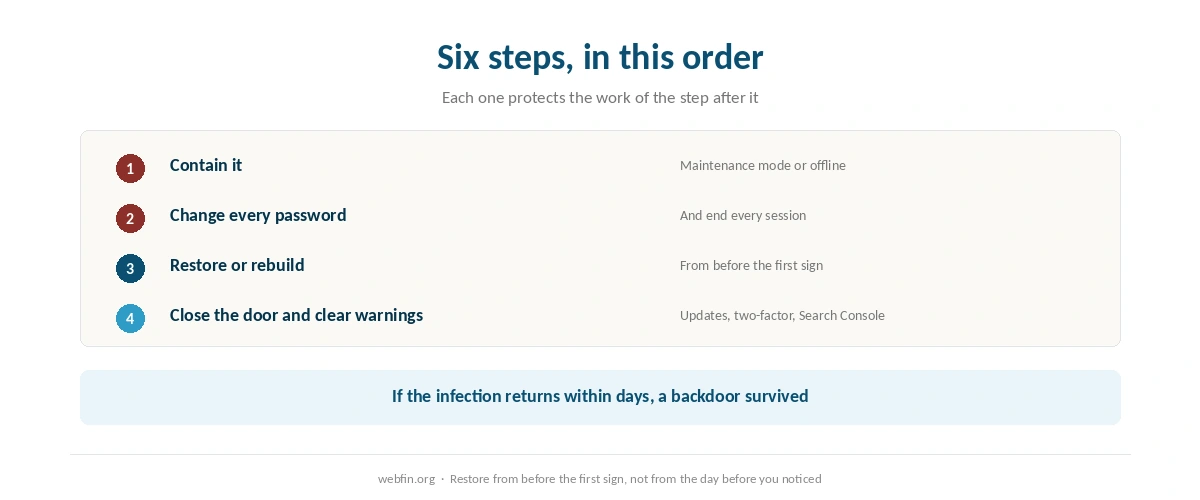
To recover a hacked website, work in this order: contain it, change every password, restore or clean the files, close the hole that let the attacker in, then clear the warnings that search engines and mail providers have raised. The order matters more than any tool, because cleaning a site before changing the passwords just lets the attacker walk back in. And the fastest recoveries share one thing: a clean backup from before the break-in, stored somewhere the attacker could not reach. Automatic copies are what make this recoverable, as setting up automatic backups explains.
How to Recover a Hacked Website: The Short Answer
Take the site offline or into maintenance mode. Change the hosting, WordPress, database, SFTP and email passwords, and log out every session. Tell your host. Restore a backup from before the infection, or reinstall WordPress, plugins and themes from their official sources. Update everything, then ask Google to review the site.
How to Tell It Has Been Hacked
The signs are usually loud once you know them. Visitors are redirected to another site, often only on mobile or only from search results. Pages you never wrote appear in search, commonly selling pills or counterfeit goods. New administrator accounts appear in WordPress. Your host suspends the account for malware, or your browser shows a red warning page before the site loads.
Some signs are quiet. Email from your domain starts landing in spam because the server is sending mail you did not write. The site slows because someone else is using its resources. If any of these appear, treat the site as compromised until you have proof it is not.
⚠️ Do not start by deleting files you think look suspicious. Take a full copy of the infected site first, clearly labeled, and store it apart from your clean backups. You may need it to understand how the attacker got in.
Step 1: Contain It
Put the site into maintenance mode or ask your host to take it offline. Every hour it stays up, it can infect visitors, send spam from your domain and spread to other sites in the same account. If several sites share one hosting account, assume all of them are affected until you have checked each one.
Then tell your host and ask what it sees. Hosts keep access logs and often run their own scans, and some include cleanup. At others it is a paid extra, which is the moment a buyer finds out whether security was in the plan or on the menu.
Step 2: Change Every Password and End Every Session
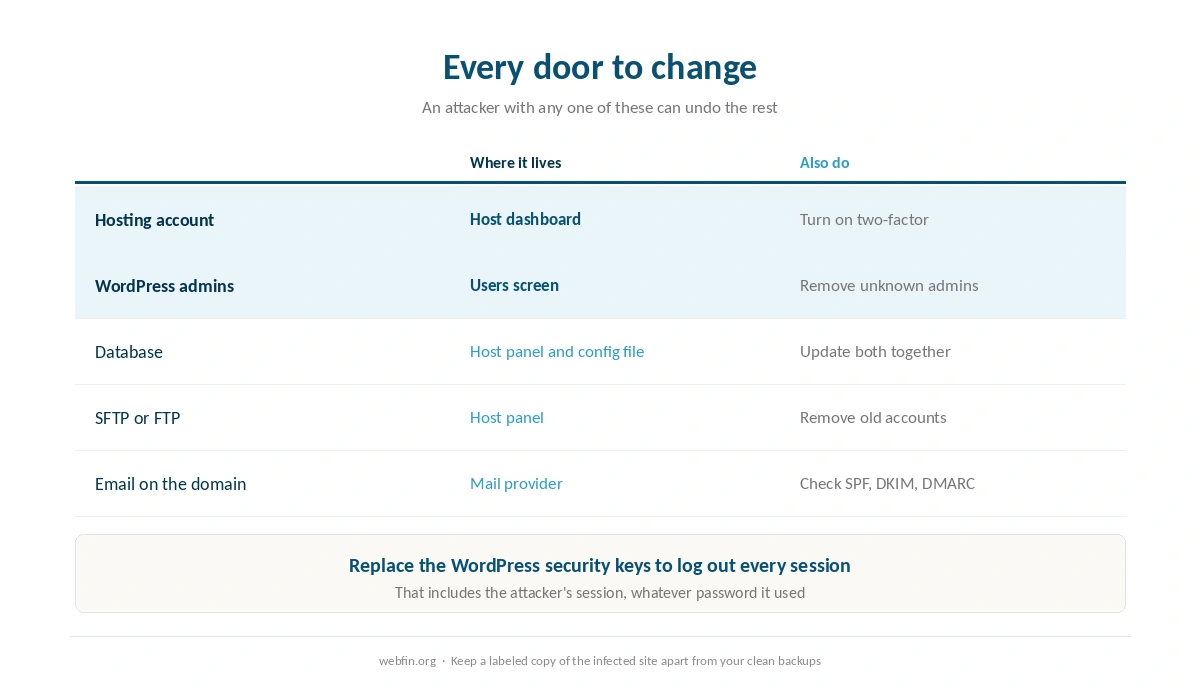
Change the hosting account password, every WordPress administrator password, the database password, SFTP or FTP credentials and the email accounts on the domain. Turn on two-factor authentication wherever it exists. An attacker with any one of these can undo the rest of the work.
Then force everyone out. Replacing the security keys in the WordPress configuration file logs out every session at once, including the attacker’s. Remove any administrator account you do not recognize, and check the remaining ones for changed email addresses.
Step 3: Restore a Clean Backup
If you have a backup from before the infection, restoring it is the quickest and most thorough recovery. The difficulty is knowing when the infection began, because malware often sits quietly for weeks before anyone notices. Restore from before the first sign, not from the day before you noticed.
This is where backup policy stops being a checkbox. HostGator describes its weekly backups as a courtesy rather than a guarantee, and daily copies there need CodeGuard at $35.88 a year, as our HostGator review records. Scala Hosting includes daily backups in its panel. Keep your own copies off the host as well, as our guide to backing up a WordPress site explains, because a backup stored in a hacked account may not be clean.
| Host | Charge | Cost per year |
|---|---|---|
| Bluehost | Premium SSL, single domain | $89.88 (optional; Let's Encrypt is free) |
| Bluehost | Domain privacy | $15.00 (free year one on Business and up) |
| Bluehost | SiteLock Essentials | $95.88 |
| Bluehost | SiteLock Prevent | $239.88 |
| Bluehost | Yoast SEO Premium | $99.99 |
| Bluehost | Early cancellation, free domain | $15.99 one-off, deducted from refund |
| GoDaddy | SSL on Economy after year one | $119.99; other tiers include it for the plan's life |
| GoDaddy | Pre-checked extras at checkout | $345.39 counted by one review, unverified |
| HostGator | CodeGuard daily backups | $35.88 (weekly copies are a courtesy, not guaranteed) |
| HostGator | SiteLock, pre-selected at checkout | $23.88 |
| HostGator | Dedicated IP | $59.40 |
| HostGator | Professional migration | $149.99 one-off |
| Hostwinds | Standard SSL | $75.00 (free AutoSSL on shared via cPanel) |
| Hostwinds | Wildcard SSL | $150.00 |
| Scala Hosting | Processor core, added or removed anytime | $36.00 per core |
| Scala Hosting | Memory, added or removed anytime | $12.00 per gigabyte |
| Hostinger | WHOIS privacy | Included |
| Hostinger | Domain renewal, .com | $15–$20, no first-party figure published |
| DreamHost | WHOIS privacy | Included for the life of the domain |
| Namecheap | Domain privacy | Included for the life of the domain |
| InterServer | Everything on the one plan | Included; no tiers to upgrade to |
Step 4: Or Clean It by Hand
Without a clean backup, rebuild from known-good sources. Reinstall WordPress core from the official download. Replace every plugin and theme with a fresh copy from its official source rather than trusting the files on the server, and delete any you no longer use.
Then look where attackers hide. Search the uploads folder for PHP files, which should not be there. Check the configuration file and any server rules file for lines you did not add. Look in the database for injected scripts in posts and options, and for administrator accounts created recently.
⚠️ If the infection returns within days, a backdoor survived. That is the point to pay a professional or use the host’s cleanup service, because a second round of guessing costs more than the fee.
Step 5: Close the Door
A common way in is something out of date: a plugin, a theme or WordPress itself. Update everything, remove what you do not use, and turn on automatic updates for minor releases. Test larger updates on a copy first, as our guide to setting up a staging site describes.
Then reduce what a stolen password can do. Give each person the lowest role that lets them work, keep administrator accounts to a minimum, and require two-factor sign-in. A web application firewall at the host or in front of the site blocks many automated attacks before they reach WordPress at all.
Step 6: Clear the Warnings
If browsers show a warning, Google has flagged the site. Open the Security Issues report in Google Search Console, confirm what it found, and request a review once the site is clean. Reviews usually take days rather than hours, and a rejected review means something was missed.
Check email too. If the server sent spam, your domain may sit on a blocklist, and legitimate mail will keep bouncing until it is removed. Make sure SPF, DKIM and DMARC are in place, as our guide to setting up email on your domain covers, so spoofed mail cannot pass as yours.
What Security Costs at Different Hosts
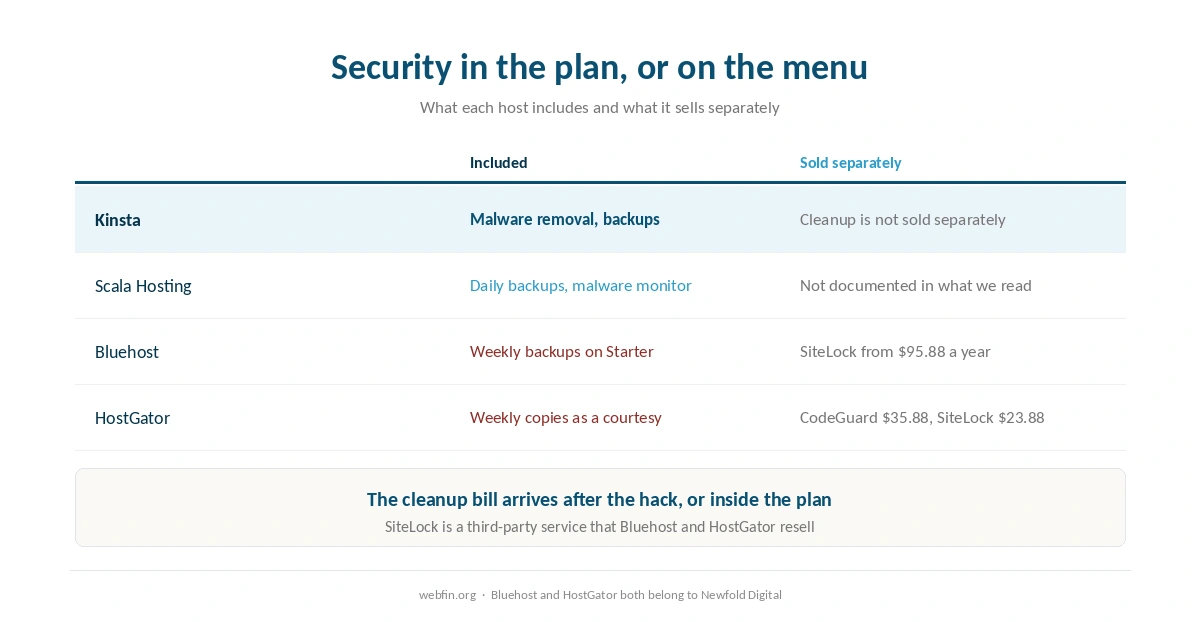
Hosts treat security very differently, and the difference shows up on the invoice. Kinsta includes malware removal in every plan. Scala Hosting includes daily backups and a malware monitor in its panel, which our Scala Hosting review describes. Bluehost sells SiteLock separately, with the Essentials tier renewing at $95.88 a year and Prevent at $239.88. HostGator places SiteLock in the cart pre-selected at $23.88.
Bluehost and HostGator both belong to Newfold Digital, and SiteLock is a third-party service they resell rather than their own. None of this makes a sold-separately host insecure. It means the cleanup bill arrives after the hack rather than inside the plan, which our page on hidden hosting fees tracks across the field.
What to Do If It Does Not Work
The infection comes back. A backdoor survived, usually a PHP file in uploads or a modified plugin. Rebuild from official sources rather than cleaning, or pay for professional cleanup.
The host has suspended the account. Ask exactly which files it flagged and what it needs to lift the suspension. Clean those first, then request a rescan.
Google rejects the review. Something remains, often injected content in the database rather than a file. Search posts and options for scripts and hidden links.
The site is down entirely after cleanup. A removed file may have been needed. Our guide to fixing a website that is down works through the checks in order.
How We Research
This guide describes procedures rather than measurements, and it runs no tests. What each host includes for backups and malware comes from the providers’ own pages as recorded in our reviews, and prices for security add-ons come from the same pages, read on 20 September 2026.
Where a host’s security feature is not documented in what we read, we leave it out rather than assume it. The criteria behind our scores are on our about page, and the plan that includes cleanup is covered in our Kinsta review.
Hacked Website FAQ
Contain it and change the passwords. Put the site into maintenance mode or ask the host to take it offline, then change the hosting, WordPress, database, SFTP and email passwords and log out every session. Cleaning before that lets the attacker return.
Restore, if you have a backup from before the infection began. Malware often sits unnoticed for weeks, so go back to before the first sign. Without a clean backup, reinstall WordPress, plugins and themes from their official sources.
Clean the site, then open the Security Issues report in Google Search Console and request a review. Reviews usually take days. A rejection means something remains, often injected content in the database rather than a file.
It varies widely. Kinsta includes malware removal. Scala Hosting includes a malware monitor and daily backups. Bluehost sells SiteLock separately, renewing at $95.88 a year for Essentials. Check the plan before you need it.
Keep WordPress, plugins and themes updated, remove what you do not use, require two-factor sign-in and give each user the lowest role that works. Keep backups off the host, and test big updates on a staging copy first.
The Verdict
Recovering a hacked site is mostly a matter of order. Contain it, change every password, restore or rebuild from clean sources, close the hole, then clear the warnings. Skip the password step and the rest is wasted, and skip the last step and the damage to email and search outlasts the hack itself.
The best time to prepare is before any of this happens. A host that includes backups and cleanup turns a hack into an inconvenience, and one that sells them turns it into an invoice. Either way, keep your own backups somewhere the hosting account cannot reach, and if you decide to leave afterward, our guide to migrating web hosting covers the move.