
Disclosure: WebFin is reader-supported. If you buy hosting through links on this page, we may earn a commission at no extra cost to you. Commissions vary between providers and our ratings do not — here’s our full disclosure.
To set up email on your domain you do two separate jobs. First you create a mailbox somewhere. Then you publish the DNS records that tell the world where your mail lives and that it is genuine. The first job takes minutes. The second decides whether your messages land in an inbox or a spam folder. Gmail now rejects or flags mail from domains that cannot prove who sent it. And the mailbox itself is where hosting plans quietly differ most, from unlimited accounts to a single one per plan.
How to Set Up Email on Your Domain: The Short Answer
Pick where the mailbox lives: your host, a dedicated email provider, or forwarding only. Create the account. Add the MX records it gives you, then one SPF record, a DKIM record and a DMARC record starting at p=none. Send a test to a Gmail address and check that all three pass.
Three Places Your Email Can Live
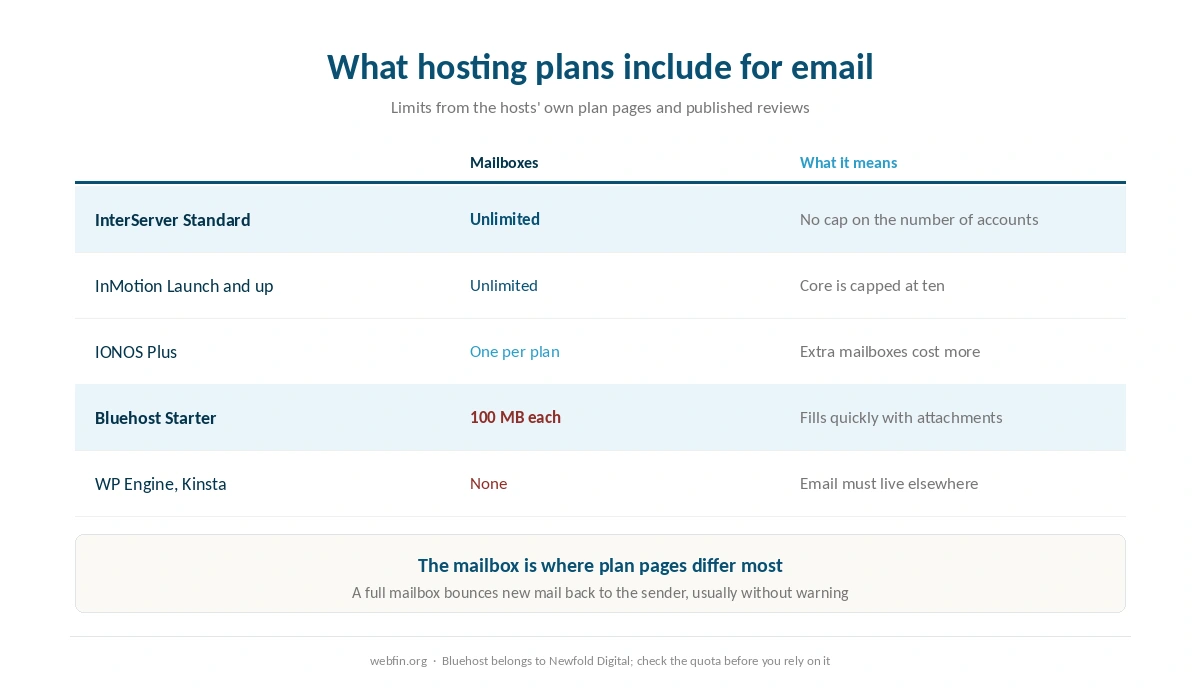
At your web host. Most shared plans include mailboxes, and the limits vary more than anything else on the plan page. InterServer includes unlimited accounts. InMotion Core includes ten, and its higher tiers remove the cap. IONOS Plus bundles one account per plan. Bluehost Starter, a Newfold Digital brand, caps each mailbox at 100 MB. That fills up within months for most people. The limits sit in our InMotion and IONOS reviews as well.
At a dedicated provider. Services built only for email charge per user per month and give you large mailboxes, strong spam filtering and mobile apps. They also survive a change of web host untouched, which is the strongest argument for them. Our list of hosting for small business weighs that choice for a company address.
Forwarding only. Many registrars can forward messages sent to your domain to an existing inbox for free. It is enough for receiving mail, and sending from the domain address then needs extra setup at the inbox provider.
⚠️ Managed WordPress hosts such as WP Engine and Kinsta do not host email at all, so a site there needs one of the other two routes. Our WP Engine review covers what that platform includes instead. The table below carries the email limits we have recorded.
| Host and plan | Limit | Where it's stated |
|---|---|---|
| Bluehost shared | 50,000 inodes — soft limit | Hosting Inode Limit article |
| Bluehost shared | 200,000 inodes — AUP threshold | Server Resource Limitations |
| Bluehost shared | 1,000,000 inodes — TOS violation | Hosting Inode Limit article |
| Bluehost shared | 5,000 tables or 10 GB, all databases | Server Resource Limitations |
| Bluehost shared | 5 GB per single database | Server Resource Limitations |
| Bluehost Starter | 100 MB per mailbox | Shared hosting prices page |
| WP Engine Startup | 25,000 monthly visits, then overage handling | Plan pages |
| WP Engine, by tier | 25,000 to 400,000 monthly visits | Plan pages |
| Rocket.net Starter | 25,000 monthly visits, 1 site, 10 GB storage | Plan pages |
| Namecheap EasyWP | 50,000 / 200,000 / 500,000 monthly visits by tier | Plan pages |
| Kinsta Starter | 25,000 monthly visits | Plan pages |
| Scala Hosting VPS | Priced per unit: $3 per core, $1 per gigabyte | Plan pages; adjustable anytime |
| HostGator shared | Weekly backups described as a courtesy, not guaranteed | Hosting terms |
| Liquid Web | Dedicated resources at every tier; no shared plan | Plan pages |
| InterServer Standard | Unlimited storage, bandwidth, email and websites | One plan, no tiers |
| GreenGeeks Lite | One website only | Plan pages |
| IONOS Plus | One email account bundled per plan | Plan pages |
| Hostinger, all plans | Not published | Hostinger support article, 28 Aug 2026 |
| Bluehost Starter | 10 GB NVMe storage | Plan pages, as listed in a 2026 audit |
| InMotion Core | One site, 10 email accounts, SSD storage; NVMe from Launch | TechRadar and a 2026 review |
| SiteGround shared | Shell access by tier — not recorded | Not stated on the plan pages we read, 20 Sep 2026 |
| Bluehost shared | Shell access by tier — not recorded | Not stated on the plan pages we read, 20 Sep 2026 |
| Hostinger, all plans | Shell access by tier — not recorded | Not stated on the plan pages we read, 20 Sep 2026 |
| Cloudways servers | Search service (OpenSearch, Elasticsearch) — not recorded | Not stated on the plan pages we read, 20 Sep 2026 |
Step 1: Create the Mailbox
At a host, open the email section of the control panel, usually labeled Email Accounts, and create the address with a strong password. At a dedicated provider, you add the domain in its admin panel and create users there. Either way, note the incoming and outgoing server names, because a mail app on your phone will ask for them.
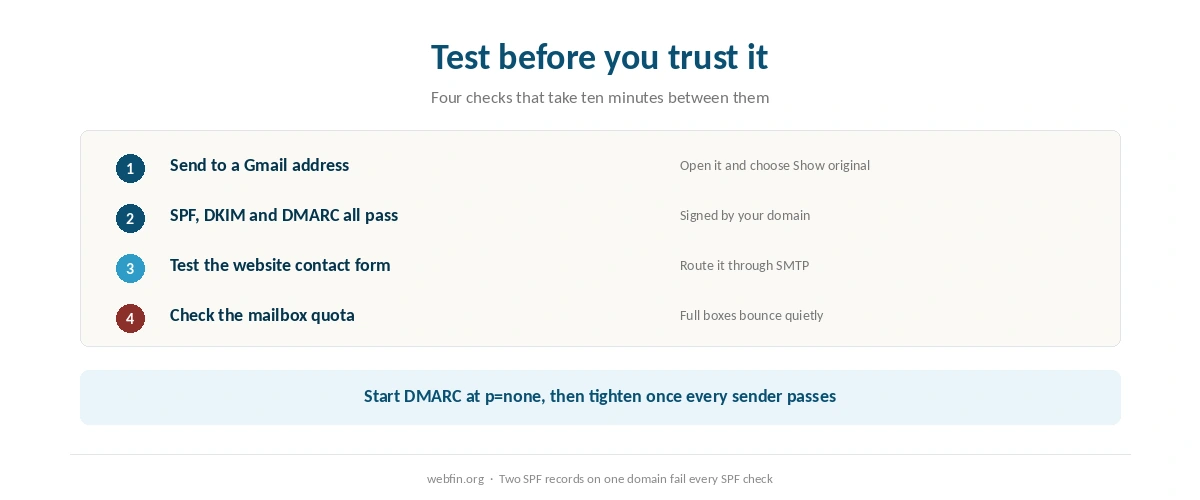
Check the mailbox size before you rely on it. A 100 MB cap is roughly a few thousand ordinary messages. Attachments use it up quickly, and our comparison of Bluehost against InMotion sets two different mailbox limits side by side. When a mailbox is full, new mail bounces back to the sender, and you rarely find out until someone mentions it.
Step 2: Add the MX Records
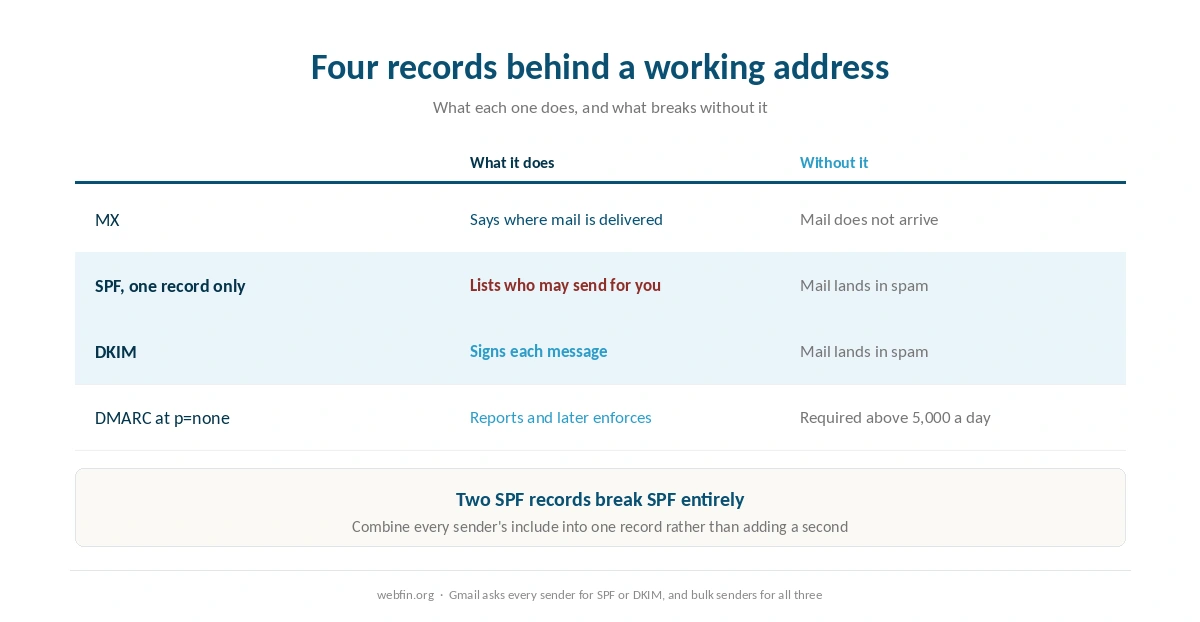
MX records tell other mail servers where to deliver messages for your domain. Your host or provider lists the exact values, usually one or more server names with a priority number. Lower numbers are tried first, and the others act as backups.
Publish records for one provider only. Mixing the MX records of a host and a dedicated provider splits your incoming mail between two places. If your domain’s nameservers point at the web host, the host may add its own MX records by default, so remove them when you move mail elsewhere. Our guide to pointing a domain to a new host explains which DNS provider controls these records.
Step 3: Publish One SPF Record
SPF is a TXT record listing the servers allowed to send mail for your domain. It starts with v=spf1, lists each sender with an include or an address, and ends with ~all or -all. Your host or email provider gives the include value to use.
⚠️ A domain can have only one SPF record. Your website host and your email provider may each tell you to add one. Combine them into a single record with both includes, otherwise receiving servers treat SPF as broken. The mistake is easy to make, and it stays invisible until mail starts going to spam.
Step 4: Turn On DKIM
DKIM signs each outgoing message with a key, and receivers check the signature against a public key you publish in DNS. Your host or email provider generates the key pair and shows you a TXT or CNAME record to add, usually under a name containing _domainkey.
On a shared host with cPanel, DKIM is often a single switch in the email deliverability section, which also shows whether SPF is correct. At a dedicated provider, you add the record and then press a button to start signing. Until signing starts, the record alone does nothing.
Step 5: Add a DMARC Record
DMARC tells receivers what to do when a message fails SPF and DKIM, and where to send reports about it. It is a TXT record at _dmarc on your domain. Start with v=DMARC1; p=none and an address for aggregate reports, which monitors without blocking anything.
Read the reports for a few weeks to find every service that sends as your domain: the website, a newsletter tool, an invoicing system. Once they all pass, move the policy to quarantine and later to reject, which stops others sending mail that pretends to be yours.
Step 6: Test Before You Trust It
Send a message from the new address to a Gmail account. Open it and choose Show original. Gmail reports SPF, DKIM and DMARC as pass or fail at the top. All three should pass, and the signing domain should be yours rather than the host’s.
Test the website’s own mail too. Contact forms often send through the server without authentication, and those messages are the ones that vanish. An SMTP plugin that sends through your mailbox, with your credentials, usually fixes it.
Why Gmail Now Cares About All This
Since February 2024, Google’s sender requirements ask every domain sending to Gmail to publish SPF or DKIM, send over TLS and keep valid reverse DNS. Domains sending more than 5,000 messages a day to Gmail must publish SPF and DKIM together, plus a DMARC record, which can stay at p=none. Several reports this year describe enforcement tightening from November 2025, with non-compliant mail rejected rather than only flagged.
For a small business, the lower tier is what matters: without SPF or DKIM, your invoices and replies can land in spam. That is why the DNS steps above are not optional extras. They are what makes a domain address usable at all.
What to Do If It Does Not Work
Messages go to spam. Check Show original. A failing SPF usually means two SPF records or a missing include, and a failing DKIM usually means signing was never switched on.
Mail stopped arriving after a host move. The MX records did not move with the nameservers. Add them at the new DNS provider exactly as they were.
Senders get bounces saying the mailbox is full. The plan caps mailbox size. Archive old mail, raise the quota if the host allows it, or move to a dedicated provider. Our piece on what unlimited hosting means covers where these caps hide.
The contact form sends nothing. Route it through authenticated SMTP rather than the server’s default mail function.
How We Research
This guide describes procedures rather than measurements. Mailbox limits and prices come from the hosts’ own plan pages and from reviews that list them, read on 20 September 2026 and recorded in the table above. The sender rules come from Google’s published requirements, with the enforcement date as reported by several sources this year. Our page on choosing a domain registrar covers why domains sit outside every hosting table we keep.
Menu names differ between control panels, so the steps describe what to look for rather than where to click on one brand. The criteria behind our scores are on our about page, and the plan with unlimited email is covered in our InterServer review.
Domain Email FAQ
Most shared plans do, with very different limits. InterServer includes unlimited accounts, InMotion Core ten, IONOS Plus one, and Bluehost Starter caps each mailbox at 100 MB. Managed WordPress hosts such as WP Engine and Kinsta include none.
MX records to receive mail, one SPF record listing who may send, a DKIM record so messages are signed, and a DMARC record telling receivers what to do with failures. Start DMARC at p=none and tighten it once everything passes.
Usually because SPF or DKIM fails. Two SPF records on one domain break SPF, and DKIM does nothing until signing is switched on. Send a test to Gmail and use Show original to see which check fails.
For domains sending more than 5,000 messages a day to Gmail, yes, along with SPF and DKIM together; a policy of p=none is enough. Every other sender needs at least SPF or DKIM. Several reports describe stricter enforcement from November 2025.
It is cheaper and fine for a few addresses. A dedicated email provider costs per user but survives any change of web host untouched, has larger mailboxes and stronger filtering. For a business, separating the two usually pays off.
The Verdict
Setting up domain email is two jobs, and people usually do only the first. Creating the mailbox takes minutes. Publishing MX, one SPF record, DKIM and DMARC is what makes messages from that mailbox arrive, and since Gmail began enforcing its sender rules, skipping it is no longer a harmless shortcut. Why mailbox limits matter most locally is covered in hosting for local business.
Choose where the mailbox lives with the plan limits in view. A host with unlimited accounts is enough for most small sites, and a dedicated provider is worth paying for once email carries the business. Moving hosts later is covered in our guide to migrating web hosting, and charges that follow the first term are in hidden hosting fees.