Disclosure: WebFin is reader-supported. If you buy hosting through links on this page, we may earn a commission at no extra cost to you. Commissions vary between providers and our ratings do not — here’s our full disclosure.
Is WP Engine SSL free? Yes. WP Engine has offered free Let’s Encrypt certificates to all customers since 2016, enabled in its User Portal, according to WP Engine’s own announcement.
This guide therefore covers what the certificate includes, how to turn it on, and when a paid one makes sense.
WP Engine SSL: The Short Answer
In short, the free certificate covers a typical site, while our sources do not confirm wildcard support.
The Options at a Glance
| Point | Detail | Note |
|---|---|---|
| Let’s Encrypt | Free for all customers | Since 2016 |
| Where to manage | User Portal | A few clicks |
| Third-party certificates | Supported | Added in the dashboard |

In fact, WP Engine’s announcement describes the free certificates.
What the Free Certificate Covers
In practice, enabling HTTPS takes a few clicks in the User Portal, according to WP Engine. Moreover, owners who need an organization-validated certificate can add a third-party one through the dashboard. In other words, the basics cost nothing.
Paid Certificates and Limits
However, our sources do not confirm free wildcard certificates at WP Engine, so check with support before relying on one for many subdomains. In addition, WP Engine publishes SSL as a component on its status page, which helps when diagnosing certificate errors.
| Host | Charge | Cost per year |
|---|---|---|
| Bluehost | Premium SSL, single domain | $89.88 (optional; Let's Encrypt is free) |
| Bluehost | Domain privacy | $15.00 (free year one on Business and up) |
| Bluehost | SiteLock Essentials | $95.88 |
| Bluehost | SiteLock Prevent | $239.88 |
| Bluehost | Yoast SEO Premium | $99.99 |
| Bluehost | Early cancellation, free domain | $15.99 one-off, deducted from refund |
| GoDaddy | SSL on Economy after year one | $119.99; other tiers include it for the plan's life |
| GoDaddy | Pre-checked extras at checkout | $345.39 counted by one review, unverified |
| HostGator | CodeGuard daily backups | $35.88 (weekly copies are a courtesy, not guaranteed) |
| HostGator | SiteLock, pre-selected at checkout | $23.88 |
| HostGator | Dedicated IP | $59.40 |
| HostGator | Professional migration | $149.99 one-off |
| Hostwinds | Standard SSL | $75.00 (free AutoSSL on shared via cPanel) |
| Hostwinds | Wildcard SSL | $150.00 |
| Scala Hosting | Processor core, added or removed anytime | $36.00 per core |
| Scala Hosting | Memory, added or removed anytime | $12.00 per gigabyte |
| Hostinger | WHOIS privacy | Included |
| Hostinger | Domain renewal, .com | $15–$20, no first-party figure published |
| DreamHost | WHOIS privacy | Included for the life of the domain |
| Namecheap | Domain privacy | Included for the life of the domain |
| InterServer | Everything on the one plan | Included; no tiers to upgrade to |
| AWS Lightsail | Transfer overage | $0.09 a GB in most regions (Toolradar, Sep 2026) |
| AWS Lightsail | CDN | 50 GB of CDN distribution free for one year (AWS pricing page) |
| Bluehost | .com renewal after the free year | $12.99 (DomainOffer guide to free domains, 2026) |
| Bluehost | Managed VPS cPanel license at checkout | $540 per instance, though the plan page lists cPanel as included; 36-month renewal about $83.99 vs $98.99 listed (HostAdvice 2026) |
| Cloudflare Registrar | .com at cost, registration = renewal | $10.11 (PriceWorld, Feb 2026) to $10.44 ($10.26 Verisign + $0.18 ICANN; DevToolPicks, StartupOwl 2026); transfer $10.46 (user report, Feb 2026) |
| Cloudways | Rackspace email add-on | $1.50 a mailbox a month from Sep 1, 2026 (was $1.00); 25 GB; up to 10,000 emails a day; aliases and forwarding free; email migration $10 a mailbox (Cloudways blog and support) |
| Cloudways | Titan email add-on | Three plans; Titan Pro $1.99 a mailbox a month, up to 100 GB; $1.50 for Rackspace customers (Cloudways blog, Aug 2026) |
| Contabo | Setup fee and Windows | Setup fee on Cloud VPS 10 at times (LearnWithHasan) vs none (Toolradar, Sep 2026); Windows license about €4.99 a month |
| Dedicated servers | Extra IPv4 | Often $2–$5 a month each (Valebyte 2026) |
| DigitalOcean | Droplet backups | 20% of the Droplet's monthly price (Kuberns, 2026) |
| DigitalOcean | New-customer credit | $200 for 60 days in most 2026 sources; $5 per DigitalOcean's pricing-page FAQ read 19 Aug 2026 (Findstack) |
| DigitalOcean | Transfer overage | $0.01 a GiB (Kuberns, 2026) |
| Domain name, typical yearly cost | $10 to $20 a year | Hostinger's own guide to domain costs, Mar 2026 |
| Domains at hosts, .com renewal | DreamHost $9.95; Hostinger about $16.99 | 2026 domain-offer guide (domainoffer.net); conflicts with Hostinger's $15–$20 range |
| DreamHost | .com domain (tracker) | $9.99 registration (since Jan 2, 2026; $4.99 before), $19.99 renewal, $9.99 transfer (DomainOffer, May 2026); conflicts with DomainOffer guide ($9.95 renewal) |
| Dynadot | .com domain | $8.99 registration, $10.88 renewal, 39% below a $14.64 market average; .net $12.52 flat; .llc $10.92 → $35.20 (DomainOffer, May 2026) |
| GoDaddy | .com domain | $11.99 first year, $21.99 renewal; five years $96.95 (Findstack, Oct 2026, from published 2026 comparisons) |
| GoDaddy | WHOIS privacy | $9.99 a domain a year (Findstack, Oct 2026) |
| GoDaddy | Website Builder Commerce payments | 2.7% + $0.30 a card transaction (Website Builder Expert, 2026) |
| GoDaddy Reseller | Wholesale rates, Basic / Pro | Domain .com $13.19 / $11.59; Professional Email $2.01 / $1.61 a month; Managed WordPress $8.01 / $7.01 a month; SSL from $36.73 / $31.73 (GoDaddy help center, official) |
| GoDaddy vs Namecheap | Cheap new extensions (.site, .online, .website) | $0.99 first year; renew $39.99–$54.99 at GoDaddy vs $20.98–$34.98 at Namecheap (DomainOffer, 2026) |
| Hetzner | Traffic, IPv4 and backups | 20 TB EU, 1 TB US, 0.5 TB Singapore; overage €1/TB (€7.40 Singapore); IPv4 +€0.50; backups 20% (LearnWithHasan, BetterStack 2026) |
| HostGator | cPanel email (paid add-on) | Free 0–2 mailboxes; Basic $2.99 a month ($35.88 a year) 3–10; Plus $5.99 ($71.88) 11–20; Premium $8.99 ($107.88) unlimited; tied to the hosting plan (HostGator help center) |
| HostGator | Professional Email (Titan) | One-month trial, then $2.99 a month (CloudsPress 2026) |
| HostGator | .com domain | $12.99 first year, $23.99 renewal, $12.99 transfer (ProfileTree; whtop); privacy an optional paid extra; free domain year one on 12/24/36-month Shared, WordPress or Cloud plans; non-refundable domain fee may apply on first-year cancellation (CloudsPress) |
| Hostinger | SSL | Free Let's Encrypt certificates, unlimited, installed and renewed automatically (Hostinger compare page; Bitcatcha; Truehost) |
| Hostinger | Business Email | Starter $0.99 → $1.59 a mailbox a month (10 GB); Premium $2.99 → $3.99 (50 GB), 48-month terms (TechRadar); hosting plans include a free trial that auto-renews as paid Starter (Hostinger support) |
| Hostinger | .com domain (tracker) | $9.99 registration, $19.99 renewal, $9.99 transfer (DomainOffer, May 2026) |
| Hover | .com domain | $18.99 registration and renewal, 30% above a $14.64 market average (DomainOffer, May 2026); .tech $4.99 → $63.99 |
| IONOS | Extra IPv4 address on VPS | $5.00 a month; one IPv4 included per server (IONOS VPS page) |
| IONOS | .com domain | $10.00 registration, $20.00 renewal, $9.50 transfer (DomainOffer, May 2026); $1 first year for new customers (StartupOwl; Thewearify citing IONOS); .website $1.00 → $40.00 |
| IONOS | DNSSEC via Domain Guard | $1 first year, then $15 a year (StartupOwl 2026) |
| IONOS | Email plans | Basic Email $1.10 → $2.00 (1 mailbox, 2 GB); Business/Professional Email $2.00 → $4.00 (25 mailboxes, 2 GB each); Exchange 50 GB about $6 a user at renewal (TrekMail citing IONOS; Toolradar, Sep 2026); extra 10 GB storage purchasable (IONOS help) |
| Linode | Backups and egress overage | Backups 20% (Kuberns) or 25% (LearnWithHasan) of plan; overage $0.005/GB |
| Namecheap | .com domain | $8.88 first year, $13.98 renewal; five years $65.91 (same source) |
| Namecheap | Incoming .com transfer | $10.98 to $33.98, including a year (Findstack, Oct 2026) |
| Namecheap | SSL on shared hosting | Free PositiveSSL for one year per domain or subdomain, up to 50 per cPanel account; then a paid renewal ($7.88 per Vendr or $8.88 per NateShivar a year); no AutoSSL on shared, manual Let's Encrypt install allowed (Namecheap knowledge base and blog) |
| Namecheap | Private Email | $0.99 a mailbox a month first year, $1.99 renewal (Vendr 2026) |
| Namecheap VPS | cPanel license | Charged separately, monthly, tiered; prices rose Jan 13, 2026 (Namecheap blog); $10.88 in an older review (Tom's Hardware), $17.88 after Jan 2026 per a competitor's blog (InMotion) |
| Namecheap VPS | Complete management with cPanel | About $50 to $55 a month in total (TechRadar); management only on Quasar and Magnetar (Namecheap VPS page) |
| Network Solutions | .com domain | $9.59 registration, $32.99 renewal, $10.99 transfer, +$0.20 ICANN fee (DomainOffer, May 2026); about $25 first year, $37.99 renewal (BestGuide 2026); .online $0.99 first year, renews $52.99 (DomainOffer, Jul 2026) |
| Porkbun | .com domain | $10.08 registration, $11.08 renewal, $10.08 transfer (DomainOffer, May 2026); later 2026 pages list $11.52 / $12.52 / $11.52 — verify |
| Porkbun | Cheap extensions | .website $1.96 first year, renews $21.11; .pw $3.43, renews $18.33 (DomainOffer, 2026) |
| Pressable | Visit overage | $1.20 per 1,000 visits; $1.00 per GB storage (FrontDesk Review, Sep 2026) |
| Porkbun | Email inbox | $24 a year per inbox (knowledge base); $36 in a developer documentation example; 10 GB; 15-day free trial with new domains |
| Liquid Web | Mailboxes | $2.25 a mailbox a month, 25 GB, plus a $10 monthly base charge for unlimited domains; requires active hosting (whtop, 2026) |
| SiteGround | Domains | $15.95 a year for .com, $17.95 .net, $19.95 .co.uk (Tooltester, 2026); WHOIS privacy free in year one only (whtop) |
| OVHcloud | Domains | .ovh $2.15 year one, $3.49 renewal, $53.99 reactivation; .com renewal $12.59 (European Alternatives); 15 GB mailbox and DNSSEC included |
| Cloudways | Offsite backup storage | $0.033 per GB per server; incremental; charges rounded up in $0.50 steps, so $3.85 becomes $4 and $1.22 becomes $1.50 (Cloudways support center) |
| DigitalOcean | Snapshots | $0.06 per GB a month (DIYAI, 2026) |
How to Turn On WP Engine SSL
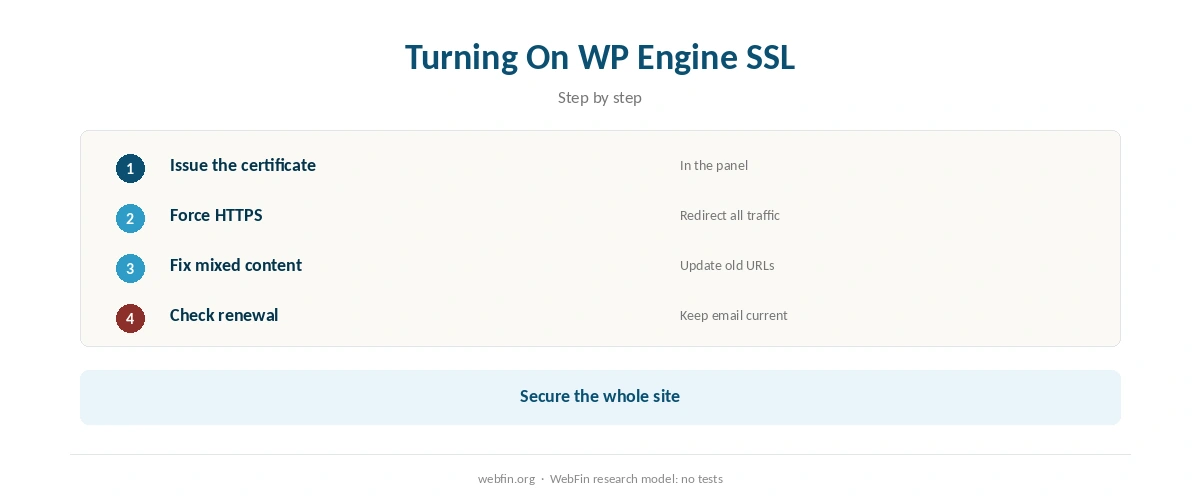
First, in the WP Engine User Portal, open the site’s SSL section and add a free Let’s Encrypt certificate, or upload a third-party one. Then make the site load over HTTPS for every visitor. As a result, WP Engine SSL then protects every page.
If the site shows a broken padlock afterwards, mixed content is the usual cause; our guide to what SSL does explains it. If you use Cloudflare in front of the host, our Cloudflare SSL guide explains which mode to choose.
Against Other Hosts
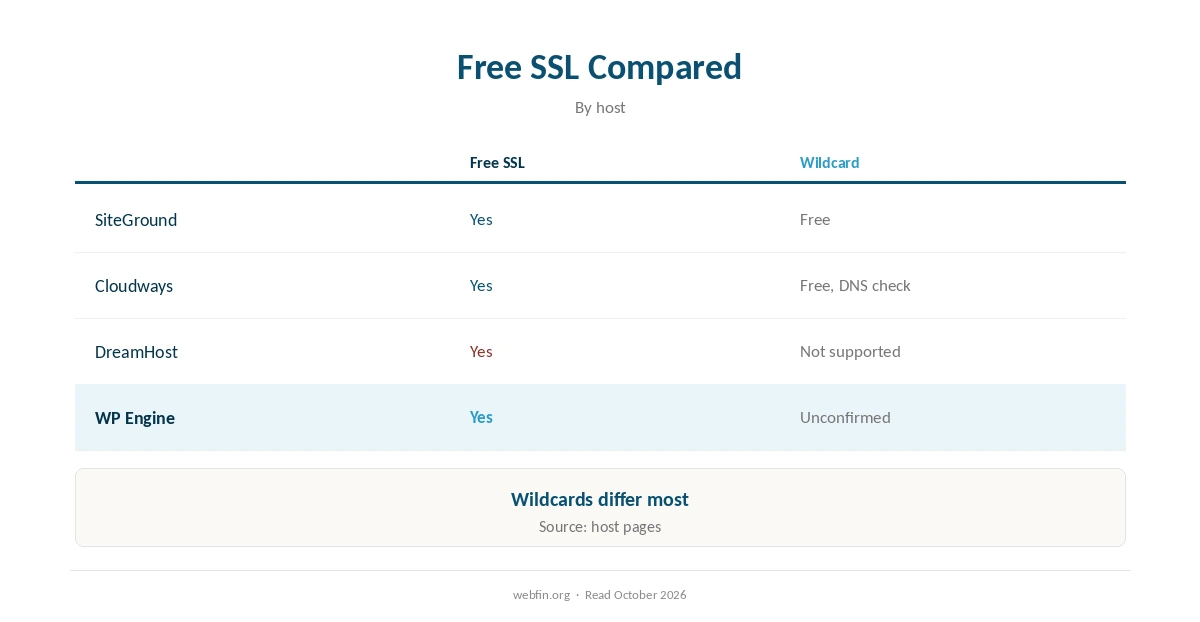
For comparison, our tables list Cloudways with free Let’s Encrypt, wildcard included and SiteGround with free Standard and Wildcard Let’s Encrypt. Meanwhile, they list DreamHost with free Let’s Encrypt, no wildcard. So the free certificate is standard, while wildcards and renewals differ.
Our page on hidden hosting fees covers paid certificate upsells. Our cheap hosting guide lists hosts with free SSL.
For plan prices, see our WP Engine pricing guide. Our WP Engine cPanel guide covers the panel.
Its reliability record is in our WP Engine uptime guide. For other hosts, our WP Engine alternatives help. Support channels are in our customer service guide.
Related reading also includes Does WP Engine offer email?, which covers a closely related question.
How We Research
We run no tests. Certificate details come from WP Engine’s own pages and named sources, read in October 2026. Confirm current options in your account, since hosts change certificate offers.
The criteria behind our scores are on our about page.
WP Engine SSL FAQ
Yes. WP Engine has offered free Let’s Encrypt certificates to all customers since 2016, enabled in its User Portal, according to WP Engine’s own announcement.
Our sources do not confirm a free wildcard; ask support.
In short: in the WP Engine User Portal, open the site’s SSL section and add a free Let’s Encrypt certificate, or upload a third-party one.
Specifically, our sources do not state the cycle, although Let’s Encrypt builds its certificates to renew automatically.
Rarely; a paid certificate makes sense for stores and sites that need organization validation.
The Verdict
Overall, WP Engine SSL is free for a standard certificate, while wildcard support needs confirming.
Therefore turn on WP Engine SSL first, force HTTPS, and pay for an upgrade only if the site needs it.