
Disclosure: WebFin is reader-supported. If you buy hosting through links on this page, we may earn a commission at no extra cost to you. Commissions vary between providers and our ratings do not — here’s our full disclosure.
To avoid checkout upsells, decide what you need before you open the cart, then read every line of the order summary before you pay. Hosting carts sell extras at the moment a buyer is least likely to question them. Some are ticked for you. Some have free equivalents. And each one renews on its own date at its own price, long after the day you meant to buy only the plan.
How to Avoid Checkout Upsells: The Short Answer
Write down the plan and term you want. In the cart, check the term selector, untick every add-on you did not choose, and skip paid certificates, security scanners and backup services that have free alternatives. Read the total due today and the renewal line. After buying, turn off auto-renewal on anything you did not mean to keep.
What Hosting Carts Sell
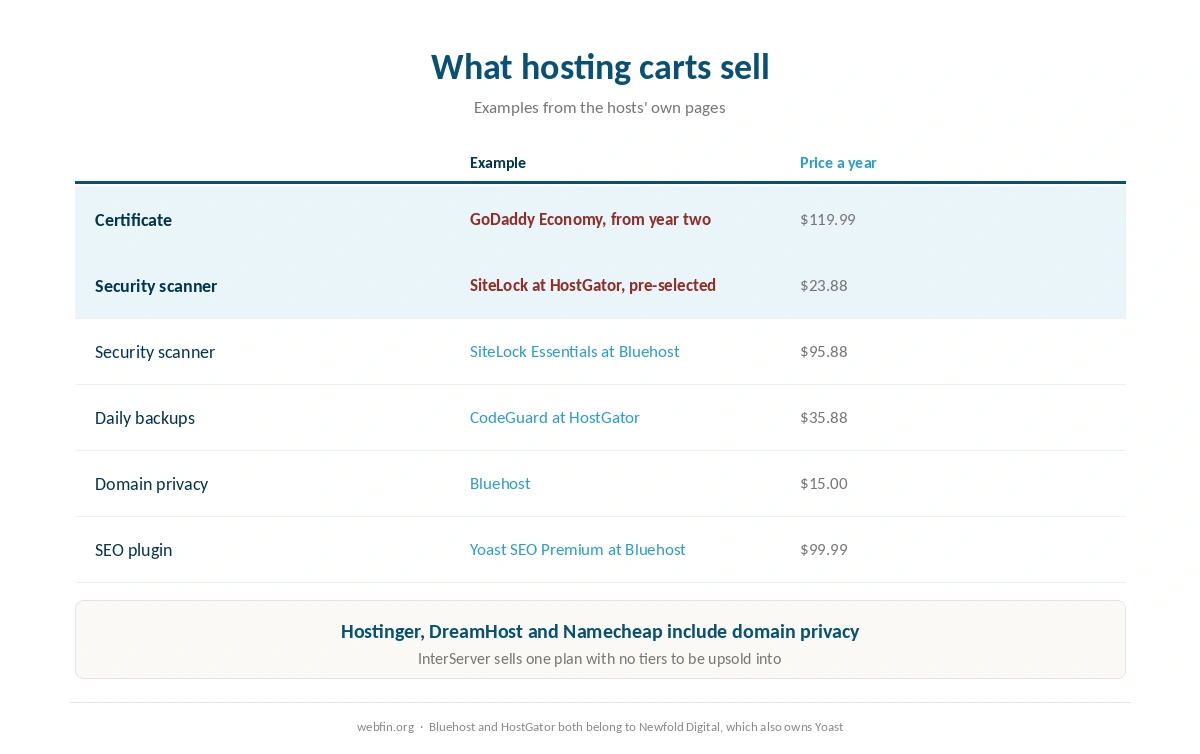
The extras fall into a few groups, and our table below lists what several hosts charge. Certificates: Bluehost offers a premium certificate at $89.88 a year when free ones cover most sites, and GoDaddy charges $119.99 on Economy after the first year. Security scanners: Bluehost sells SiteLock from $95.88, and HostGator places it in the cart pre-selected at $23.88.
Backups: HostGator sells daily CodeGuard backups at $35.88 and describes its weekly copies as a courtesy. Privacy: Bluehost charges $15.00 a year, while Hostinger, DreamHost and Namecheap include it. Services: HostGator prices professional migration at $149.99 and a dedicated IP at $59.40.
| Host | Charge | Cost per year |
|---|---|---|
| Bluehost | Premium SSL, single domain | $89.88 (optional; Let's Encrypt is free) |
| Bluehost | Domain privacy | $15.00 (free year one on Business and up) |
| Bluehost | SiteLock Essentials | $95.88 |
| Bluehost | SiteLock Prevent | $239.88 |
| Bluehost | Yoast SEO Premium | $99.99 |
| Bluehost | Early cancellation, free domain | $15.99 one-off, deducted from refund |
| GoDaddy | SSL on Economy after year one | $119.99; other tiers include it for the plan's life |
| GoDaddy | Pre-checked extras at checkout | $345.39 counted by one review, unverified |
| HostGator | CodeGuard daily backups | $35.88 (weekly copies are a courtesy, not guaranteed) |
| HostGator | SiteLock, pre-selected at checkout | $23.88 |
| HostGator | Dedicated IP | $59.40 |
| HostGator | Professional migration | $149.99 one-off |
| Hostwinds | Standard SSL | $75.00 (free AutoSSL on shared via cPanel) |
| Hostwinds | Wildcard SSL | $150.00 |
| Scala Hosting | Processor core, added or removed anytime | $36.00 per core |
| Scala Hosting | Memory, added or removed anytime | $12.00 per gigabyte |
| Hostinger | WHOIS privacy | Included |
| Hostinger | Domain renewal, .com | $15–$20, no first-party figure published |
| DreamHost | WHOIS privacy | Included for the life of the domain |
| Namecheap | Domain privacy | Included for the life of the domain |
| InterServer | Everything on the one plan | Included; no tiers to upgrade to |
Three Carts, Three Different Problems
Bluehost keeps the plan lean and sells the rest from its dashboard: the premium certificate, SiteLock and Yoast SEO Premium. Our Bluehost review lists each one with its renewal.
HostGator, a Newfold Digital brand like Bluehost, pre-selects SiteLock in the cart and sells daily backups separately, as our HostGator review records.
GoDaddy charges for the certificate on Economy from the second year, and one review counted a large sum of pre-checked extras. Our GoDaddy review covers what we could verify. Hosts such as InterServer, with one plan and no tiers, and DreamHost, with privacy included, simply leave less to decline.
Step 1: Decide Before You Open the Cart
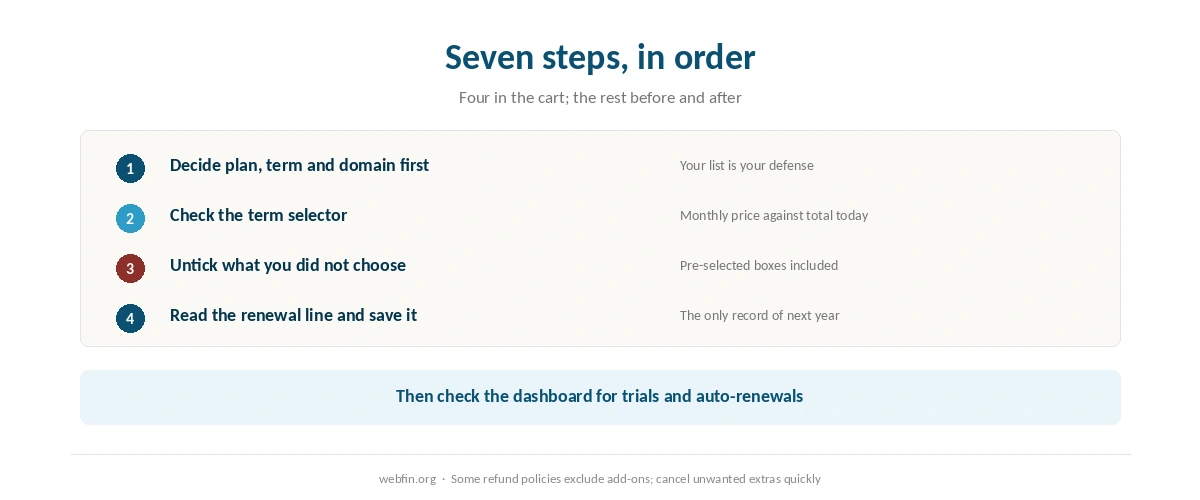
Write down three things: the plan, the term and whether you need a new domain. That list is your defense. Anything that appears in the cart and is not on it needs a reason to stay.
Price the plan on its renewal, not only its introductory rate, before you start. Our page on hosting renewal prices lists what several plans cost in their second term. A low headline with a steep renewal is the first upsell, and it happens before any add-on appears.
Step 2: Check the Term Selector
The monthly figure in the cart depends on the term, and the term shown first may be the longest. That gives the lowest monthly price and the largest payment today. Switch the term and watch both numbers change.
Choose the term that fits how long you expect the site to run. A three-year prepayment is a good deal for a site you will keep and a poor one for a project you might close. The total due today is the number that matters at this step.
Step 3: Untick What You Did Not Choose
Go through the add-on list line by line. HostGator places SiteLock in the cart pre-selected, and one review counted a large sum of pre-checked extras at GoDaddy, which we could not verify. Either way, a ticked box is a purchase you did not decide to make.
Untick security scanners, SEO tools, backup services, email packages and certificates unless each one is on your list. Hosts that sell extras in the dashboard, such as Bluehost, let you add them later if you find you need them. The reverse is harder: removing a paid add-on can mean waiting for its renewal.
Step 4: Know the Free Alternatives
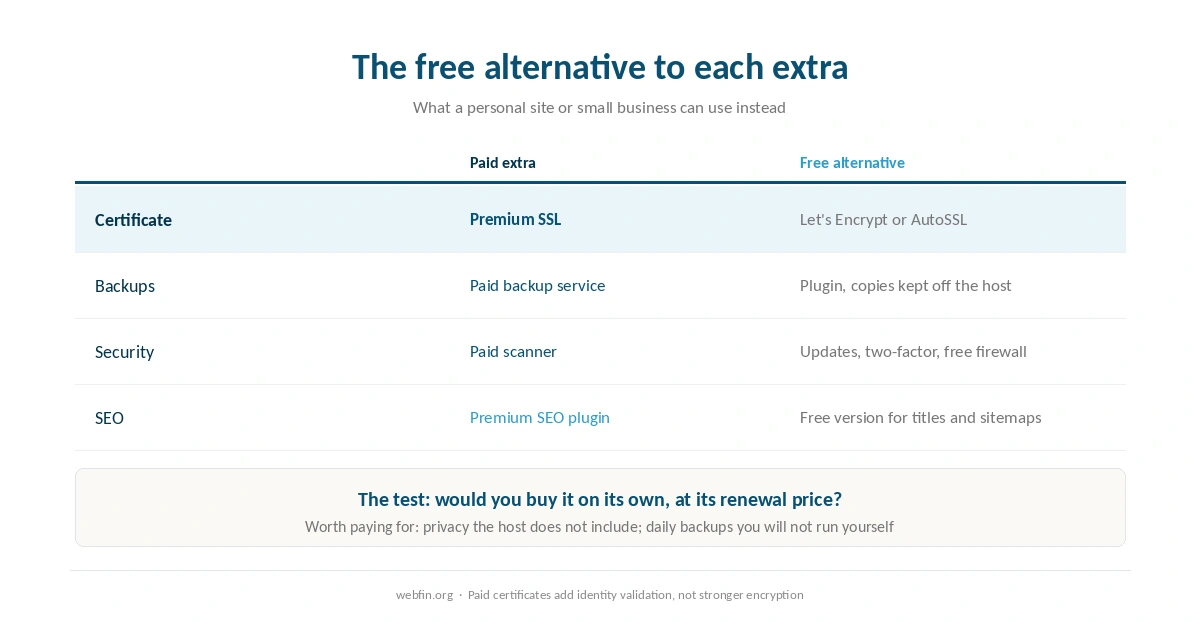
Certificates. Free certificates from Let’s Encrypt or a host’s AutoSSL provide the same encryption as a paid one. Paid tiers add identity validation, which a personal site or a small business can do without. Our guide to installing an SSL certificate covers them.
Backups. A backup plugin that sends copies off the host protects you better than a paid backup stored in the same account. Our guide to backing up a WordPress site explains why.
Security. Updates, two-factor sign-in and a free firewall plugin cover the basics. Our guide to recovering a hacked website covers what to do if something gets through.
SEO tools. The free versions of common SEO plugins handle titles, descriptions and sitemaps, the core of what a small site needs. Bluehost sells Yoast SEO Premium at $99.99, and Newfold Digital owns both Bluehost and Yoast.
Step 5: Keep What Earns Its Place
Not every extra is a trap. Domain privacy is worth having if the host does not include it, because it keeps your contact details out of public records. Daily backups are worth paying for if the host keeps only weekly copies and you will not run your own.
The test is simple: would you buy this extra on its own, at its renewal price, if nobody had offered it? If the answer is yes, keep it. If you would not have thought of it, it can wait.
Step 6: Read the Order Summary
Before paying, read the total due today, the term, and the renewal price for the plan and for each extra that remains. Some hosts show the renewal only here. ChemiCloud, for one, shows its renewal at checkout and in the client area rather than on the plan table, as our ChemiCloud review explains.
Save the summary as a file or a screenshot. It is the only record of what you agreed to pay next time, and it settles most billing questions a year later. Our guide to reading a hosting agreement covers the documents behind it.
Step 7: Check the Dashboard After Buying
Log in and look for trials that turn into paid services and for extras set to renew automatically. Turn off auto-renewal on anything you did not mean to keep, and put the plan’s renewal date in your calendar a month ahead.
If an extra slipped through, cancel it quickly. Refund policies can exclude add-ons, as HostGator’s does, so the window for getting that money back may be shorter than the one for the plan. Our guide to canceling hosting and getting a refund covers the order.
What to Do If You Already Paid
An extra you did not want. Contact support, ask for it to be removed and refunded, and turn off its auto-renewal either way.
A term longer than you meant. Ask whether the host will switch it inside the refund window, rather than canceling the whole purchase.
A paid certificate. Let it run to the end of its term, switch to a free one, and turn off its renewal.
A free domain with a deduction. Bluehost keeps $15.99 for a free domain if you cancel early. Know that before deciding whether to leave.
How We Research
This guide describes what to look for rather than any one checkout, which hosts redesign often. Prices for extras come from the providers’ own pages, read on 20 September 2026, and sit in the table above. The pre-checked total at GoDaddy comes from one review and is marked as unverified.
The criteria behind our scores are on our about page, and our page on hidden hosting fees collects every charge we have recorded.
Checkout Upsells FAQ
Not for encryption. Free certificates from Let’s Encrypt or a host’s AutoSSL provide the same encryption as a paid one. Bluehost offers a premium certificate at $89.88 a year, and GoDaddy charges $119.99 on Economy after the first year.
Only if you have a specific reason. Updates, two-factor sign-in and a free firewall plugin cover the basics for a small site. HostGator places SiteLock in the cart pre-selected, so untick it unless you chose it.
If the host does not include it, it is worth considering, because it keeps your contact details out of public records. Hostinger, DreamHost and Namecheap include it; Bluehost charges $15.00 a year.
At hosts whose dashboards sell extras, such as Bluehost, yes. Adding later is easy, while removing a paid add-on can mean waiting for its renewal, so leave it out if you are unsure.
Ask support to remove and refund it, and turn off its auto-renewal. Check the refund policy, because some hosts exclude add-ons from the money-back window that covers the plan.
The Verdict
Avoiding checkout upsells is mostly a matter of arriving with a list. Decide the plan, the term and the domain first, untick everything else, and skip the extras that have free equivalents. Then read the total and the renewal line before you pay, and save the summary.
Hosts that include privacy, or sell one plan with no tiers, leave less to decline. That is worth weighing when you choose, as our list of hosting for beginners does for a first site.