
Disclosure: WebFin is reader-supported. If you buy hosting through links on this page, we may earn a commission at no extra cost to you. Commissions vary between providers and our ratings do not — here’s our full disclosure.
The best hosting for developers is chosen on three things a pricing page rarely compares: the tools you get at the entry tier, the control you have over the server, and how the bill behaves when you spin things up and tear them down. SSH, Git and WP-CLI are now common, even on some shared plans. What still separates hosts is whether you can size resources yourself, test changes in a real staging environment, and stop paying the moment a project ends.
Best Hosting for Developers: The Short Answer
Cloudways, for most developers. SSH, WP-CLI, Git deployment, PHP version selection and staging ship on every tier, you choose the underlying cloud, and billing is hourly from $14.00 a month. WP Engine suits a build-review-handover workflow, and Scala Hosting suits anyone who wants resources priced by the unit.
What a Developer Actually Needs From a Host
Shell and version control. SSH access, Git deployment and WP-CLI turn routine work into commands. Without them, every update is a click-through in a panel that someone else designed.
A real staging environment. A copy of the site that shares the server setup, not a plugin clone in a subfolder. The best implementations add a separate development environment, so testing and review never touch production.
Control over resources. The ability to add processor and memory for a launch and remove them afterward, or at least to choose the server you run on.
Billing that matches project life. Hourly or monthly billing with no lock-in suits developers far better than a three-year prepayment. A renewal price is a smaller worry when the commitment is a month at a time.
Visibility when things break. Error logs, PHP settings and some view of performance in the dashboard save hours of guessing. Kinsta includes application performance monitoring, which most hosts leave to a paid third-party tool, and that alone can decide it for someone who spends their week on slow queries.
| Host | Measurement | Source and date |
|---|---|---|
| WP Engine | Global TTFB 65 ms, 1st of 34 hosts | Hostingstep, 2025 ranking, 40 locations |
| WP Engine | US TTFB 365 ms across 22 locations | Hostingstep, 2025 ranking |
| WP Engine | TTFB 355 ms, 349,920 checks | Hostingstep, Oct 2025 – May 2026 |
| WP Engine | Uptime 99.976%, 10th of 14 managed hosts | Study of 14 managed hosts, 2026 |
| WP Engine | Load 27 ms at 0% errors | Hostingstep, 2026 benchmarks |
| Rocket.net | Cached TTFB 85 ms globally | 12-month test, Mar 2025 – Mar 2026 |
| Rocket.net | Origin TTFB 310 ms; checkout bypasses cache | Same 12-month test |
| Rocket.net | Uptime 99.97%, seven outages in the window | Hostingstep, Oct 2025 – May 2026 |
| Rocket.net | Hardware score fell 8.5 → 7.5; not recommended | Hostingstep, 2026, tracked since Oct 2020 |
| Hostinger Business | Global TTFB 223 ms, 5th of 34 hosts | Hostingstep, 2026 |
| Hostinger Premium | Global TTFB 495 ms, 28th of 34; no CDN | Hostingstep, 2026 |
| Hostinger | TTFB 707 ms; server response 246 ms | Cybernews, June 2026 |
| Hostinger | Uptime 99.99%, 33 min down in 2025 | Hostingstep, continuous since 2021 |
| Hostinger | Uptime 99.93%, 6-month window | HostPro Reviews, 2026 |
| Hostinger | LCP 0.607 s, 2nd of 15 hosts | TechRadar, 10-week window, 2026 |
| Bluehost | Hardware score 9.6 of 10 | Hostingstep, 2026 |
| Bluehost | Load 41 ms at 0% errors after the Oracle move | Hostingstep changelog, 9 Jul 2026 |
| Bluehost | Response 411 ms; uptime 99.99% across 9 outages | Hostingstep, Nov 2025 – Aug 2026 |
| Bluehost | Global TTFB 224 ms across 40 locations, cached | Hostingstep Bluehost review, Jul 2026 |
| HostGator | Global TTFB 1.23 s; uptime 99.68%; 762 ms at 500 users | Hostingstep HostGator review, 2026 |
| HostGator | Hardware joint-highest in the field after the Oracle move | Hostingstep, 1 Sep 2026 update |
| ChemiCloud | US TTFB 531 ms; global 460 ms | Hostingstep, Oct 2025 – May 2026 |
| ChemiCloud | Load 1,068 ms at a 4.2% error rate | Hostingstep, same window |
| ChemiCloud | Uptime 99.76%; overall 6.1 of 10, degrading | Hostingstep, tracked since 2021 |
| GoDaddy shared | TTFB 751 ms; load test did not complete | Hostingstep, Nov 2025 – Jun 2026 |
| GoDaddy shared | Uptime 99.76% | Hostingstep, Nov 2025 – Jun 2026 |
| GoDaddy Managed WordPress | TTFB 344 ms; hardware 3.8 of 10 | Hostingstep, 2026 |
| GreenGeeks | TTFB 395 ms North America, 447 ms Europe | Long-term independent testing, 2026 |
| GreenGeeks | TTFB 580–610 ms Asia and Australia | Same testing window |
| GreenGeeks | Load 26 ms at 0% errors; WPBench 5.0 of 10 | Hostingstep, 2026 |
| GreenGeeks | 25 outages in the window; no integrated CDN found | Hostingstep, 2026 |
| Kinsta | Origin TTFB 525 ms; edge figures differ | Hostingstep, 2026 |
| Kinsta | Load 40 ms at 0% errors; WPBench 8.8 of 10 | Hostingstep, 2026 reviews |
| DreamHost | TTFB 450–500 ms band | Hostingstep, 2026 benchmarks |
| Scala Hosting | Uptime 99.97% across twelve months | Live site, 40,000 monthly visitors, UptimeRobot |
| Scala Hosting | 29 ms at the 95th percentile, 50 users | k6 load test, 2026 |
| InterServer | Uptime 99.98% across eighteen months | Six production sites, UptimeRobot |
| InterServer | Load under 700 ms; under 1.5 s by another source | Two 2026 reviews |
| A2 Hosting | TTFB 150–198 ms | 2026 studies; LiteSpeed on Turbo tiers |
| IONOS | Global TTFB 480 ms; WPBench 7.2 of 10 | Hostingstep, 2026 benchmarks |
| IONOS | Uptime 99.99%; load test failed at 65.4% errors | Hostingstep, 2026 benchmarks |
| Namecheap | TTFB 461 ms; global 448 ms; WPBench 5.0 | Hostingstep, Q4 2025; monitoring paused 30 Jun 2026 |
| InMotion | TTFB 300–500 ms shared | Published measurement, 2026 |
| InMotion | Uptime 99.97–99.99%; one account near 99.5% | Several 2026 sources |
| Hostwinds | No independent measurement found | 99.9999% is the company's own claim |
| Liquid Web | Not covered by the benchmarks we cite | VPS and dedicated are outside their scope |
| SiteGround | TTFB 632 ms; 22nd of 34 hosts | Hostingstep, 2026 benchmarks |
| SiteGround | Uptime 99.96% in 2025; 193 min over 44 outages | Hostingstep, full year 2025 |
| SiteGround | WPBench 8.4 of 10; load 170 ms at 0% errors | Hostingstep, Oct 2025 – May 2026 |
| Scala Hosting | TTFB 465 ms; global 501 ms | Hostingstep, 2026 benchmarks |
| Scala Hosting | WPBench 8.8 of 10; load 48 ms at 0% errors | Hostingstep, 2026 benchmarks |
| Scala Hosting | Uptime 99.98% across the year | Hostingstep, 2026 benchmarks |
| Cloudways | Vultr HF: load 288 ms at 1.7% errors; WPBench 7.6 | Hostingstep Cloudways review, 2026 |
| Cloudways | Uptime 99.996% to 99.999% across five plans | Hostingstep, Oct 2025 – May 2026 |
Cloudways: Tooling on Every Tier, Billed by the Hour
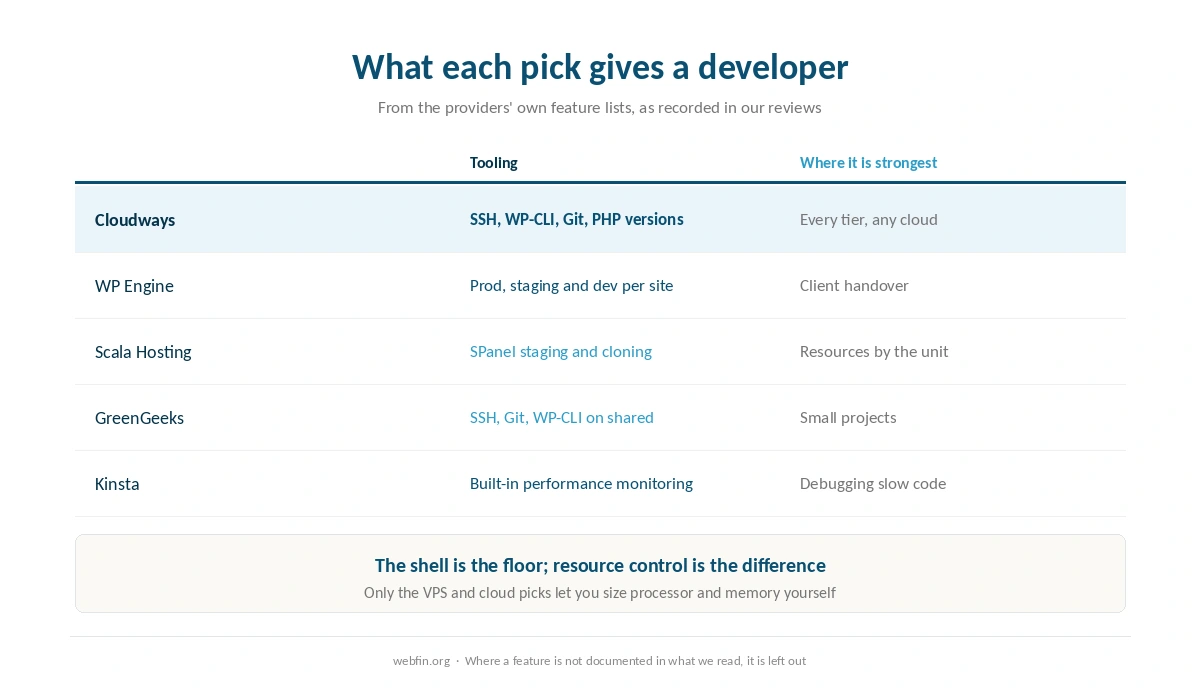
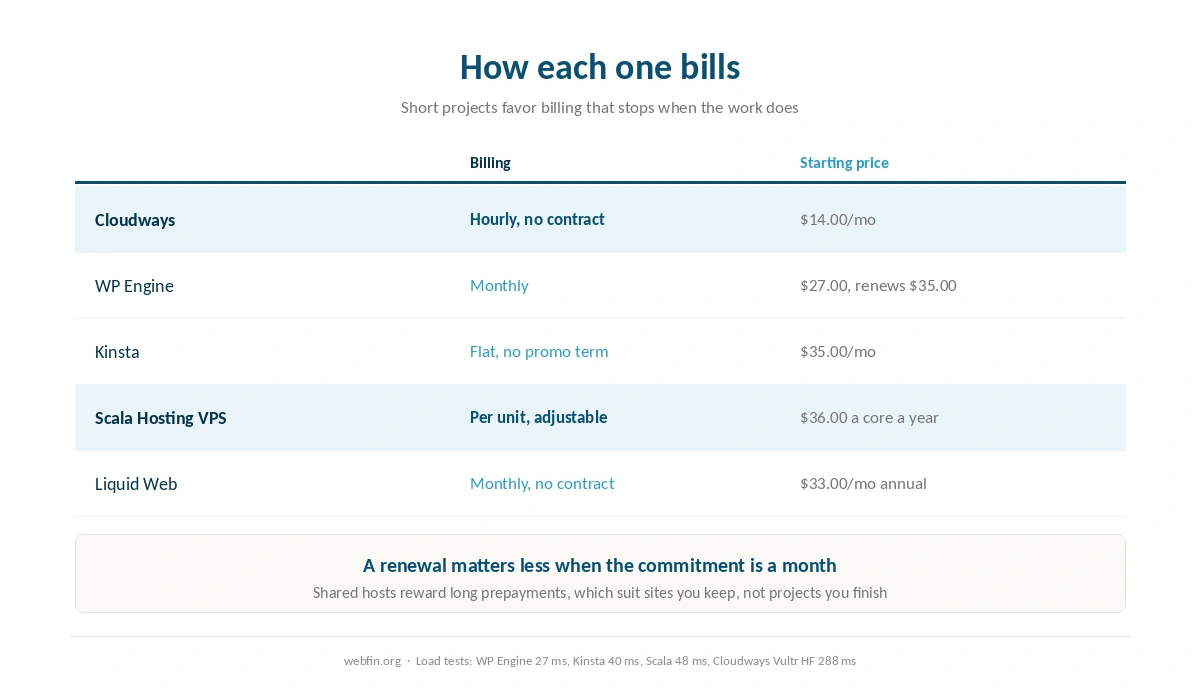
Cloudways ships staging, SSH, WP-CLI, Git deployment and PHP version selection at every tier, and launching a server takes minutes. It sits on your choice of cloud provider, so a project with a data residency requirement can be placed deliberately. Plans start at $14.00 a month with no promotional term, billed hourly.
Strengths. Everything a developer expects, on the cheapest tier. Stop the server and the bill stops. Uptime held between 99.996% and 99.999% across five plans in the benchmark window.
Weaknesses. Under load it is weaker than the managed picks: the Vultr High Frequency plan served the load test at 288 ms with a 1.7% error rate. Phone support is a paid add-on.
Choose it if you want a server you control without running one. Skip it if traffic spikes are the whole problem. Our Cloudways review covers each cloud.
WP Engine: Built for Build, Review, Hand Over
WP Engine gives every site a production, staging and development environment, and none of them count against the site limit. Installs transfer between accounts, so handing a finished site to a client is a supported operation. It served the load test at 27 ms with no errors, and its edge network answers in 65 ms globally.
Strengths. The cleanest environment workflow in this guide. The strongest load result we can cite. Monthly billing.
Weaknesses. Price, at $27.00 renewing to $35.00, which is 1.3× over 12 months. It hosts WordPress only, with no email and no cPanel. Startup has no phone line.
Choose it if you build WordPress sites for clients. Skip it if you work outside WordPress. Our WP Engine review prices the tiers.
Scala Hosting: Resources by the Unit
Scala’s VPS prices a processor core at $36.00 a year and a gigabyte of memory at $12.00, adjustable whenever you need them. Its own SPanel handles domains, databases, SSL, daily backups, WordPress staging and cloning, so there is no per-account cPanel license in the price. The shared plan served the load test at 48 ms with no errors and scores 8.8 of 10 on hardware.
Strengths. The most precise resource control in this guide. Strong measured hardware. Pro-rated refunds of unused term after the first 30 days.
Weaknesses. SPanel is proprietary, so your skills and scripts do not carry to other hosts. No phone line. Ownership is not documented in anything we read.
Choose it if you want to size the server yourself. Skip it if you depend on cPanel conventions. Our guide to moving from shared to VPS covers the move itself.
GreenGeeks: Developer Tools on a Shared Budget
GreenGeeks includes SSH, Git and WP-CLI alongside cPanel on its shared plans, which is more than the price tier suggests. It served the load test at 26 ms with no errors. For side projects, prototypes and personal sites, that is a lot of capability for a shared plan.
Strengths. Command-line tools without a VPS. A standard panel, so accounts export cleanly. Strong load handling.
Weaknesses. Hardware scores 5.0 of 10, which limits heavy uncached work. The Lite renewal rose to $13.95 this year, and sources disagree on which term its $2.95 intro needs.
Choose it if you want a cheap place for small projects with a shell. Skip it if you need dedicated resources. Our GreenGeeks review covers the renewal change.
Kinsta: One Dashboard, One Container per Site
Kinsta puts staging, DNS, analytics, cache control, error logs and PHP settings in one dashboard, and includes application performance monitoring that is normally a paid tool. Each site runs in its own container. It served the load test at 40 ms with every request answered, and Starter costs $35.00 a month flat.
Strengths. Built-in performance monitoring for debugging slow code. Isolation between sites. A flat price with no promotional term.
Weaknesses. WordPress only, no telephone line at any tier, and a per-site price that adds up across many projects.
Choose it if you debug performance for a living. Skip it if you run many small sites. Our Kinsta review has the scoring.
Root Access and Full Servers
Everything above is managed to some degree, which is what most developers want. If you need root and a machine that belongs to you, a managed VPS or dedicated server is the next step. Liquid Web sells managed servers with dedicated resources from $33.00 a month on annual billing, bills monthly with no contract, and commits to answering support within 59 seconds.
That route trades convenience for control. You decide the stack, and you own the consequences of that decision. Our Liquid Web review covers the range, and the benchmark project we cite does not test servers, so there is no load figure to compare there.
What to Check Before You Commit
Which tier carries the shell. Several budget hosts advertise SSH and then limit it to higher plans. Read the feature row for the tier you are buying, not the marketing headline.
What a staging push does. On most one-click tools, pushing staging to production replaces the live database, so orders and form entries recorded in between can vanish. Know whether your host offers a files-only push before the first release.
How you leave. A cPanel account exports in a standard format. A proprietary panel or a platform-specific layout means rebuilding elsewhere, which is a cost that arrives only when you want to go. Portability is worth weighing on day one, when it is cheap to choose.
Who answers when a deploy breaks. Developer-focused hosts often skip the phone and rely on chat and tickets. For most engineers that is fine, and a written thread is easier to act on. For a client who expects to call someone, it is not.
Four Kinds of Developer, Four Answers
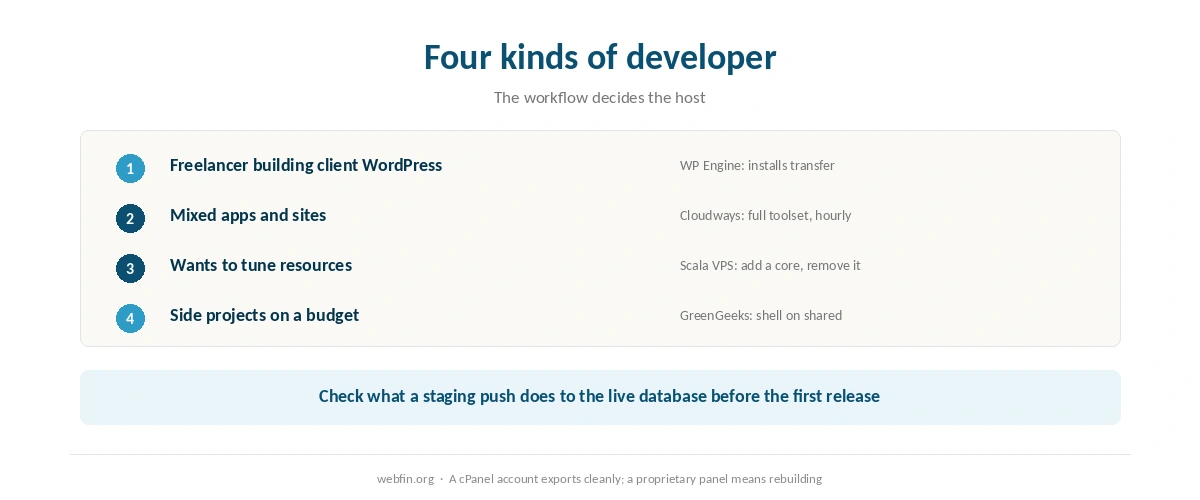
Freelancer building client WordPress sites. WP Engine, for three environments per site and installs that transfer to the client. Our roundup of hosting for agencies covers the portfolio case.
Developer running mixed apps and sites. Cloudways, for a real server with the full toolset and hourly billing.
Someone who wants to tune resources. Scala Hosting VPS, adding a core for a launch and removing it after.
Side projects on a small budget. GreenGeeks, for SSH, Git and WP-CLI on a shared plan.
How We Research
We run no tests. Tooling comes from the providers’ own feature lists as recorded in our reviews, and load, uptime and hardware figures come from Hostingstep’s 2026 benchmarks with their windows. Prices come from the providers’ own pages, read on 20 September 2026.
Where a feature is not documented in what we read, we leave it out rather than assume it. The criteria behind our scores are on our about page, and our guide to setting up a staging site covers the workflow every pick here supports.
Developer Hosting FAQ
Cloudways ships SSH, WP-CLI, Git deployment, PHP version selection and staging on every tier. WP Engine adds a separate development environment per site. GreenGeeks includes SSH, Git and WP-CLI even on shared plans.
Not always. Managed platforms give you a shell, Git and staging without running a server. A VPS makes sense when you need to size resources or install software a managed host does not allow. Scala prices a core at $36.00 a year.
Cloudways, which bills hourly and stops when you stop the server. WP Engine and Liquid Web bill monthly with no contract. Shared hosts usually reward long prepayments, which suits a site you keep rather than a project you finish.
On some plans. GreenGeeks includes SSH, Git and WP-CLI on shared hosting, alongside cPanel. Check the plan page before buying, because several budget hosts restrict shell access to higher tiers or leave it out.
In the 2026 benchmarks WP Engine served the load test at 27 ms, Kinsta at 40 ms and Scala at 48 ms, all without errors. Cloudways on Vultr High Frequency answered at 288 ms with a 1.7% error rate.
The Verdict
Cloudways is the default for developers, because it gives the full toolset on the cheapest tier and bills in a way that matches how projects start and end. WP Engine is the pick for WordPress client work, and Scala Hosting for anyone who wants to control resources precisely. Our page on Cloudflare free against paid covers what the tiers change for an ordinary site.
Tooling has become common enough that it no longer decides much by itself. What does is resource control, a real staging environment and a bill that stops when the project does. Weigh those first, and read the load result before trusting any host with a launch; our roundup of hosting for high traffic ranks by it.