Disclosure: WebFin is reader-supported. If you buy hosting through links on this page, we may earn a commission at no extra cost to you. Commissions vary between providers and our ratings do not — here’s our full disclosure.
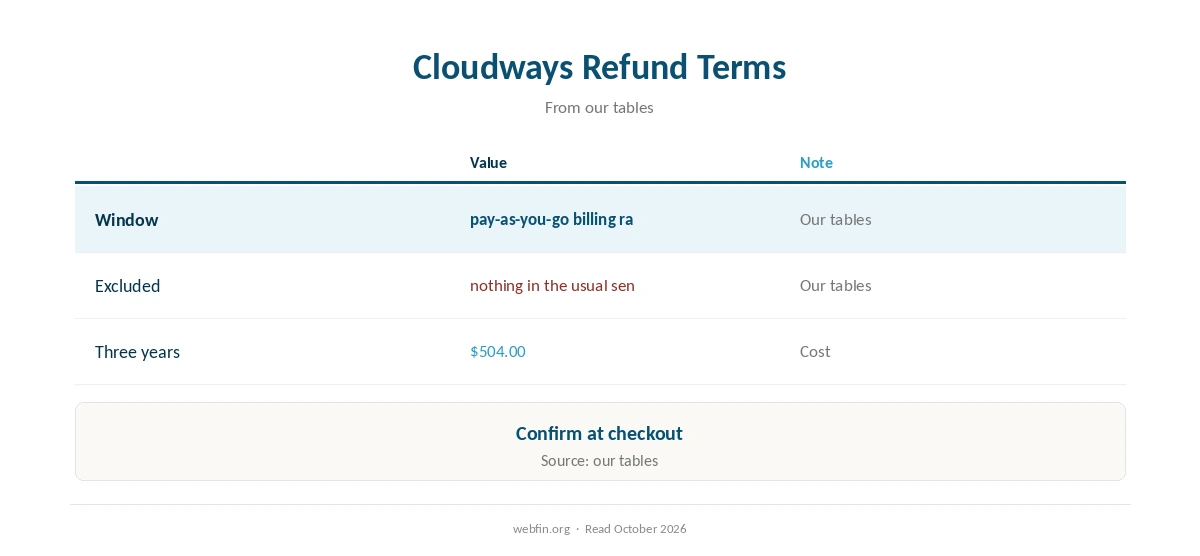
The Cloudways refund policy comes down to pay-as-you-go billing rather than a refund window, according to our tables. So there is no classic money-back window to track.
In other words, you pay only for the hours a server runs, so there is little to refund. So this page explains the terms, the cancellation steps and the rivals worth weighing. Ownership: DigitalOcean, since 2022.
Cloudways Refund Policy: The Short Answer
In short, the Cloudways refund policy works through pay-as-you-go billing rather than a refund window, so the cost of leaving is whatever period you have already paid. In any case, save a copy of the site and keep the support reply.
What the Cloudways Refund Policy Covers
| Point | Cloudways | Source |
|---|---|---|
| Refund window | Pay-as-you-go billing rather than a refund window | Our tables |
| Excluded | Nothing in the usual sense, since you stop a server and billing stops | Our tables |
| Support channels | Chat and tickets around the clock, with phone as a paid add-on | Published channels, 2026 |
| Three-year cost | $504.00 over three years at $14.00 a month | Our tables |
Add-ons such as email bill separately, as Cloudways’ own FAQ shows.
Free Trial or Refund Window?
Cloudways bills by the hour, so a short test costs only the hours a server runs. In practice, therefore, set a reminder before the next billing date.
Alternatively, our guide to free web hosting covers hosts you can try without paying.
How to Use the Cloudways Refund Policy
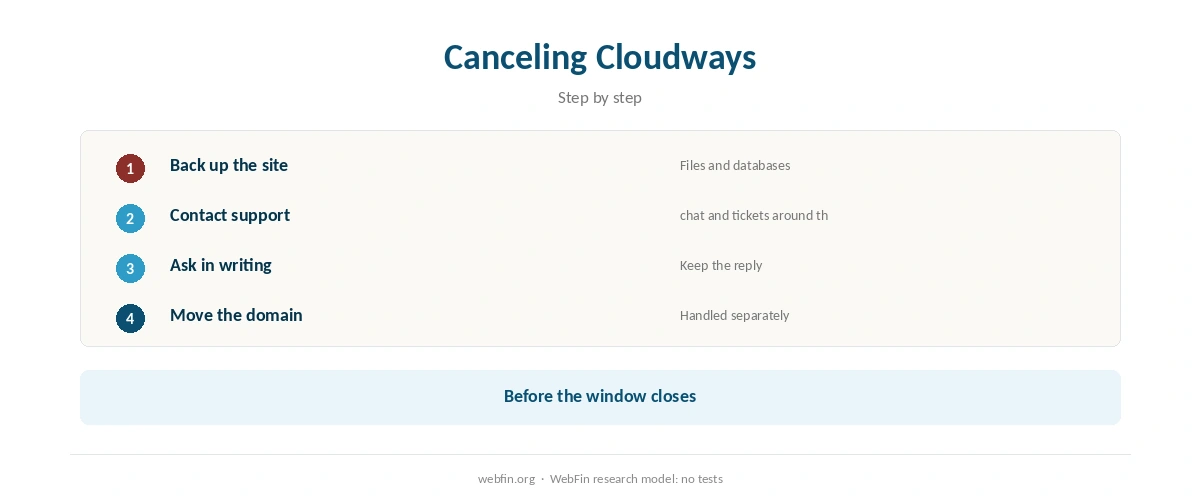
Before anything else, take a full backup, as our guide to backups explains, since cancellation may wipe the account. After that, open a request through chat and tickets around the clock, with phone as a paid add-on.
In addition, keep a written record of the request and the reply. Lastly, transfer any domain separately, because registration fees rarely come back, as our domain transfer guide explains.
| Host | Refund window | What's excluded |
|---|---|---|
| DreamHost | 97 days by four sources, 30 by another | Disputed; confirm at checkout |
| InMotion | 90 days on 6-month terms and longer | 30 days monthly, VPS and reseller; no monthly billing on shared |
| ChemiCloud | 45 days on shared, WordPress and reseller; 7 days on VPS | Renewals; first-time accounts only; the clock starts at activation (ChemiCloud refund policy) |
| HostGator | 45 days, all plans | Domains and add-ons |
| Hostinger | 30 days, including renewals of hosting and email (not crypto payments) | Domain renewals and GPU; new domains within 96 hours only; 180-day cooldown after a VPS refund (Hostinger support, 2026) |
| SiteGround | 30 days on shared, 14 on cloud; renewals within 30 days of payment | Domains and third-party services; monthly plans reported excluded |
| Bluehost | 30 days | Add-ons, domains and professional services; $15.99 deducted for the free domain |
| Scala Hosting | 30 days, new clients, web and reseller hosting | Domains and licenses; no refund after 30 days (Scala refund policy) |
| Namecheap | 30 days; EasyWP adds a 30-day trial with no card | Domains |
| InterServer | 30 days | Domains |
| GreenGeeks | 30 days | Domains and add-ons; no pro-rated refund after 30 days (founder, on whtop) |
| IONOS | 30 days | Domains |
| Rocket.net | 30 days | Domains |
| GoDaddy | 30 days | Domains and some services |
| Kinsta | 30 days | Domains |
| WP Engine | Monthly billing; cancel before the next cycle | Not a refund window in the usual sense |
| Liquid Web | Monthly billing, no contract | Not a refund window in the usual sense |
| Cloudways | Pay-as-you-go; stop and the billing stops | Not a refund window in the usual sense |
| A2 Hosting | 30 days on the first term (whtop, 2026); older reviews describe an anytime guarantee | Confirm in writing; now hosting.com |
| Hostwinds | 72 hours, by several sources | HostScore, TechRadar, company replies on Trustpilot; WebsitePlanet reports 48 hours to 30 days by term |

Refund Windows Elsewhere
For comparison, our tables list Kinsta at 30 days and WP Engine at monthly billing. Meanwhile, they list Liquid Web at monthly billing. In short, a longer window matters most when you prepay several years.
Our guide to canceling hosting, likewise, lists each host’s refund rules.
For the extras that sit outside most guarantees, see our page on hidden hosting fees. Meanwhile, our renewal price guide sets the renewal against rivals.
What Staying With Cloudways Costs
Staying costs from $14.00 a month, flat, with no promotional term. Hostingstep recorded 99.996% to 99.999% uptime across five plans, although a Vultr HF plan showed 1.7% errors under load. In practice, resizing the server often solves the problem that prompts a cancellation.
Before You Leave
Ask first whether a cheaper term would solve the problem. Our Cloudways pricing guide and Cloudways coupon guide show what the plan really costs.
If the decision is final, migrate before you cancel, following our guide on migrating web hosting. Our shared hosting picks, meanwhile, rank the alternatives.
How We Research
We run no tests. Refund terms, support channels, prices and ownership come from our TablePress tables, built from Cloudways’ own pages and named third-party sources, read in October 2026.
Refund rules change, so confirm them at checkout. The criteria behind our scores are on our about page.
Cloudways Refund Policy FAQ
Pay-as-you-go billing rather than a refund window, according to our tables.
There is no classic window, so in practice you lose only the period already paid.
Cloudways bills by the hour, so a short test costs only the hours a server runs.
Contact support through chat and tickets around the clock, with phone as a paid add-on, and keep the reply in writing.
DigitalOcean, since 2022.
The Verdict
Overall, the Cloudways refund policy gives you pay-as-you-go billing rather than a refund window. In other words, you pay only for the hours a server runs, so there is little to refund.
So, before relying on the Cloudways refund policy, save a backup, get the cancellation in writing and transfer domains separately.