
Disclosure: WebFin is reader-supported. If you buy hosting through links on this page, we may earn a commission at no extra cost to you. Commissions vary between providers and our ratings do not — here’s our full disclosure.
To transfer a domain, unlock it at your current registrar, request the transfer authorization code, start the transfer at the new registrar with that code, and approve it. The five-day release window means it finishes within about a week. Two things have changed recently. The code now has a formal name, the Transfer Authorization Code. And ICANN’s revised policy cuts the lock after a new registration from 60 days to 30. Registrars are rolling it out during 2026. The step that breaks sites is neither of those. It is DNS, if your records lived at the registrar you are leaving.
How to Transfer a Domain: The Short Answer
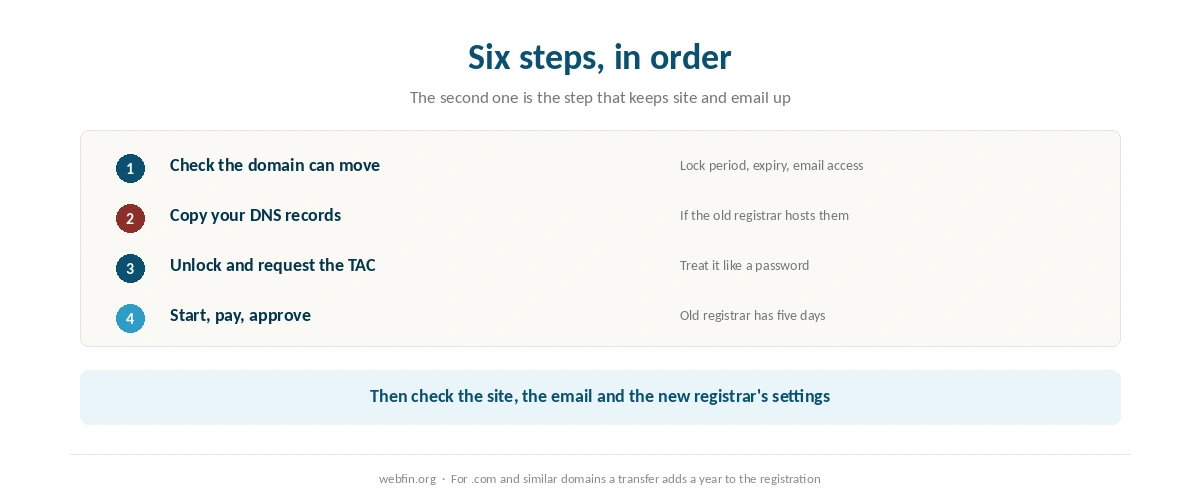
Check that the domain is not newly registered or recently transferred. Copy your DNS records if the old registrar hosts them. Unlock the domain, request the Transfer Authorization Code, and start the transfer at the new registrar. Approve the confirmation email, then wait up to five days for the old registrar to release it.
Transfer or Just Point?
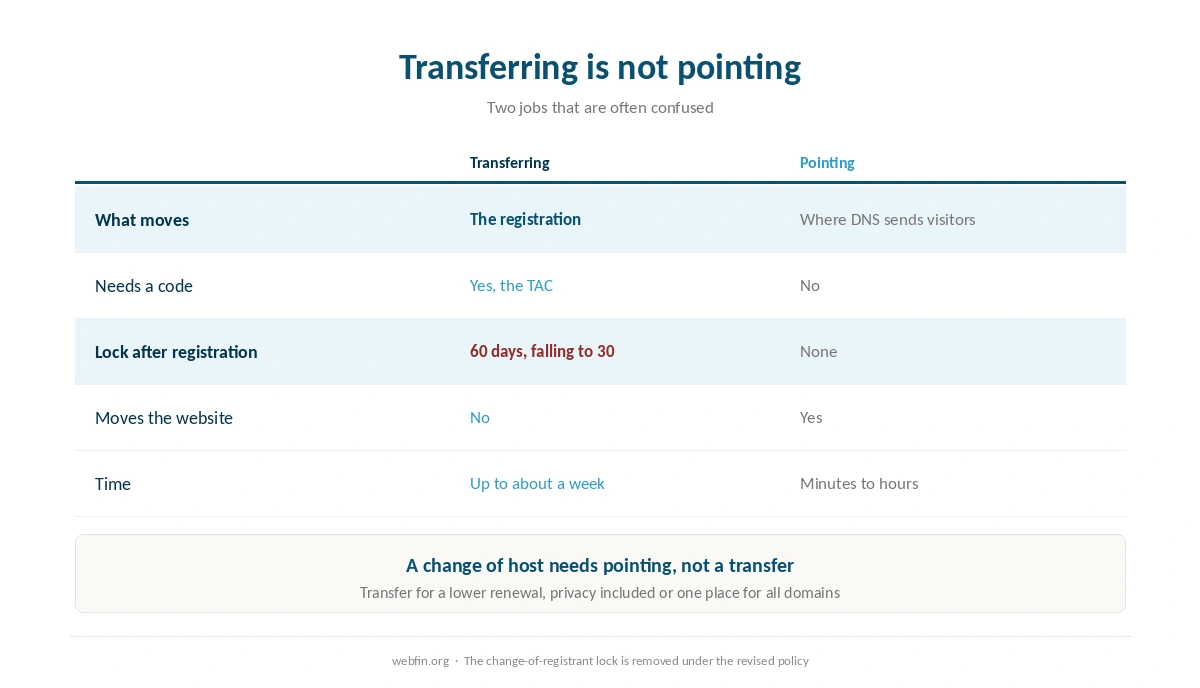
Transferring moves the registration: who you pay each year for the name. Pointing moves DNS: which server answers for the site. You can change hosts without transferring anything, and a transfer does not move your website.
So transfer when you want a different registrar, for example for a lower renewal, privacy or to keep all your domains in one place. Our guide to pointing a domain to a new host covers the other job, which is the one a change of host needs.
Step 1: Check the Domain Can Move
Registrars block transfers for a period after a domain is registered or transferred in, as an anti-fraud measure. Under the long-standing ICANN policy that period is 60 days. ICANN’s revised transfer policy, approved in March 2025, shortens it to 30 days and makes it mandatory. Registrar guidance this year describes it rolling out across registrars during 2026.
The same revision removes the lock that used to follow a change of registrant details, so editing your contact information will no longer freeze the domain. Because the rollout is staggered, check what your own registrar applies today. The domain must also not be expired, and you must be able to receive email at the address on the registration.
Step 2: Copy Your DNS Records
If your nameservers point at your web host or a separate DNS provider, the transfer does not touch them, and the site keeps working. If your DNS lives at the registrar you are leaving, it may stop when the domain moves.
So export or screenshot every record first: A, CNAME, MX, TXT and any verification records. Recreate them at the new registrar or your host before the transfer completes, or point the nameservers at a DNS provider that will stay. Email is the thing that breaks if you skip this, and our guide to setting up email on your domain lists the records that carry it.
Step 3: Unlock and Request the Code
At your current registrar, turn off the transfer lock, sometimes labeled registrar lock. Then request the Transfer Authorization Code, which older guides call the EPP or auth code. It is the same thing under a new name, and the revised policy tightens how it is issued and how long it stays valid.
Treat the code like a password. Anyone who holds it and can start a transfer can move your domain. Request it when you are ready to use it, not weeks in advance.
Step 4: Start the Transfer at the New Registrar
Enter the domain and the code at the registrar you are moving to, and pay the transfer fee. For .com and similar domains, the transfer adds a year to the registration, which is what that fee buys, so you lose no time already paid for.
Compare the renewal price rather than the transfer price. A cheap transfer followed by a high renewal is the same trap as a cheap hosting promotion, which our page on hosting renewal prices tracks for hosting. Our page on hidden hosting fees covers the charges that follow a domain.
Step 5: Approve and Wait
Watch for confirmation emails and approve the transfer where asked. Once the new registrar submits it, the old registrar has five calendar days to approve or deny it. If it does nothing, the transfer proceeds automatically at the end of that window.
Some registrars let you approve the release from your account to speed things up. Either way, expect about a week at most. A transfer that has not completed after that deserves a message to both registrars.
Step 6: Check Everything Afterward
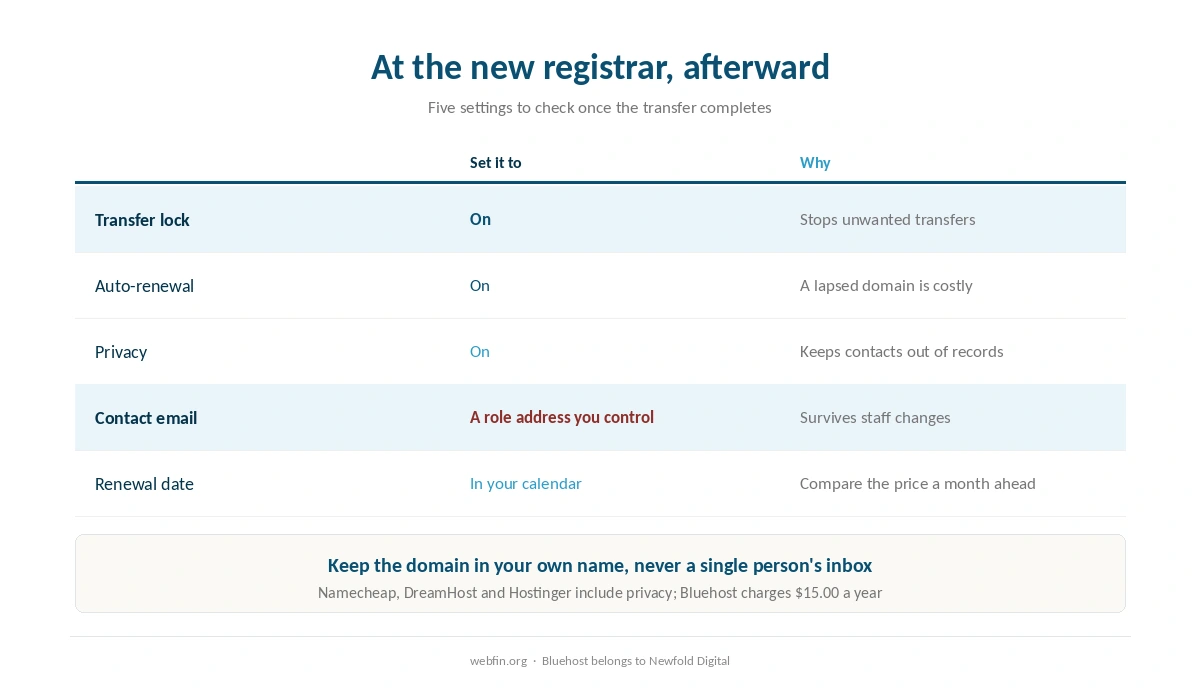
Visit the site and send yourself an email to confirm DNS survived. Then, at the new registrar, turn the transfer lock back on, switch on auto-renewal, confirm privacy is active, and check the contact details. Put the renewal date in your calendar a month ahead. Our page on domain renewal prices covers how to compare the structure rather than the headline.
If the domain belongs to an organization, register it in the organization’s name with a shared role address, as our list of hosting for nonprofits recommends. A domain registered to one person’s inbox leaves with that person.
Moving a Domain Away From a Host
A host registers a domain bundled free with a hosting plan, and moving hosts later is simpler if the domain sits at a registrar instead. Some hosts also deduct the cost of a free domain from a refund: Bluehost, a Newfold Digital brand, keeps $15.99 if you cancel early, as our Bluehost review records.
Privacy is the other reason to move. Bluehost charges $15.00 a year for it, while Namecheap and DreamHost include it for the life of the domain, as our DreamHost review notes, and Hostinger includes it too, as our Hostinger review records. Our guide to canceling hosting and getting a refund covers the order that keeps the domain safe when you leave a host.
| Host | Charge | Cost per year |
|---|---|---|
| Bluehost | Premium SSL, single domain | $89.88 (optional; Let's Encrypt is free) |
| Bluehost | Domain privacy | $15.00 (free year one on Business and up) |
| Bluehost | SiteLock Essentials | $95.88 |
| Bluehost | SiteLock Prevent | $239.88 |
| Bluehost | Yoast SEO Premium | $99.99 |
| Bluehost | Early cancellation, free domain | $15.99 one-off, deducted from refund |
| GoDaddy | SSL on Economy after year one | $119.99; other tiers include it for the plan's life |
| GoDaddy | Pre-checked extras at checkout | $345.39 counted by one review, unverified |
| HostGator | CodeGuard daily backups | $35.88 (weekly copies are a courtesy, not guaranteed) |
| HostGator | SiteLock, pre-selected at checkout | $23.88 |
| HostGator | Dedicated IP | $59.40 |
| HostGator | Professional migration | $149.99 one-off |
| Hostwinds | Standard SSL | $75.00 (free AutoSSL on shared via cPanel) |
| Hostwinds | Wildcard SSL | $150.00 |
| Scala Hosting | Processor core, added or removed anytime | $36.00 per core |
| Scala Hosting | Memory, added or removed anytime | $12.00 per gigabyte |
| Hostinger | WHOIS privacy | Included |
| Hostinger | Domain renewal, .com | $15–$20, no first-party figure published |
| DreamHost | WHOIS privacy | Included for the life of the domain |
| Namecheap | Domain privacy | Included for the life of the domain |
| InterServer | Everything on the one plan | Included; no tiers to upgrade to |
What to Do If It Does Not Work
The code is rejected. Request a fresh one, since codes can expire, and copy it without spaces.
The registrar says the domain is locked. Either the transfer lock is still on, or the domain is inside its post-registration or post-transfer period. The second one lifts on its own.
The transfer is still pending after a week. Check for an unapproved confirmation email, then contact both registrars.
The site or email stopped. DNS lived at the old registrar. Recreate the records wherever your nameservers now point. Our guide to fixing a website that is down starts with that check.
How We Research
We are not a registrar and we run no tests. The lock periods and the Transfer Authorization Code come from reporting on ICANN’s revised transfer policy, approved at its March 2025 meeting. Registrar guidance published this year describes its rollout during 2026. The five-day window and the one-year extension come from registrar documentation.
Privacy and domain charges come from the providers’ own pages, read on 20 September 2026. The criteria behind our scores are on our about page, and our Namecheap review covers one registrar that also hosts.
Domain Transfer FAQ
Up to about a week. Once the new registrar submits the transfer, the old registrar has five calendar days to approve or deny it. If it does nothing, the transfer proceeds automatically.
It may be inside the lock that follows a new registration or a transfer. That lock is 60 days under the long-standing policy and 30 days under ICANN’s revised policy, which registrars are rolling out during 2026. Check which applies at your registrar.
The code that proves you may move the domain, known in older guides as the EPP or auth code. Your current registrar issues it, and the new one asks for it. Treat it like a password.
Not if your DNS is hosted elsewhere, because a transfer changes the registrar, not the nameservers. If your DNS lives at the old registrar, copy the records first and recreate them before the transfer completes.
No. For .com and similar domains, the transfer adds a year to the registration, which is what the transfer fee pays for. Compare the renewal price at the new registrar as well as the transfer price.
The Verdict
Transferring a domain is a short job with one real risk. The steps are routine: check the lock, unlock, get the code, start the transfer and approve it. The risk is DNS that lived at the old registrar, so copy every record before anything moves.
Do it for a reason, such as a lower renewal, privacy included or all your domains in one place. Keep the domain in your own name at a registrar rather than bundled with a host. Every future host change then becomes a DNS edit, as our guide to migrating web hosting describes.