
Disclosure: WebFin is reader-supported. If you buy hosting through links on this page, we may earn a commission at no extra cost to you. Commissions vary between providers and our ratings do not — here’s our full disclosure.
A traffic spike is either expected or it is not, and the two need different responses. For a launch or a newsletter you can prepare days ahead: cache everything cacheable, buy capacity for the week, and rehearse. For a post that spreads on its own you have about ten minutes, and the useful moves are all subtractive: cache more, disable more, ask for more. Either way the thing that decides the outcome is how many requests the plan can serve at once, not how fast it is on a quiet afternoon.
How to Handle a Traffic Spike: The Short Answer
If you know it is coming: turn on full page caching, put a content network in front, buy the bigger server or tier the day before, and test at the concurrency you expect on a staging copy. If it has already started: cache aggressively, disable search and other heavy features, pause non-essential scheduled tasks, and ask support to raise your limits. Never clear the cache during a spike.
What Actually Breaks
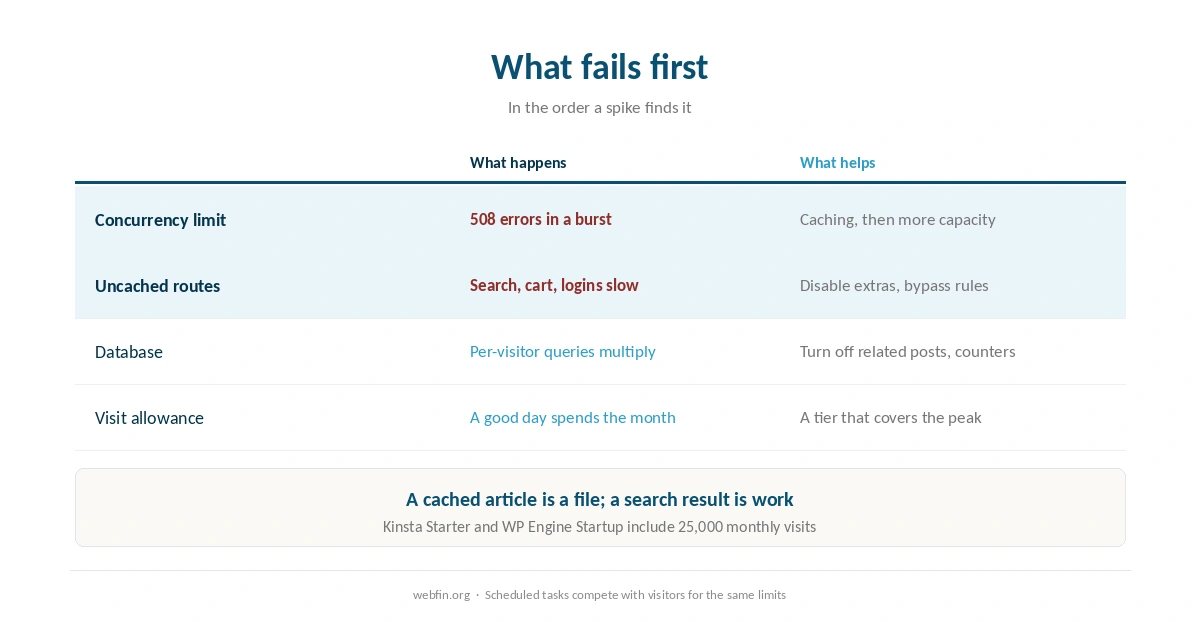
The plan’s concurrency limit. Shared accounts cap the requests they handle at once, counted as entry processes, and the visitor sees a 508 error when that cap is reached. Our guide to checking whether your host is throttling you shows where those faults appear.
Uncached pages. A cached article is a file; a search result, a cart or a logged-in page is work. Under load, the uncached routes fail first.
The database. Related posts, live counters and on-the-fly search all query per visitor, and a spike multiplies those queries rather than the page views.
A visit allowance. Managed plans that price by visits count the spike too: Kinsta Starter and WP Engine Startup each include 25,000 monthly visits, which a good day can spend.
| Host | Measurement | Source and date |
|---|---|---|
| WP Engine | Global TTFB 65 ms, 1st of 34 hosts | Hostingstep, 2025 ranking, 40 locations |
| WP Engine | US TTFB 365 ms across 22 locations | Hostingstep, 2025 ranking |
| WP Engine | TTFB 355 ms, 349,920 checks | Hostingstep, Oct 2025 – May 2026 |
| WP Engine | Uptime 99.976%, 10th of 14 managed hosts | Study of 14 managed hosts, 2026 |
| WP Engine | Load 27 ms at 0% errors | Hostingstep, 2026 benchmarks |
| Rocket.net | Cached TTFB 85 ms globally | 12-month test, Mar 2025 – Mar 2026 |
| Rocket.net | Origin TTFB 310 ms; checkout bypasses cache | Same 12-month test |
| Rocket.net | Uptime 99.97%, seven outages in the window | Hostingstep, Oct 2025 – May 2026 |
| Rocket.net | Hardware score fell 8.5 → 7.5; not recommended | Hostingstep, 2026, tracked since Oct 2020 |
| Hostinger Business | Global TTFB 223 ms, 5th of 34 hosts | Hostingstep, 2026 |
| Hostinger Premium | Global TTFB 495 ms, 28th of 34; no CDN | Hostingstep, 2026 |
| Hostinger | TTFB 707 ms; server response 246 ms | Cybernews, June 2026 |
| Hostinger | Uptime 99.99%, 33 min down in 2025 | Hostingstep, continuous since 2021 |
| Hostinger | Uptime 99.93%, 6-month window | HostPro Reviews, 2026 |
| Hostinger | LCP 0.607 s, 2nd of 15 hosts | TechRadar, 10-week window, 2026 |
| Bluehost | Hardware score 9.6 of 10 | Hostingstep, 2026 |
| Bluehost | Load 41 ms at 0% errors after the Oracle move | Hostingstep changelog, 9 Jul 2026 |
| Bluehost | Response 411 ms; uptime 99.99% across 9 outages | Hostingstep, Nov 2025 – Aug 2026 |
| Bluehost | Global TTFB 224 ms across 40 locations, cached | Hostingstep Bluehost review, Jul 2026 |
| HostGator | Global TTFB 1.23 s; uptime 99.68%; 762 ms at 500 users | Hostingstep HostGator review, 2026 |
| HostGator | Hardware joint-highest in the field after the Oracle move | Hostingstep, 1 Sep 2026 update |
| ChemiCloud | US TTFB 531 ms; global 460 ms | Hostingstep, Oct 2025 – May 2026 |
| ChemiCloud | Load 1,068 ms at a 4.2% error rate | Hostingstep, same window |
| ChemiCloud | Uptime 99.76%; overall 6.1 of 10, degrading | Hostingstep, tracked since 2021 |
| GoDaddy shared | TTFB 751 ms; load test did not complete | Hostingstep, Nov 2025 – Jun 2026 |
| GoDaddy shared | Uptime 99.76% | Hostingstep, Nov 2025 – Jun 2026 |
| GoDaddy Managed WordPress | TTFB 344 ms; hardware 3.8 of 10 | Hostingstep, 2026 |
| GreenGeeks | TTFB 395 ms North America, 447 ms Europe | Long-term independent testing, 2026 |
| GreenGeeks | TTFB 580–610 ms Asia and Australia | Same testing window |
| GreenGeeks | Load 26 ms at 0% errors; WPBench 5.0 of 10 | Hostingstep, 2026 |
| GreenGeeks | 25 outages in the window; no integrated CDN found | Hostingstep, 2026 |
| Kinsta | Origin TTFB 525 ms; edge figures differ | Hostingstep, 2026 |
| Kinsta | Load 40 ms at 0% errors; WPBench 8.8 of 10 | Hostingstep, 2026 reviews |
| DreamHost | TTFB 450–500 ms band | Hostingstep, 2026 benchmarks |
| Scala Hosting | Uptime 99.97% across twelve months | Live site, 40,000 monthly visitors, UptimeRobot |
| Scala Hosting | 29 ms at the 95th percentile, 50 users | k6 load test, 2026 |
| InterServer | Uptime 99.98% across eighteen months | Six production sites, UptimeRobot |
| InterServer | Load under 700 ms; under 1.5 s by another source | Two 2026 reviews |
| A2 Hosting | TTFB 150–198 ms | 2026 studies; LiteSpeed on Turbo tiers |
| IONOS | Global TTFB 480 ms; WPBench 7.2 of 10 | Hostingstep, 2026 benchmarks |
| IONOS | Uptime 99.99%; load test failed at 65.4% errors | Hostingstep, 2026 benchmarks |
| Namecheap | TTFB 461 ms; global 448 ms; WPBench 5.0 | Hostingstep, Q4 2025; monitoring paused 30 Jun 2026 |
| InMotion | TTFB 300–500 ms shared | Published measurement, 2026 |
| InMotion | Uptime 99.97–99.99%; one account near 99.5% | Several 2026 sources |
| Hostwinds | No independent measurement found | 99.9999% is the company's own claim |
| Liquid Web | Not covered by the benchmarks we cite | VPS and dedicated are outside their scope |
| SiteGround | TTFB 632 ms; 22nd of 34 hosts | Hostingstep, 2026 benchmarks |
| SiteGround | Uptime 99.96% in 2025; 193 min over 44 outages | Hostingstep, full year 2025 |
| SiteGround | WPBench 8.4 of 10; load 170 ms at 0% errors | Hostingstep, Oct 2025 – May 2026 |
| Scala Hosting | TTFB 465 ms; global 501 ms | Hostingstep, 2026 benchmarks |
| Scala Hosting | WPBench 8.8 of 10; load 48 ms at 0% errors | Hostingstep, 2026 benchmarks |
| Scala Hosting | Uptime 99.98% across the year | Hostingstep, 2026 benchmarks |
| Cloudways | Vultr HF: load 288 ms at 1.7% errors; WPBench 7.6 | Hostingstep Cloudways review, 2026 |
| Cloudways | Uptime 99.996% to 99.999% across five plans | Hostingstep, Oct 2025 – May 2026 |
If You Know It Is Coming
Cache everything you can. Full page caching, and a content network in front of it. Our guide to setting up a CDN covers the rules that keep checkout and member pages out of the cache.
Buy the capacity the day before. On a host that bills by the hour, such as Cloudways, move to a larger server and shrink it afterward. On a host that prices by visits, move up a tier for the month.
Warm the cache. Load the pages the traffic will hit so the first visitor is not the one who builds them.
Rehearse on staging. Run the load test at the concurrency you expect, with the host’s permission, as our guide to testing your site speed properly describes.
Take a backup. The hour before a launch is the worst time to discover you have none.
If It Has Already Started
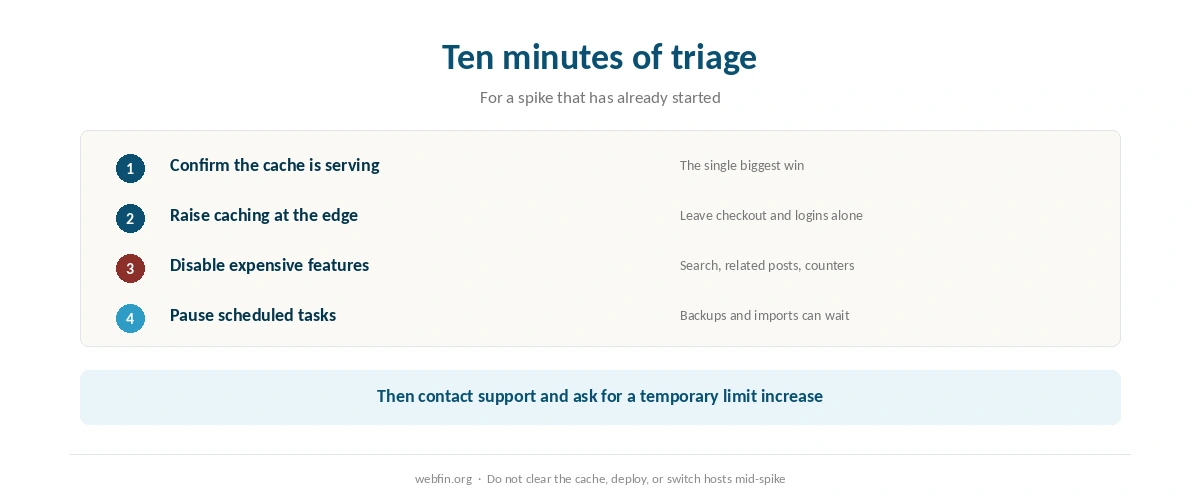
Minute one: check the cache. Confirm page caching is on and that the hot page is being served from it. This single step fixes more spikes than any other.
Minute two: raise the cache at the edge. If you use a content network, set it to cache the hot page more aggressively, leaving logged-in and checkout routes alone.
Minute three: disable the expensive features. Site search, related posts, live comment counts and anything that runs per visitor. A page that loads without them beats a page that does not load.
Minute five: pause scheduled tasks. Backups, imports and cron jobs compete with visitors for the same limits.
Minute ten: contact support. Ask for a temporary limit increase and say which page is being hit. Hosts can often do this quickly, and it is what the phone line is for.
What Not to Do
Do not clear the cache. It rebuilds under the worst possible conditions, and every visitor becomes a database query.
Do not deploy anything. A plugin update during a spike is two problems at once.
Do not change hosts mid-spike. DNS takes time to propagate, and half your visitors will be on the old server anyway. Our guide to migrating web hosting covers doing it calmly afterward.
Do not panic-optimize images. Regenerating thumbnails is heavy work at exactly the wrong moment.
What the Benchmarks Say About Plans Under Load
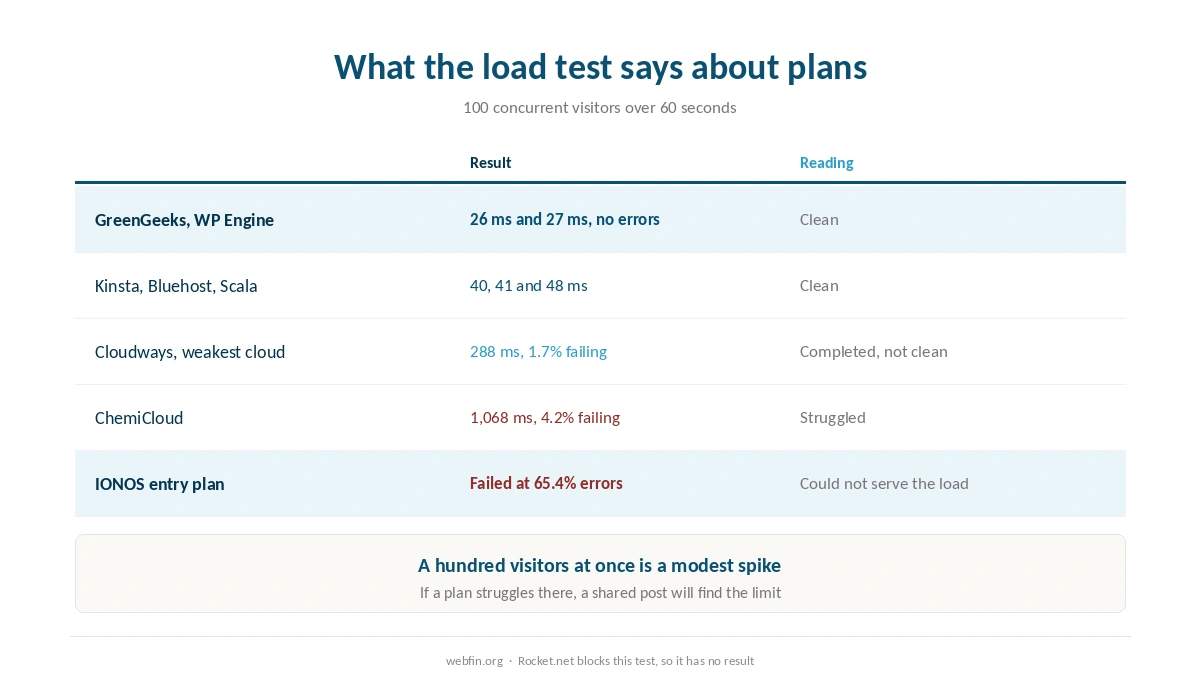
We run no tests, so these figures belong to Hostingstep. Its load test ramps to 100 concurrent visitors over 60 seconds, which is a modest spike. GreenGeeks finished at 26 ms and WP Engine at 27 ms without errors, and Kinsta at 40 ms with every request answered. Bluehost, a Newfold Digital brand, finished at 41 ms and Scala at 48 ms.
At the other end, ChemiCloud answered at 1,068 ms with 4.2% of requests failing, and the IONOS entry plan failed the test with a 65.4% error rate. Cloudways completed it at 288 ms with 1.7% failing on its weakest cloud, and Rocket.net blocks the test entirely.
⚠️ A hundred concurrent visitors is not a large spike. If a plan struggles there, a shared post will find the limit. Our roundup of hosting for high traffic ranks hosts by this result.
Two Spikes, Two Stories
A newsletter to ten thousand subscribers. Predictable, concentrated in an hour, and aimed at one page. Cache that page, buy capacity for the day, and stagger the send if the tool allows.
A post picked up by a large site. Unpredictable, spread over hours, and often aimed at an old article. Cache aggressively, disable the extras, and let the content network carry the repeat visits.
A launch sits between the two: expected timing, unpredictable size. Our list of hosting for online courses covers launch day specifically, and our guide to setting up a staging site covers rehearsing it.
After It Passes
Read the logs before the memory fades. Note the peak concurrency, which pages took the traffic, what errored and for how long. Those numbers are what turn a scare into a plan.
Then decide about capacity. On hourly billing, shrink the server and keep the receipt as a record of what the spike cost. On a visit-priced plan, check whether the month has already used its allowance. Our page on what web hosting costs prices the tiers either way.
Design the Site for Its Best Day
The cheapest spike protection is a page that does not need the database. A static-looking article, cached at the edge, with comments loaded on demand and no live counters, survives traffic that breaks a heavier page on the same plan.
That is also why the uncached routes deserve the attention: carts, logins and search are where a spike lands hardest. Our list of hosting for ecommerce covers stores, and our list of hosting for membership sites covers logged-in traffic.
How We Research
This guide describes procedures rather than measurements, and it runs no tests. The load figures named here come from Hostingstep’s 2026 benchmarks and reviews, each with its window, and we mark where a plan failed or blocked the test.
Plan limits and visit allowances come from the providers’ own pages, read on 20 September 2026. The criteria behind our scores are on our about page, and our guide to reducing TTFB covers the everyday version of the same problem.
Traffic Spike FAQ
Check that page caching is on and that the busy page is being served from cache. That one step fixes more spikes than anything else, because a cached page is a file rather than a database query.
No. Clearing it forces every visitor to rebuild pages at the worst moment. Clear caches when traffic is quiet, not when it is high.
On a host that bills by the hour, such as Cloudways, yes: resize the server and shrink it afterward. Changing host entirely mid-spike is a bad idea, because DNS takes time and half your visitors stay on the old server.
The load test we cite ramps to 100 concurrent visitors over 60 seconds, which is modest. GreenGeeks, WP Engine, Kinsta, Bluehost and Scala completed it cleanly, while the IONOS entry plan failed with a 65.4% error rate.
Yes. Kinsta Starter and WP Engine Startup each include 25,000 monthly visits, and a good day can spend a month’s allowance. Hosts that price by server size have no allowance to exceed.
The Verdict
Prepare if you can, subtract if you cannot. Caching and a content network do most of the work in advance, and during an unexpected spike the fastest wins come from turning things off: search, related posts, scheduled jobs.
Then use the numbers afterward. A spike that broke your site at a hundred concurrent visitors tells you more about the plan than any marketing page, and the benchmarks say which hosts handle that load cleanly. Our guide to fixing a website that is down covers the case where the spike wins.