
Disclosure: WebFin is reader-supported. If you buy hosting through links on this page, we may earn a commission at no extra cost to you. Commissions vary between providers and our ratings do not — here’s our full disclosure.
Bluehost cPanel is still included on its shared plans, though the newer Account Manager hides it a little: you open it from the Hosting tab’s Quick Links, without a separate login, according to Bluehost’s own help center.
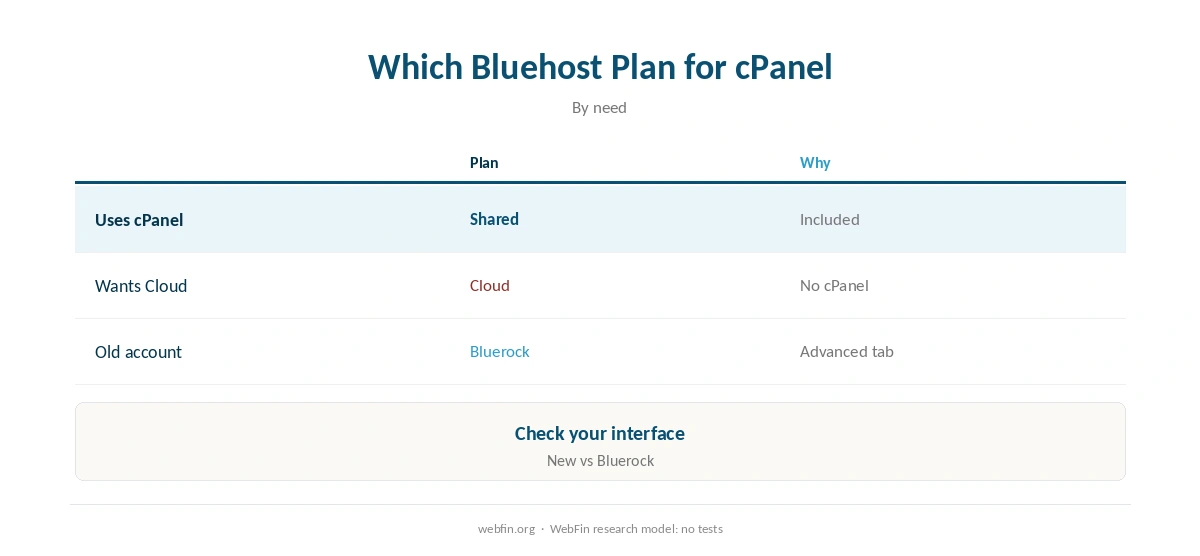
The exception is Bluehost Cloud, which does not include cPanel. Bluehost belongs to Newfold Digital.
Bluehost cPanel: The Short Answer
In short, log in to Bluehost, open the Hosting tab and click cPanel under Quick Links. If you are on Bluehost Cloud, you will not find it.
What Bluehost Gives You in cPanel
| Point | Bluehost | Source |
|---|---|---|
| Panel | cPanel on shared plans | Help center |
| Access | Hosting tab → Quick Links → cPanel | Help center |
| Direct URL | Your domain followed by /cpanel or :2083 | Help center |
| Bluehost Cloud | No cPanel | Help center |
| Installer | Softaculous inside cPanel | Help center |
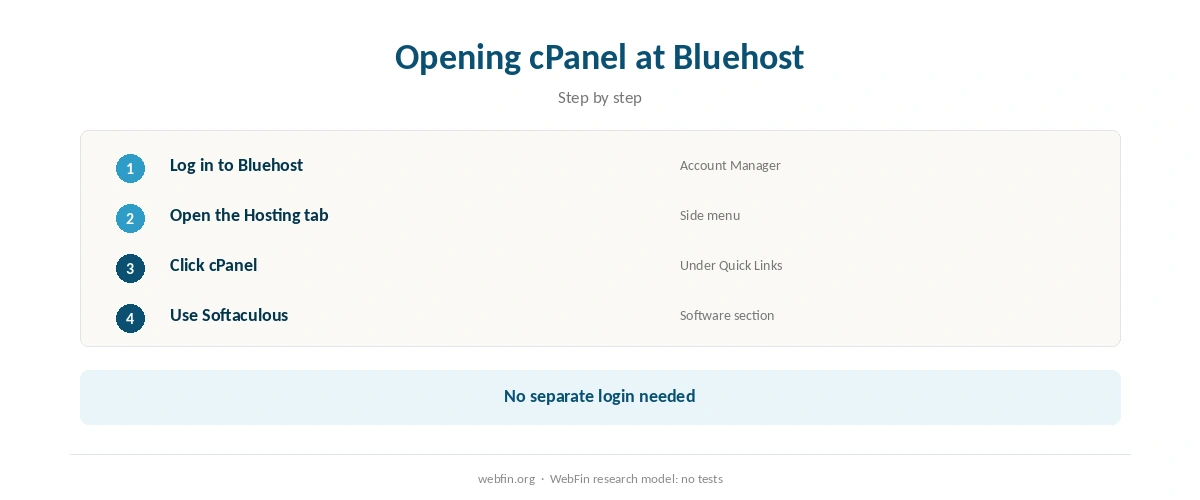
According to Bluehost’s cPanel access guide, you can open cPanel from the Hosting tab’s Quick Links or from the Websites tab’s Overview, and it opens in a new tab without a separate username or password. You can also reach it at your domain followed by /cpanel or :2083.
Older accounts on the Bluerock interface find cPanel under the Advanced tab instead, and Softaculous sits in cPanel’s Software section for one-click installs.
Reaching cPanel
You open cPanel from your Bluehost account dashboard; the host links to it from the hosting section. Many cPanel servers also answer at your domain followed by /cpanel, though the host’s dashboard is the safer route.
Once inside, the first jobs are the same anywhere: install the site, add email accounts and check backups. Our guide on how to make a website walks through the first site.
| Host and plan | How it builds | 36-month total |
|---|---|---|
| ChemiCloud Starter, 36-month term | 36 prepaid months at $2.49 | $89.64 |
| InterServer Standard | 36 months at $2.50, price locked | $90.00 |
| DreamHost Launch, 48-month term | 36 of 48 prepaid months at $2.89 | $104.04 |
| Namecheap Stellar, 24-month term | 24 at $1.98, then 12 at $4.88 | $106.08 |
| Hostinger Premium, 48-month term | 36 of 48 prepaid months at $2.99 | $107.64 |
| HostGator Hatchling, 36-month term | 36 months at $3.75, renewal not reached | $135.00 |
| HostGator Hatchling, with daily backups | 36 at $3.75, plus CodeGuard at $35.88 a year | $242.64 |
| Bluehost Starter, 36-month term | 36 months at $3.99, renewal not reached | $143.64 |
| GoDaddy Economy, 36-month term | 36 months at $5.99, renewal not reached | $215.64 |
| GoDaddy Economy, with SSL from year two | 36 at $5.99, plus $119.99 in years two and three | $455.62 |
| Hostwinds Basic, annual | 12 at $4.54, then 24 at $6.99 | $222.24 |
| SiteGround StartUp, 24-month term | 24 at $2.99, then 12 at $14.99 | $251.64 |
| DreamHost Launch, annual | 12 at $2.89, then 24 at $10.99 | $298.44 |
| Scala Hosting Mini, annual | 12 at $2.95, then 24 at $11.95 | $322.20 |
| Bluehost Starter, 12-month term | 12 at $3.99, then 24 at $11.99 | $335.64 |
| IONOS Plus, annual | 12 at $1.00, then 24 at $14.00 | $348.00 |
| GreenGeeks Lite, 36-month prepay | 36 months at $2.95 | $106.20 |
| GreenGeeks Lite, annual | 12 at $2.95, then 24 at $13.95 | $370.20 |
| SiteGround StartUp, 12-month term | 12 at $2.99, then 24 at $17.99 | $467.64 |
| Cloudways, from | 36 months at $14.00, flat | $504.00 |
| A2 Hosting Turbo Boost, annual | 12 at $6.99, then 24 at $20.99 | $587.64 |
| Rocket.net Starter, annual | 12 at $25.00, then 24 at $30.00 | $1,020.00 |
| WP Engine Startup, annual | 12 at $27.00, then 24 at $35.00 | $1,164.00 |
| Liquid Web managed VPS | 36 months at $33.00 | $1,188.00 |
| Kinsta Starter | 36 months at $35.00, flat | $1,260.00 |
| InMotion Core, 36-month term | 36 months at $3.19, renewal not reached | $114.84 |
| InMotion Launch, 36-month term | 36 months at $4.99, renewal not reached | $179.64 |
| Cloudways email, five mailboxes, a month | 5 × $1.50 Rackspace / 5 × $1.99 Titan Pro | $7.50 / $9.95 |
| DreamHost Email, 5 mailboxes, annual | $1.67 × 5 × 12 | $100.20 a year |
| GoDaddy Economy, next 36-month term | Renewal shown in the cart at $15.32 a month | $551.63 |
| Google Workspace or Microsoft 365 middle plan, ten users | $14.00 a user × 10 × 12 months | $1,680 |
| Hostinger Business Starter, five mailboxes, one year after the trial | 5 × $1.59 × 12 | $95.40 |
| Hostinger VPS KVM 1, 24-month term | 24 at $6.49, then 12 at $11.99 | $299.64 |
| Hostinger VPS KVM 2, 24-month term | 24 at $8.99, then 12 at $14.99 | $395.64 |
| Hostinger Website Builder Premium, 48-month term | 36 of 48 prepaid months at $2.99 | $107.64 |
| IONOS VPS L, 1-year term | 6 at $10.00, then 30 at $15.00 | $510.00 |
| IONOS VPS M, 1-year term | 6 at $6.00, then 30 at $8.00 | $276.00 |
| IONOS VPS XS | 36 at $2.00 | $72.00 |
| Suite middle plan, five users | $14.00 a user × 5, a month | $70.00 |
| Zoho Mail Lite, five users | $1.00 a user × 5, a month | $5.00 |

What Bluehost With cPanel Costs
Starter costs $143.64 across a 36-month term and renews at $9.99 a month on that term, as our Bluehost renewal price guide explains.
Moreover, untick extras such as SiteLock at checkout, as our Bluehost coupon guide shows.
Bluehost Cloud Has No cPanel
Bluehost’s help center states that Bluehost Cloud hosting does not include cPanel. So if you rely on cPanel tools or tutorials, choose a shared plan, as our Bluehost pricing guide explains.
cPanel Alternatives
Several big hosts now use their own panels instead of cPanel. For instance, Hostinger uses hPanel, as our Hostinger review explains, and our guide to shared hosting covers what any panel should offer.
If you outgrow shared hosting, cPanel also runs on many VPS plans, as our best VPS picks show. Our shared vs VPS guide helps you decide when to move.
First Steps in cPanel
First of all, set up email on your domain, as our guide on setting up email on your domain explains. Next, confirm a free certificate is active, as our guide to SSL explains.
Then check which PHP version the site runs, as our PHP hosting guide explains, and keep your own backups, following our guide to backups.
Moreover, these guides cover related questions: cPanel Website Migration and Bluehost status guide. Related reading also includes Bluehost Migration.
How We Research
We run no tests. Bluehost’s cPanel and prices come from its own pages and our TablePress tables, read in October 2026; our best cPanel hosting picks confirmed cPanel on each host’s own pages.
The criteria behind our scores are on our about page.
Bluehost cPanel FAQ
Yes, on shared plans; Bluehost Cloud does not include it.
Hosting tab → Quick Links → cPanel, or Websites → Overview.
No; it opens from the Bluehost dashboard.
Yes, at your domain followed by /cpanel or :2083.
Under the Advanced tab in the Bluerock interface.
The Verdict
Bluehost cPanel is still there on shared plans, one click from the Hosting tab, though Bluehost Cloud leaves it out.
Choose a shared plan if you depend on cPanel, and use the dashboard link rather than a separate login.