Disclosure: WebFin is reader-supported. If you buy hosting through links on this page, we may earn a commission at no extra cost to you. Commissions vary between providers and our ratings do not — here’s our full disclosure.
How to make a website in 2026 takes seven steps. Decide what the site is for, buy a domain, choose hosting, install a content system, add pages, secure it and back it up. For most people, the content system is WordPress, which hosts install in a few clicks.
This guide walks through each step and the decisions that affect cost later. Each step links to a detailed guide.
How to Make a Website: The Short Answer
In short, register a domain, buy a hosting plan with a one-click WordPress installer, install it, pick a theme and add your pages. Then switch on HTTPS and backups before you launch.
Step 1: Decide What the Site Is For
A blog, a portfolio, a shop and a booking site need different tools. A shop needs WooCommerce or a similar store, for example, while a portfolio needs strong image galleries. Our guides to hosting for bloggers and small business match the host to the job.
Step 2: Buy a Domain
Pick a short name and choose a registrar by its renewal price, as our guide on how to buy a domain explains. Many hosting plans include the first year free, though the renewal then applies.

Step 3: Choose Hosting
Shared hosting suits most new sites when you make a website for the first time. Compare the three-year total rather than the first month, as our best shared hosting picks do. Also check the refund window in case the host does not suit you.
A very small hobby site can start on free hosting, but it pays in ads and limits, as our guide to free hosting explains.
Step 4: Install WordPress or Another System
Most hosts install WordPress in a few clicks. On cPanel hosts, an installer such as Softaculous handles it, as HostGator’s help center describes. HostGator belongs to Newfold Digital. By contrast, some hosts, such as DreamHost, build their own WordPress installer, as DreamHost’s glossary explains.
If you prefer a different system, Drupal and Joomla install the same way on most cPanel hosts. Our best WordPress hosting guide compares hosts built around WordPress.
| Host and plan | How it builds | 36-month total |
|---|---|---|
| ChemiCloud Starter, 36-month term | 36 prepaid months at $2.49 | $89.64 |
| InterServer Standard | 36 months at $2.50, price locked | $90.00 |
| DreamHost Launch, 48-month term | 36 of 48 prepaid months at $2.89 | $104.04 |
| Namecheap Stellar, 24-month term | 24 at $1.98, then 12 at $4.88 | $106.08 |
| Hostinger Premium, 48-month term | 36 of 48 prepaid months at $2.99 | $107.64 |
| HostGator Hatchling, 36-month term | 36 months at $3.75, renewal not reached | $135.00 |
| HostGator Hatchling, with daily backups | 36 at $3.75, plus CodeGuard at $35.88 a year | $242.64 |
| Bluehost Starter, 36-month term | 36 months at $3.99, renewal not reached | $143.64 |
| GoDaddy Economy, 36-month term | 36 months at $5.99, renewal not reached | $215.64 |
| GoDaddy Economy, with SSL from year two | 36 at $5.99, plus $119.99 in years two and three | $455.62 |
| Hostwinds Basic, annual | 12 at $4.54, then 24 at $6.99 | $222.24 |
| SiteGround StartUp, 24-month term | 24 at $2.99, then 12 at $14.99 | $251.64 |
| DreamHost Launch, annual | 12 at $2.89, then 24 at $10.99 | $298.44 |
| Scala Hosting Mini, annual | 12 at $2.95, then 24 at $11.95 | $322.20 |
| Bluehost Starter, 12-month term | 12 at $3.99, then 24 at $11.99 | $335.64 |
| IONOS Plus, annual | 12 at $1.00, then 24 at $14.00 | $348.00 |
| GreenGeeks Lite, 36-month prepay | 36 months at $2.95 | $106.20 |
| GreenGeeks Lite, annual | 12 at $2.95, then 24 at $13.95 | $370.20 |
| SiteGround StartUp, 12-month term | 12 at $2.99, then 24 at $17.99 | $467.64 |
| Cloudways, from | 36 months at $14.00, flat | $504.00 |
| A2 Hosting Turbo Boost, annual | 12 at $6.99, then 24 at $20.99 | $587.64 |
| Rocket.net Starter, annual | 12 at $25.00, then 24 at $30.00 | $1,020.00 |
| WP Engine Startup, annual | 12 at $27.00, then 24 at $35.00 | $1,164.00 |
| Liquid Web managed VPS | 36 months at $33.00 | $1,188.00 |
| Kinsta Starter | 36 months at $35.00, flat | $1,260.00 |
| InMotion Core, 36-month term | 36 months at $3.19, renewal not reached | $114.84 |
| InMotion Launch, 36-month term | 36 months at $4.99, renewal not reached | $179.64 |
| Cloudways email, five mailboxes, a month | 5 × $1.50 Rackspace / 5 × $1.99 Titan Pro | $7.50 / $9.95 |
| DreamHost Email, 5 mailboxes, annual | $1.67 × 5 × 12 | $100.20 a year |
| GoDaddy Economy, next 36-month term | Renewal shown in the cart at $15.32 a month | $551.63 |
| Google Workspace or Microsoft 365 middle plan, ten users | $14.00 a user × 10 × 12 months | $1,680 |
| Hostinger Business Starter, five mailboxes, one year after the trial | 5 × $1.59 × 12 | $95.40 |
| Hostinger VPS KVM 1, 24-month term | 24 at $6.49, then 12 at $11.99 | $299.64 |
| Hostinger VPS KVM 2, 24-month term | 24 at $8.99, then 12 at $14.99 | $395.64 |
| Hostinger Website Builder Premium, 48-month term | 36 of 48 prepaid months at $2.99 | $107.64 |
| IONOS VPS L, 1-year term | 6 at $10.00, then 30 at $15.00 | $510.00 |
| IONOS VPS M, 1-year term | 6 at $6.00, then 30 at $8.00 | $276.00 |
| IONOS VPS XS | 36 at $2.00 | $72.00 |
| Suite middle plan, five users | $14.00 a user × 5, a month | $70.00 |
| Zoho Mail Lite, five users | $1.00 a user × 5, a month | $5.00 |
Step 5: Choose a Theme and Add Pages
To make a website look finished, pick a lightweight theme, then add the essentials: home, about, contact and your main content. Keep plugins to the ones you need, since each adds upkeep and can slow the site.
Check speed as you build, using the tools in our guide to website speed test tools. Then add caching, as our guide to WordPress caching plugins explains.
Step 6: Secure It
Switch on HTTPS first; most hosts include a free certificate, as our guide on installing an SSL certificate explains. Then add a security plugin, following our guide to WordPress security plugins.
Step 7: Back It Up and Launch
Before launch, set up automatic backups with one copy away from your host, as our guide to website backup services explains. Then launch, and add uptime monitoring so you hear first if the site goes down.

Similarly, this guide may be useful next: How to Fix a 500 Error.
How We Research
We run no tests. Installer details come from HostGator’s help center and DreamHost’s glossary, and prices come from our TablePress tables, read in October 2026. Each step links to the detailed guide behind it.
The criteria behind our host scores are on our about page.
How to Make a Website: FAQ
Buy a domain, choose hosting with a one-click WordPress installer, install it, pick a theme, add pages, then secure and back it up.
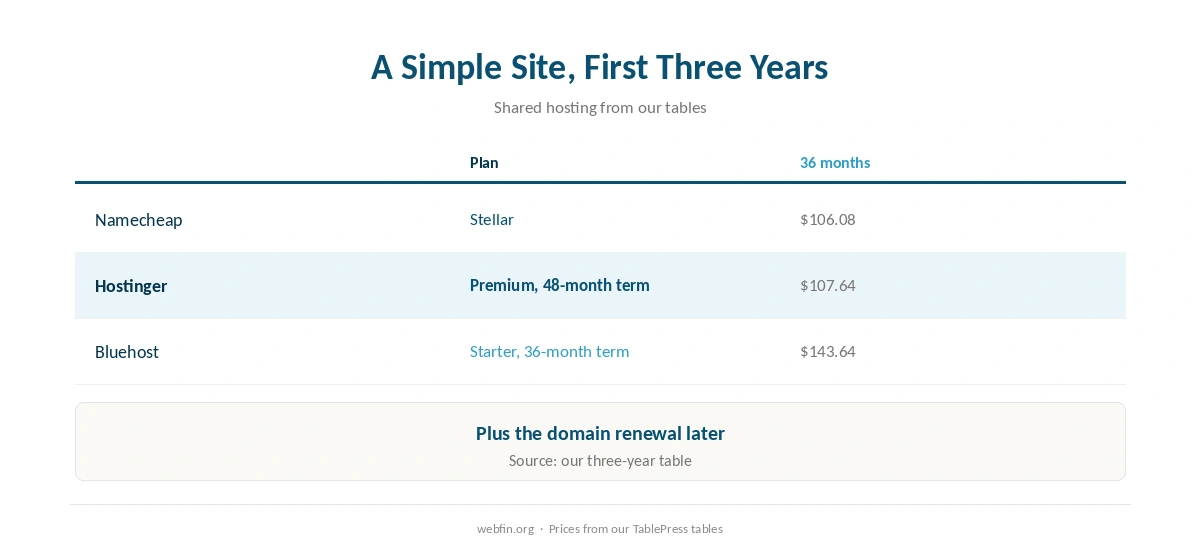
A simple site on shared hosting costs $106.08 to $143.64 over three years in our tables, plus the domain renewal.
No. WordPress and a theme cover most simple sites without code.
Yes, on free hosting, but you pay in ads, a subdomain and the risk of closure.
Switch on HTTPS, set up backups with one copy off the host and add uptime monitoring.
The Verdict
To make a website takes seven steps, and none needs code: a domain, hosting, WordPress, a theme, pages, HTTPS and backups. The choices that cost most later are the host’s renewal and the backup plan.
So compare three-year hosting totals, keep the domain’s renewal in view and back up before launch. The rest you can change as the site grows.