Disclosure: WebFin is reader-supported. If you buy hosting through links on this page, we may earn a commission at no extra cost to you. Commissions vary between providers and our ratings do not — here’s our full disclosure.
Kinsta cloud hosting runs every site on Google Cloud’s compute-optimized C2 machines and Google’s Premium Tier network, according to Kinsta’s own pages. In addition, in some data centers it uses newer C3D machines, which Kinsta’s tests found 20% to 50% faster in response time.
It is managed WordPress hosting rather than a raw cloud server, at a flat $35.00 a month for Starter. This guide explains the infrastructure and what the price buys.
Kinsta Cloud Hosting: The Short Answer
In short, Kinsta suits WordPress owners who want premium Google Cloud infrastructure managed for them, at a predictable price. For a lower bill, however, Cloudways starts at $14.00 a month.
The Google Cloud Infrastructure
| Point | Kinsta | Source |
|---|---|---|
| Machines | C2 everywhere; C3D in some data centers | Kinsta |
| C3D gain | 20% to 50% faster response than C2 | Kinsta’s own tests |
| Network | Google Premium Tier | Kinsta |
| Locations | 37 on its 2026 page | Kinsta |
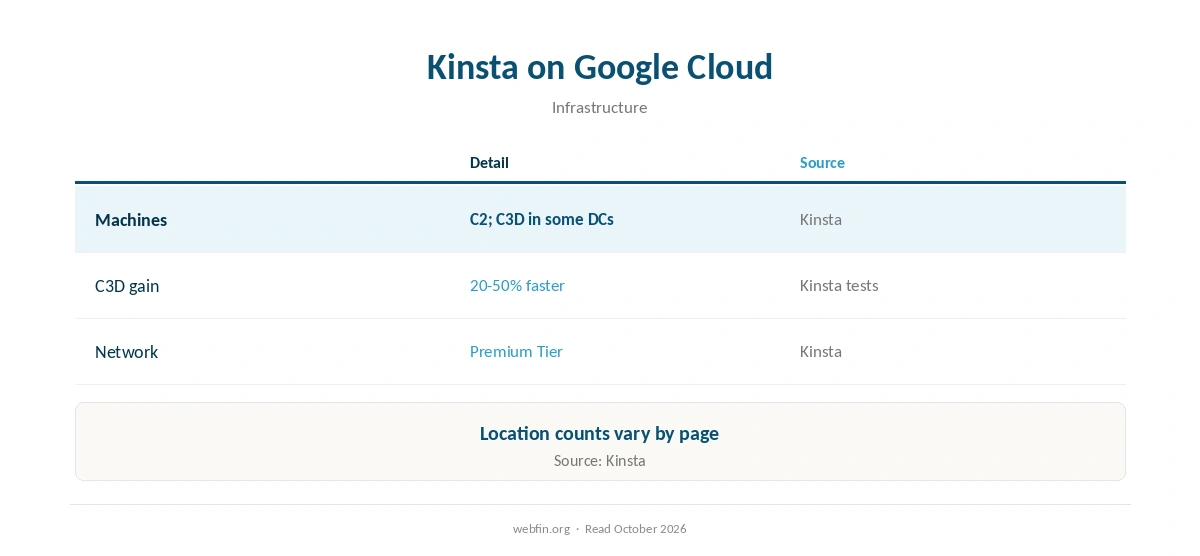
According to Kinsta’s infrastructure page, all plans use Google’s C2 machines and Premium Tier network, which routes traffic over Google’s own network rather than the public internet where possible. Kinsta also claims WP Engine supports only 14 Google Cloud locations, a competitor’s claim worth checking.
MyKinsta flags C3D data centers as ‘Boosted’, according to Kinsta’s changelog. ⚠️ Location counts differ across Kinsta’s pages, from 27 to 37, as the network grew.
What the Price Buys
In practice, Kinsta Starter costs $35.00 a month with no promotional term, and allows 25,000 monthly visits, according to our tables. Meanwhile, support runs by chat and ticket around the clock, without a phone line.
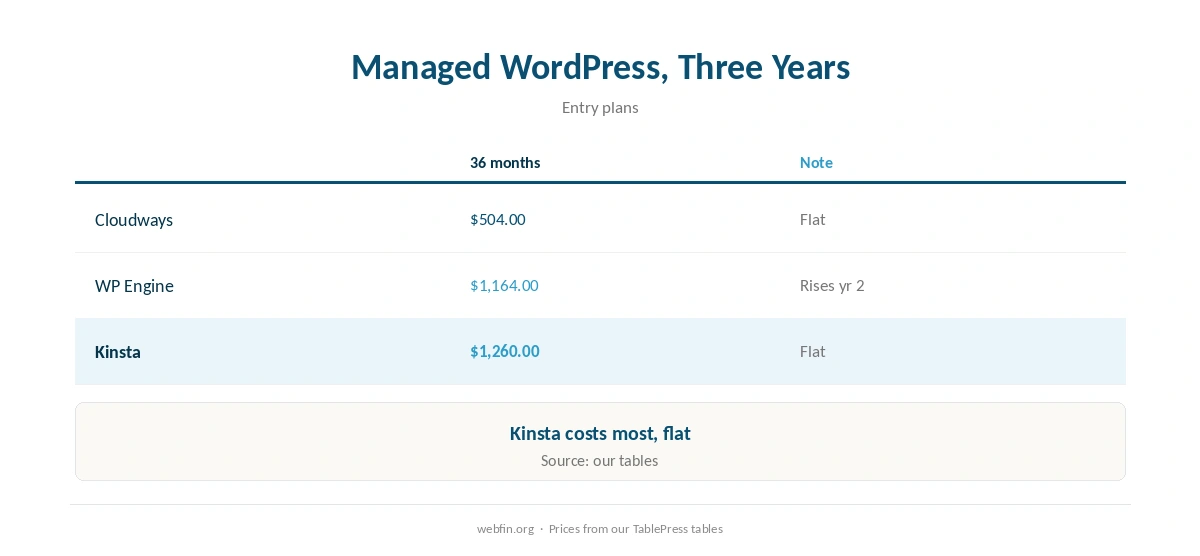
As a result, three years cost $1,260.00, against $504.00 on Cloudways and $1,164.00 on WP Engine Startup. Our WP Engine alternatives therefore compare all three.
| Host and plan | How it builds | 36-month total |
|---|---|---|
| ChemiCloud Starter, 36-month term | 36 prepaid months at $2.49 | $89.64 |
| InterServer Standard | 36 months at $2.50, price locked | $90.00 |
| DreamHost Launch, 48-month term | 36 of 48 prepaid months at $2.89 | $104.04 |
| Namecheap Stellar, 24-month term | 24 at $1.98, then 12 at $4.88 | $106.08 |
| Hostinger Premium, 48-month term | 36 of 48 prepaid months at $2.99 | $107.64 |
| HostGator Hatchling, 36-month term | 36 months at $3.75, renewal not reached | $135.00 |
| HostGator Hatchling, with daily backups | 36 at $3.75, plus CodeGuard at $35.88 a year | $242.64 |
| Bluehost Starter, 36-month term | 36 months at $3.99, renewal not reached | $143.64 |
| GoDaddy Economy, 36-month term | 36 months at $5.99, renewal not reached | $215.64 |
| GoDaddy Economy, with SSL from year two | 36 at $5.99, plus $119.99 in years two and three | $455.62 |
| Hostwinds Basic, annual | 12 at $4.54, then 24 at $6.99 | $222.24 |
| SiteGround StartUp, 24-month term | 24 at $2.99, then 12 at $14.99 | $251.64 |
| DreamHost Launch, annual | 12 at $2.89, then 24 at $10.99 | $298.44 |
| Scala Hosting Mini, annual | 12 at $2.95, then 24 at $11.95 | $322.20 |
| Bluehost Starter, 12-month term | 12 at $3.99, then 24 at $11.99 | $335.64 |
| IONOS Plus, annual | 12 at $1.00, then 24 at $14.00 | $348.00 |
| GreenGeeks Lite, 36-month prepay | 36 months at $2.95 | $106.20 |
| GreenGeeks Lite, annual | 12 at $2.95, then 24 at $13.95 | $370.20 |
| SiteGround StartUp, 12-month term | 12 at $2.99, then 24 at $17.99 | $467.64 |
| Cloudways, from | 36 months at $14.00, flat | $504.00 |
| A2 Hosting Turbo Boost, annual | 12 at $6.99, then 24 at $20.99 | $587.64 |
| Rocket.net Starter, annual | 12 at $25.00, then 24 at $30.00 | $1,020.00 |
| WP Engine Startup, annual | 12 at $27.00, then 24 at $35.00 | $1,164.00 |
| Liquid Web managed VPS | 36 months at $33.00 | $1,188.00 |
| Kinsta Starter | 36 months at $35.00, flat | $1,260.00 |
| InMotion Core, 36-month term | 36 months at $3.19, renewal not reached | $114.84 |
| InMotion Launch, 36-month term | 36 months at $4.99, renewal not reached | $179.64 |
| Cloudways email, five mailboxes, a month | 5 × $1.50 Rackspace / 5 × $1.99 Titan Pro | $7.50 / $9.95 |
| DreamHost Email, 5 mailboxes, annual | $1.67 × 5 × 12 | $100.20 a year |
| GoDaddy Economy, next 36-month term | Renewal shown in the cart at $15.32 a month | $551.63 |
| Google Workspace or Microsoft 365 middle plan, ten users | $14.00 a user × 10 × 12 months | $1,680 |
| Hostinger Business Starter, five mailboxes, one year after the trial | 5 × $1.59 × 12 | $95.40 |
| Hostinger VPS KVM 1, 24-month term | 24 at $6.49, then 12 at $11.99 | $299.64 |
| Hostinger VPS KVM 2, 24-month term | 24 at $8.99, then 12 at $14.99 | $395.64 |
| Hostinger Website Builder Premium, 48-month term | 36 of 48 prepaid months at $2.99 | $107.64 |
| IONOS VPS L, 1-year term | 6 at $10.00, then 30 at $15.00 | $510.00 |
| IONOS VPS M, 1-year term | 6 at $6.00, then 30 at $8.00 | $276.00 |
| IONOS VPS XS | 36 at $2.00 | $72.00 |
| Suite middle plan, five users | $14.00 a user × 5, a month | $70.00 |
| Zoho Mail Lite, five users | $1.00 a user × 5, a month | $5.00 |
Speed in Practice
For example, Hostingstep measured Kinsta’s origin TTFB at 525 ms, with edge figures differing, and a load result of 40 ms at 0% errors, according to our tables. So the infrastructure shows most clearly under load.
Our guide to reducing TTFB explains what affects response time, and our guide to CDNs covers edge delivery.
Who Should Choose Kinsta
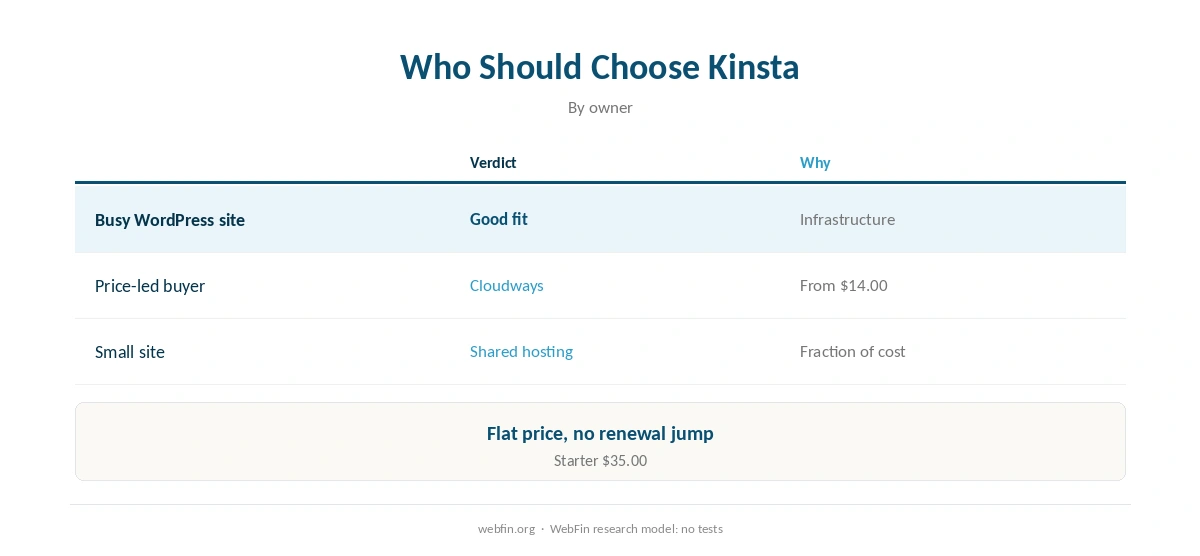
Choose Kinsta cloud hosting if you run a busy WordPress site and want premium infrastructure without managing servers. For a small site, by contrast, shared hosting costs a fraction, as our WordPress hosting picks show.
Similarly, our Cloudways cloud guide covers a cheaper managed cloud, and our managed vs unmanaged guide explains what management includes.
Running a Site on Kinsta
Kinsta cloud hosting includes backups, but keep your own copy too, as our guide to backups explains. Then add uptime monitoring so you see problems first.
Moving in is straightforward, as our guide on migrating web hosting explains. For outages on any managed host, our WP Engine status guide shows how status pages work.
Finally, for the wider choice, our best cloud hosting picks compare managed clouds, and our VPS vs cloud guide explains the models.
How We Research
We run no tests. Infrastructure details come from Kinsta’s own pages; prices, limits and benchmarks from our TablePress tables, built from plan pages and Hostingstep. We read every source in October 2026.
The criteria behind our scores are on our about page, where Kinsta scores 4.1.
Kinsta Cloud Hosting FAQ
Yes; every site runs on Google Cloud C2 machines and its Premium Tier network.
Newer Google Cloud machines that Kinsta’s tests found 20% to 50% faster in response time.
Starter costs $35.00 a month, flat, with 25,000 visits.
No; chat and tickets around the clock.
No; it is managed WordPress hosting built on Google Cloud.
The Verdict
Overall, Kinsta cloud hosting puts WordPress on Google Cloud’s fastest machines and network, managed for you at a flat $35.00 a month.
In short, choose it for busy WordPress sites that value infrastructure and predictability; choose Cloudways if price matters more.