
Disclosure: WebFin is reader-supported. If you buy hosting through links on this page, we may earn a commission at no extra cost to you. Commissions vary between providers and our ratings do not — here’s our full disclosure.
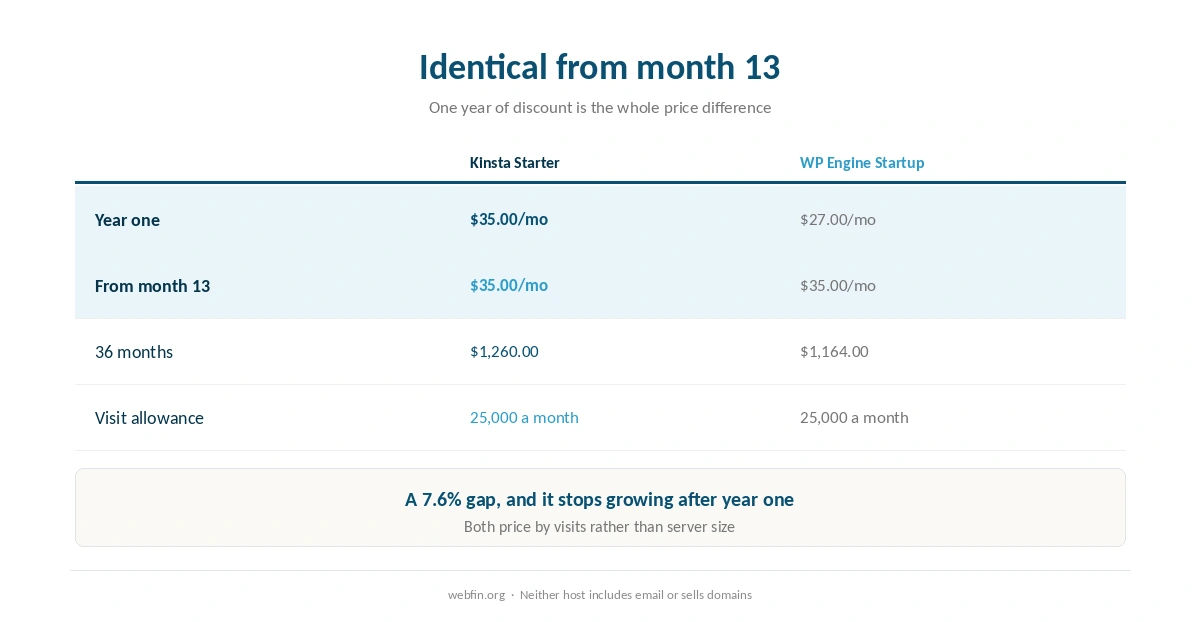
Kinsta vs WP Engine is the closest comparison on this site. Both score 4.1 in our reviews, both include 25,000 monthly visits and one site on their entry plans, and from month 13 both charge exactly $35.00 a month. The whole price difference is WP Engine’s first year at $27.00, which comes to ninety-six dollars over 36 months: $1,164.00 against $1,260.00. Our published tie-break settles a tied score on cost of ownership, so WP Engine takes it, and for once the benchmarks agree. For the same host against SiteGround, see SiteGround vs WP Engine.
Kinsta vs WP Engine: The Short Answer
WP Engine, by our tie-break and by the measurements. It placed first of 34 hosts in a global response ranking at 65 ms and finished the load test at 27 ms without an error. Every site also gets three environments. Kinsta answers with application performance monitoring included in the plan and a container per site, which matter when a site is slow rather than when it is fast.
Head to Head
| Criterion | Kinsta Starter | WP Engine Startup |
|---|---|---|
| Price, year one | $35.00/mo flat | $27.00/mo |
| Price from month 13 | $35.00/mo | $35.00/mo |
| 36 months | $1,260.00 | $1,164.00 |
| Load test | 40 ms, every request answered | 27 ms, no errors |
| Global response | 525 ms at origin; edge lower | 65 ms, 1st of 34 |
| US response | Not in our table | 355 ms over 349,920 checks |
| Environments per site | Production and staging | Production, staging, development |
| Isolation | A container per site | Not described as containers |
| Performance monitoring | Included in the plan | Not included |
| Visit allowance | 25,000 monthly visits | 25,000 monthly visits |
| Owner | Not established in our sources | Silver Lake majority, 2018 |
| Our score | 4.1 | 4.1 |
A Tie, and a Ninety-Six Dollar Rule
Both hosts score 4.1. What happens next is published on our about page. A tie goes to the lower cost of ownership over 36 months, and if that ties too, to the host that publishes its renewal.
WP Engine costs $1,164.00 across 36 months and Kinsta $1,260.00. The gap is 7.6%, and it comes entirely from year one, because WP Engine discounts its first twelve months to $27.00 and Kinsta never discounts anything. From month 13 the two bills are identical.
⚠️ This is the narrowest tie-break we have applied, and it is worth saying plainly that ninety-six dollars across three years is not a reason on its own. What makes WP Engine the pick is that the measurements point the same way. If you value Kinsta’s monitoring at more than three dollars a month, buy Kinsta.
| Host and plan | How it builds | 36-month total |
|---|---|---|
| ChemiCloud Starter, 36-month term | 36 prepaid months at $2.49 | $89.64 |
| InterServer Standard | 36 months at $2.50, price locked | $90.00 |
| DreamHost Launch, 48-month term | 36 of 48 prepaid months at $2.89 | $104.04 |
| Namecheap Stellar, 24-month term | 24 at $1.98, then 12 at $4.88 | $106.08 |
| Hostinger Premium, 48-month term | 36 of 48 prepaid months at $2.99 | $107.64 |
| HostGator Hatchling, 36-month term | 36 months at $3.75, renewal not reached | $135.00 |
| HostGator Hatchling, with daily backups | 36 at $3.75, plus CodeGuard at $35.88 a year | $242.64 |
| Bluehost Starter, 36-month term | 36 months at $3.99, renewal not reached | $143.64 |
| GoDaddy Economy, 36-month term | 36 months at $5.99, renewal not reached | $215.64 |
| GoDaddy Economy, with SSL from year two | 36 at $5.99, plus $119.99 in years two and three | $455.62 |
| Hostwinds Basic, annual | 12 at $4.54, then 24 at $6.99 | $222.24 |
| SiteGround StartUp, 24-month term | 24 at $2.99, then 12 at $14.99 | $251.64 |
| DreamHost Launch, annual | 12 at $2.89, then 24 at $10.99 | $298.44 |
| Scala Hosting Mini, annual | 12 at $2.95, then 24 at $11.95 | $322.20 |
| Bluehost Starter, 12-month term | 12 at $3.99, then 24 at $11.99 | $335.64 |
| IONOS Plus, annual | 12 at $1.00, then 24 at $14.00 | $348.00 |
| GreenGeeks Lite, 36-month prepay | 36 months at $2.95 | $106.20 |
| GreenGeeks Lite, annual | 12 at $2.95, then 24 at $13.95 | $370.20 |
| SiteGround StartUp, 12-month term | 12 at $2.99, then 24 at $17.99 | $467.64 |
| Cloudways, from | 36 months at $14.00, flat | $504.00 |
| A2 Hosting Turbo Boost, annual | 12 at $6.99, then 24 at $20.99 | $587.64 |
| Rocket.net Starter, annual | 12 at $25.00, then 24 at $30.00 | $1,020.00 |
| WP Engine Startup, annual | 12 at $27.00, then 24 at $35.00 | $1,164.00 |
| Liquid Web managed VPS | 36 months at $33.00 | $1,188.00 |
| Kinsta Starter | 36 months at $35.00, flat | $1,260.00 |
| InMotion Core, 36-month term | 36 months at $3.19, renewal not reached | $114.84 |
| InMotion Launch, 36-month term | 36 months at $4.99, renewal not reached | $179.64 |
WP Engine Leads on Every Named Measurement
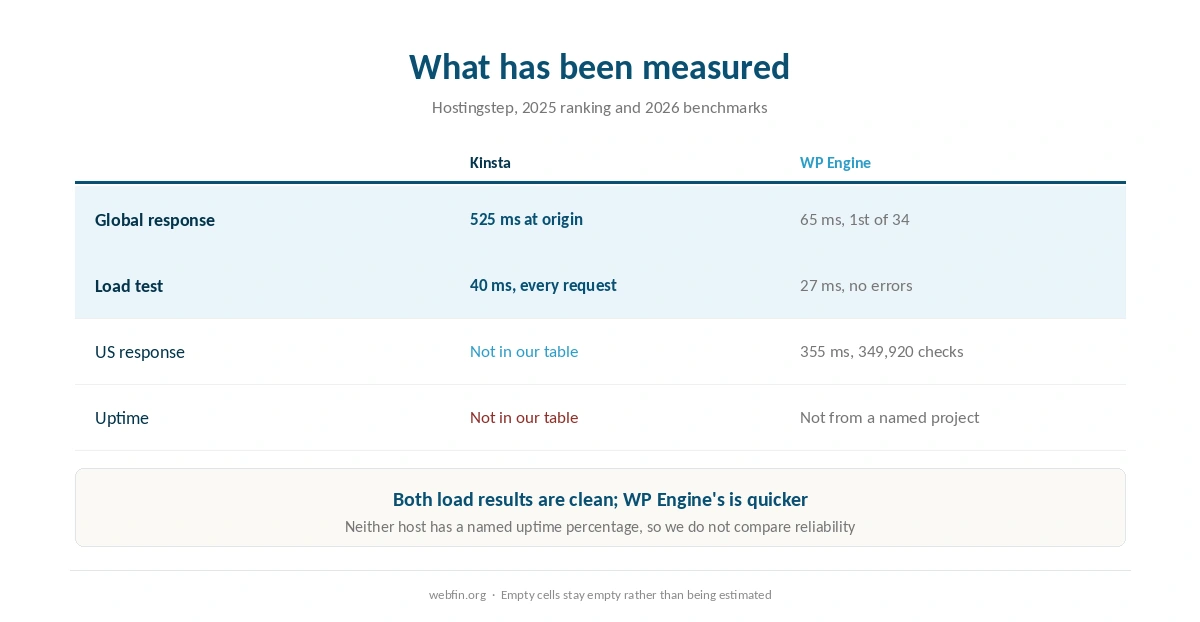
We run no tests, so these figures belong to Hostingstep. In its 2025 global ranking across 40 locations, WP Engine answered in 65 ms and placed first of 34 hosts. Across October 2025 to May 2026 it averaged 355 ms from US locations over 349,920 checks. Its load test finished at 27 ms without an error.
Kinsta finished the same load test at 40 ms with every request answered, a clean result and a close one. It scores 8.8 of 10 on that project’s WordPress benchmark. Its origin response is recorded at 525 ms, with lower figures at the edge where pages are cached.
⚠️ Neither host has a published uptime percentage in our table from a named project, so we do not compare them on reliability at all. That is a gap on both sides rather than a point for either. Our guide to reading an uptime report explains why we leave it blank.
Three Environments Against a Container
WP Engine gives every site production, staging and development environments, and none of them count against the site limit. Installs can also transfer between accounts. For an agency or a site that changes often, that is a release process rather than a workaround. Our guide to setting up a staging site explains why the separate development stage helps.
Kinsta runs each site in its own container, so another site’s traffic cannot reach yours, and includes application performance monitoring in the plan. That is the tool that finds the slow plugin query, and it is normally bought separately. For a site that is already misbehaving, it is worth more than a third environment.
What Both Leave Out
Neither hosts email, so both need a separate provider and a separate bill. Neither sells domains. Both host WordPress only, so a PHP application outside WordPress needs a server instead, as our list of hosting for developers covers.
Support is chat and tickets at both, around the clock. WP Engine adds a phone line on higher tiers; Kinsta has none at any tier. Neither publishes a measured response time, and no controlled test of hosting support exists in the sources we found.
The Visit Allowance Is the Same, and It Matters
Both entry plans include 25,000 monthly visits and one site. That is the number that decides the real cost for a growing site, because both price by visits rather than by server size, and a successful month pushes you to the next tier.
So read the allowance as visits rather than people: a member or a reader who returns daily counts each time. If your traffic is unpredictable, a host that prices by server size removes the question, which our comparison of Cloudways against Kinsta covers.
When Either Would Do
For a WordPress site with steady traffic under the allowance, these two hosts are close enough that the choice can rest on the dashboard you prefer. Both are clean under load, both include daily backups and staging, and both cost the same from month 13.
What would change the answer is a different requirement: email, a non-WordPress application, or traffic that spikes past 25,000 visits. In each of those cases a server suits better, as our comparison of Cloudways against WP Engine and our roundup of hosting for high traffic explain.
Ownership: One Known, One Not
Silver Lake took a majority stake in WP Engine in 2018, reported at about $250 million, so its backer is a matter of record. Kinsta’s ownership is not established in the sources we read, which is a gap rather than an implication.
For a buyer paying monthly at either host, ownership matters less than it would on a three-year prepayment. It does shape how each company is likely to price over time, and WP Engine’s gentle step from $27.00 to $35.00 has held under the same backer.
Which Site Belongs Where
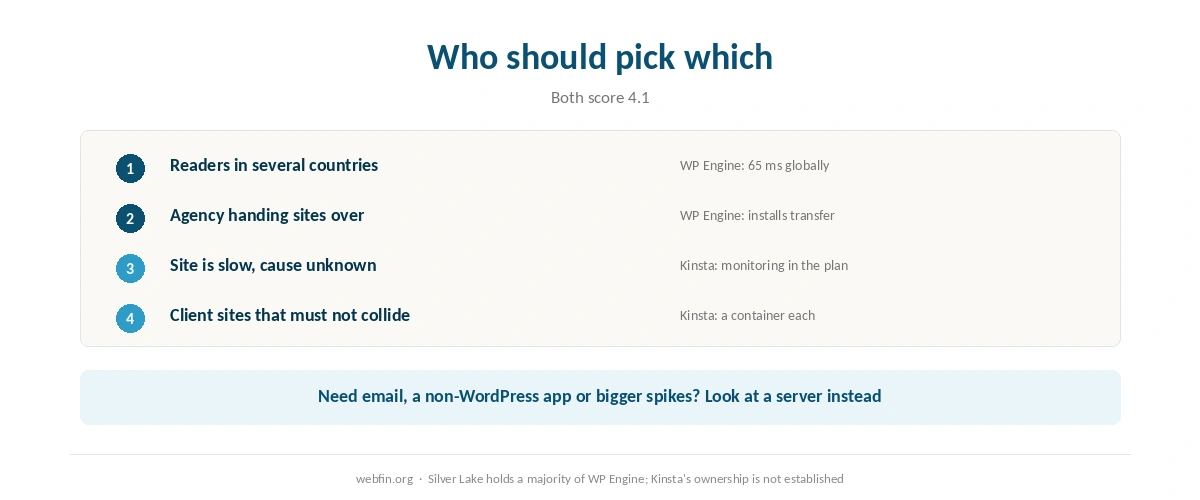
A publication or business site with readers in several countries. WP Engine, for the global response figure and the clean load result.
An agency handing sites to clients. WP Engine, for transferable installs and three environments per site. Our list of hosting for agencies covers the handover.
A site that is already slow and nobody knows why. Kinsta, because the monitoring is in the plan, as our guide to testing your site speed properly explains it is otherwise a guessing game.
Several client sites that must not affect each other. Kinsta, for the container per site. Our list of hosting for multiple sites covers that shape.
Where Each One Is Weakest
Kinsta is weakest on price and on the record. It costs ninety-six dollars more over three years, its origin response of 525 ms is the slower figure, and neither its uptime nor its ownership is documented in the sources we read. Our Kinsta review prices the tiers.
WP Engine is weakest on what it does not include: no monitoring in the plan, no containers described, no email, and a phone line only on higher tiers. Its visit allowance is the same ceiling as Kinsta’s. Our WP Engine review covers the rest.
Winners by Category
Tie-break, cost of ownership: WP Engine, at $1,164.00 against $1,260.00. From month 13: level at $35.00. Global response: WP Engine, first of 34 at 65 ms. Load test: WP Engine, at 27 ms against 40 ms. Development workflow: WP Engine, with three environments. Performance monitoring: Kinsta, included. Isolation: Kinsta, a container per site.
How We Research
We run no tests. Speed and load figures come from Hostingstep’s 2025 ranking and 2026 benchmarks and reviews, each with its window. Where our table holds no figure, as with uptime for both hosts and US response for Kinsta, we leave the cell empty rather than estimating.
Prices, visit allowances and environments come from the providers’ own pages, read on 20 September 2026. When two hosts tie on score we apply the tie-break published on our about page and say what it leaves out.
Kinsta vs WP Engine FAQ
WP Engine, by ninety-six dollars over 36 months: $1,164.00 against $1,260.00. The difference is its first year at $27.00. From month 13 both charge $35.00 a month, so the gap stops growing.
WP Engine on every named measurement we hold. It placed first of 34 hosts at 65 ms in a global ranking and averaged 355 ms from US locations over 349,920 checks. Its load test finished at 27 ms, and Kinsta’s 40 ms is also clean.
They win different criteria and land level. Our published tie-break gives a tie to the lower 36-month cost, which is WP Engine by ninety-six dollars. Kinsta keeps the included performance monitoring and a container per site.
No. Both host WordPress only and neither hosts email, so each needs a separate email provider. Neither sells domains either.
Yes, at the entry tier: both include 25,000 monthly visits and one site. Both price by visits rather than server size, so a successful month moves you up a tier at either host.
The Verdict
WP Engine takes this, and unusually the tie-break and the measurements agree. It costs ninety-six dollars less over three years, leads every named speed figure we hold, and gives each site a development environment as well as staging. From month 13 you pay the same as you would at Kinsta. Our page on Kinsta against Hostwinds covers the comparison with no load figures on one side.
Kinsta is the better buy in one specific case. When a site is slow and nobody knows why, the monitoring included in its plan is worth more than that difference and the third environment. Its container per site is the other reason to pick it. Our page on what web hosting costs runs both totals further.