
Disclosure: WebFin is reader-supported. If you buy hosting through links on this page, we may earn a commission at no extra cost to you. Commissions vary between providers and our ratings do not — here’s our full disclosure.
To cancel hosting and get a refund, get your site and your domain out first, then cancel in writing inside the window, and expect the domain fee to stay with the host. That order matters more than the policy itself. Most hosts refund within 30 days, a few give 45 or more, and nearly all exclude the domain. The money is usually easy to recover. The site and the domain are what people lose when they cancel in the wrong order. If you want a smaller plan rather than none, see how to downgrade a hosting plan.
How to Cancel Hosting and Get a Refund: The Short Answer
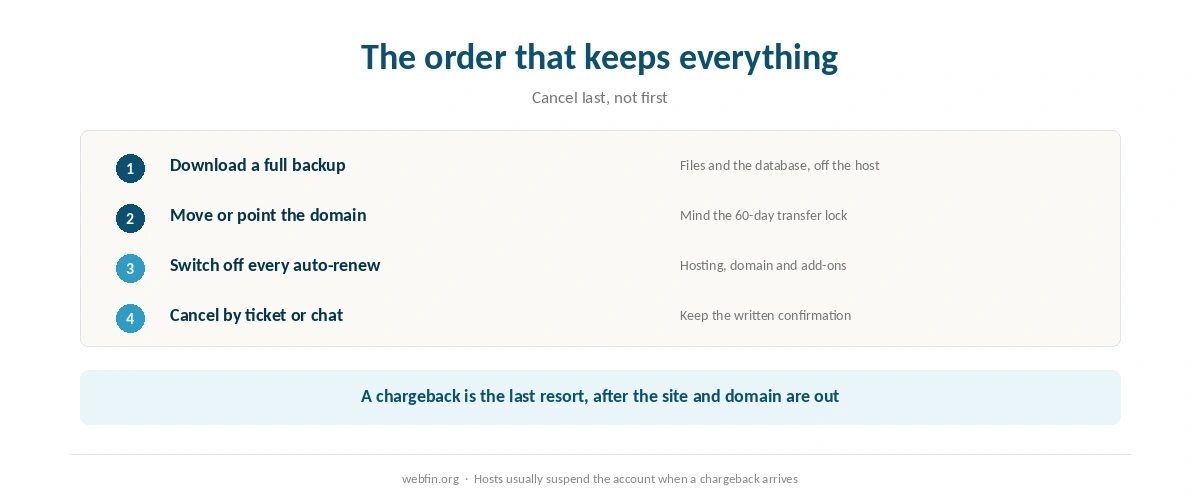
Back up the site and download the files. Move or unlock the domain. Turn off auto-renew. Then cancel by ticket or chat and save the reply. Do it before the window closes, counted from the purchase date, and expect the refund to leave out domains and add-ons.
What a Refund Window Actually Covers
A money-back guarantee refunds the hosting. It almost never refunds the domain, because the host pays the registry for a registration and cannot take it back. Add-ons such as security scanners, premium certificates and professional services are usually excluded too.
The free domain is the detail that catches people. Bluehost, for example, deducts $15.99 from the refund if you cancel inside the window, and the domain stays yours. It is a fair charge for a real registration, and it is still a fee for leaving. Our comparison of Bluehost against GoDaddy sets both hosts’ exclusions side by side.
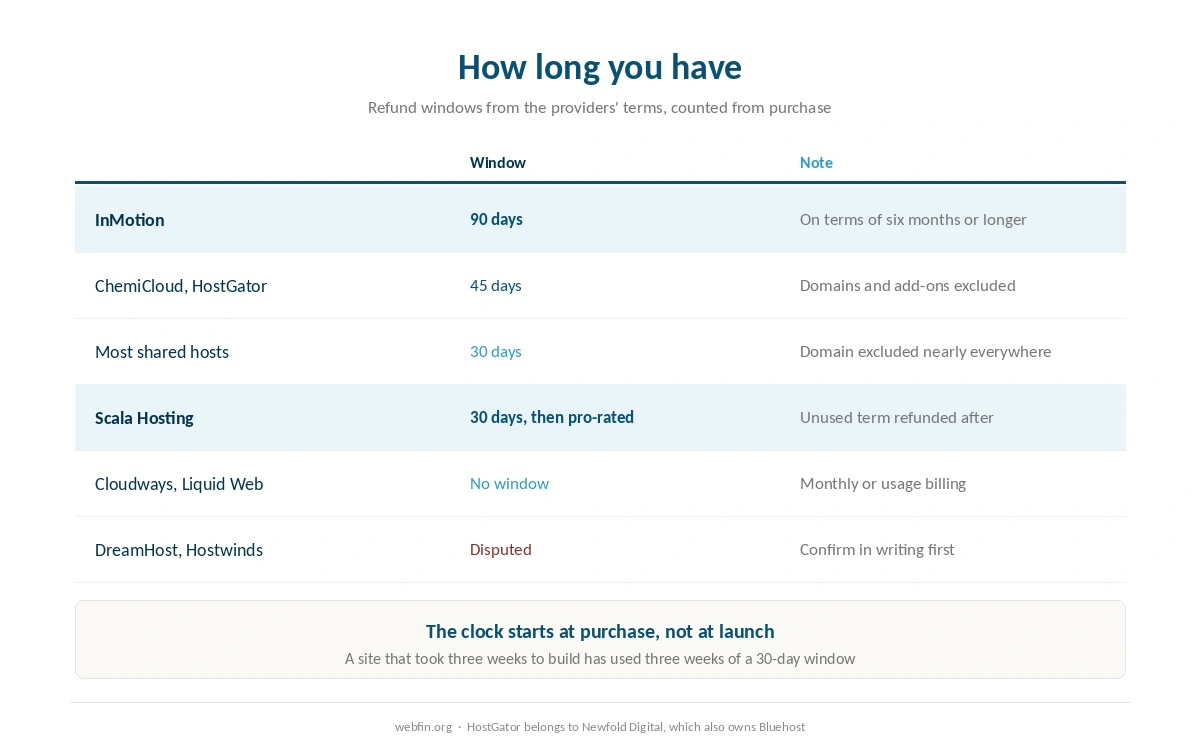
⚠️ The clock starts at purchase, not at launch. A site that took three weeks to build has used three weeks of a 30-day window before anyone has seen it. If you are unsure about a host, build something small first and decide early.
Step 1: Find Your Window and Your Purchase Date
Most shared hosts give 30 days. ChemiCloud and HostGator, a Newfold Digital brand, give 45. InMotion gives 90 days on terms of six months or longer. At the other end, WP Engine, Liquid Web and Cloudways bill monthly or by usage, so there is no window in the usual sense: you stop paying at the next cycle.
Sources disagree on three policies. Four quote DreamHost at 97 days and one at 30. Two describe A2 Hosting in different ways. And for Hostwinds, one source says 30 days while two say three. If yours is one of them, ask support to confirm your window in writing today. Our comparison of SiteGround against Hostwinds covers why that last conflict matters.
| Host | Refund window | What's excluded |
|---|---|---|
| DreamHost | 97 days by four sources, 30 by another | Disputed; confirm at checkout |
| InMotion | 90 days on 6-month terms and longer | 30 days monthly, VPS and reseller; no monthly billing on shared |
| ChemiCloud | 45 days | Domains and add-ons |
| HostGator | 45 days, all plans | Domains and add-ons |
| Hostinger | 30 days | Domain registration |
| SiteGround | 30 days on shared, 14 on cloud; renewals within 30 days of payment | Domains and third-party services; monthly plans reported excluded |
| Bluehost | 30 days | Add-ons, domains and professional services; $15.99 deducted for the free domain |
| Scala Hosting | 30 days, then a pro-rated refund of unused term | Domains and licenses |
| Namecheap | 30 days; EasyWP adds a 30-day trial with no card | Domains |
| InterServer | 30 days | Domains |
| GreenGeeks | 30 days | Domains and add-ons |
| IONOS | 30 days | Domains |
| Rocket.net | 30 days | Domains |
| GoDaddy | 30 days | Domains and some services |
| Kinsta | 30 days | Domains |
| WP Engine | Monthly billing; cancel before the next cycle | Not a refund window in the usual sense |
| Liquid Web | Monthly billing, no contract | Not a refund window in the usual sense |
| Cloudways | Pay-as-you-go; stop and the billing stops | Not a refund window in the usual sense |
| A2 Hosting | Disputed: anytime guarantee, or standard terms | Two 2026 sources in conflict |
| Hostwinds | Disputed: 30 days by one source, 3 by two others | Confirm in writing before paying |
Step 2: Get the Site and the Domain Out First
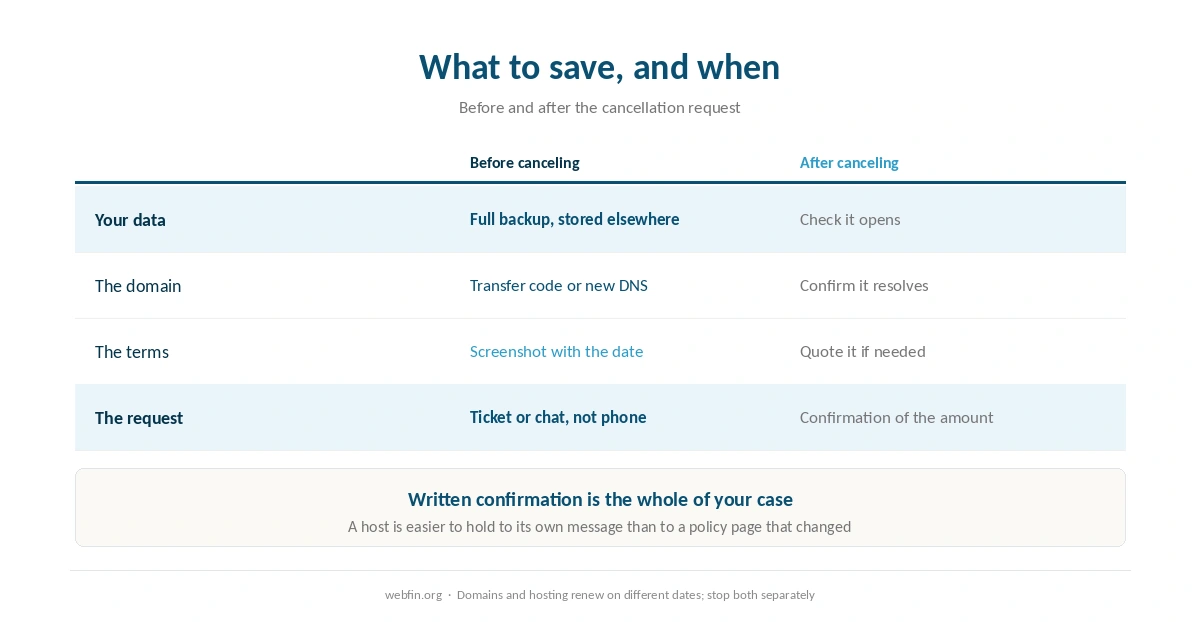
Download a full backup before you touch the cancel button. That means files and the database, stored somewhere that is not the host. Once an account closes, the data usually goes with it. Our guide to backing up a WordPress site covers the parts people forget, such as uploads and the database export.
Then deal with the domain. If it is registered at the host, either transfer it out or point it at the new host and keep it where it is for now. Transfers can be blocked for a period after a domain is registered or moved: 60 days under the long-standing ICANN policy, and 30 days under the revised policy that registrars are rolling out during 2026. So a brand new domain may have to stay put for a while.
Moving to another host in the same week? Do the move first and cancel second. Our guide to migrating web hosting sets out the order, and it is the order that keeps the site online throughout.
Step 3: Turn Off Auto-Renew Separately
Hosting and domains renew on different schedules, and canceling one rarely cancels the other. Switch off auto-renew for each service you are leaving, then check the billing page for anything still scheduled. Add-ons bought at checkout often carry their own renewal dates.
This step matters even when you are staying. A renewal you did not expect is the commonest reason people go looking for a refund policy, and our page on hosting renewal prices shows how large that second invoice tends to be.
Step 4: Cancel in Writing and Keep the Record
Use a support ticket or chat, not a phone call, so there is a transcript. State the account, the services you are canceling and that you are requesting a refund under the money-back guarantee. Ask for written confirmation of the amount and the date it will be issued.
Save the confirmation somewhere outside the host. If the refund does not arrive, that message is the whole of your case, and a host is far easier to hold to its own words than to a policy page that may have changed.
Step 5: Expect the Retention Offer
Most hosts will offer a discount, a free month or an upgrade before processing a cancellation. Some of those offers are genuinely good. Decide in advance what would make you stay, because a retention offer is designed to be accepted in the moment.
If the reason for leaving is price, the offer may solve it. If the reason is performance, outages or support, a discount on the same service rarely fixes anything. Our guide to reading an uptime report helps decide whether the problem is worth leaving over.
Step 6: If the Window Has Closed
Outside the window, most shared hosts treat the prepaid term as spent. Scala Hosting is a notable exception: after 30 days it refunds the unused part of the term on a pro-rated basis. Elsewhere, ask anyway. Some hosts will convert the remaining term into account credit, and a polite request with a clear reason sometimes works.
⚠️ A chargeback through your card issuer is the last resort, not the first. Hosts usually suspend the account when one arrives, so make sure the site and domain are already out before you file. Our page on hidden hosting fees lists the charges most likely to prompt one.
What to Do If It Does Not Work
Support keeps offering discounts instead of canceling. Repeat the request in writing and ask for the cancellation to be processed today. A clear, repeated instruction in a ticket is hard to ignore.
A charge arrived after canceling. Check whether a domain or add-on renewed separately. If not, reply to the original confirmation and ask for a reversal citing its date.
The domain will not transfer. Check for the transfer lock that follows a new registration and for the registrar lock in the account. If the lock is policy, point the domain at your new host and transfer it when the period ends. The transfer itself is covered in how to transfer a domain.
The policy on the page differs from what support says. Screenshot the page with its date, quote it in the ticket, and ask which applies to your purchase. Disputed policies are exactly why the written confirmation in step 4 matters.
How We Research
Refund windows and exclusions come from the providers’ own terms and from reviews published this year, read on 20 September 2026, and they sit in the table above. Where sources disagree, as they do for DreamHost, A2 Hosting and Hostwinds, we print both readings and advise confirming in writing rather than choosing one.
Policies change, and the one that applies is the one in force when you bought. The criteria behind our scores are on our about page, and the full workings for the 45-day ChemiCloud window are in our ChemiCloud review.
Hosting Refund FAQ
Usually 30 days from the purchase date. ChemiCloud and HostGator give 45, and InMotion gives 90 on terms of six months or longer. Monthly and pay-as-you-go hosts such as Cloudways have no window, because you simply stop paying at the next cycle.
Almost never. The host pays the registry for a registration and cannot reverse it. Bluehost deducts $15.99 from the refund for a free domain if you cancel early, and the domain remains yours to keep or transfer.
After. Back up the site, move it to the new host, point the domain there and check that everything works. Cancel the old account only then, so the site stays online and you lose nothing when the old account closes.
Rarely. Scala Hosting refunds the unused term on a pro-rated basis after its 30-day window, which is unusual. Elsewhere, ask for account credit. A card chargeback is a last resort and usually triggers suspension of the account.
Registrars refuse transfers for a period after a domain is registered or moved: 60 days under the long-standing ICANN policy, and 30 days under the revised policy rolling out during 2026. Point the domain at your new host in the meantime and transfer the registration once the period ends.
The Verdict
Canceling hosting is easy, and getting the money back usually is too. What goes wrong is the order: people cancel first and discover the backup, the domain and the email went with the account. Get everything out, switch off every renewal, then cancel in writing inside the window.
If you are choosing a host now, the refund terms are worth weighing before you need them. A long window, a pro-rated policy or simple monthly billing all cost less than a long prepayment you cannot recover. Our page on what web hosting costs prices the options.