
Disclosure: WebFin is reader-supported. If you buy hosting through links on this page, we may earn a commission at no extra cost to you. Commissions vary between providers and our ratings do not — here’s our full disclosure.
The best WordPress caching plugin depends less on the plugin than on your host’s web server. LiteSpeed Cache is free and caches at the server level, but only on hosts running LiteSpeed. On Apache or Nginx, the comparisons we read agree that it loses that advantage, and a simpler plugin does the same job.
This guide compares four widely used plugins and sets out how to choose one in three questions.
The Short Answer: Which WordPress Caching Plugin
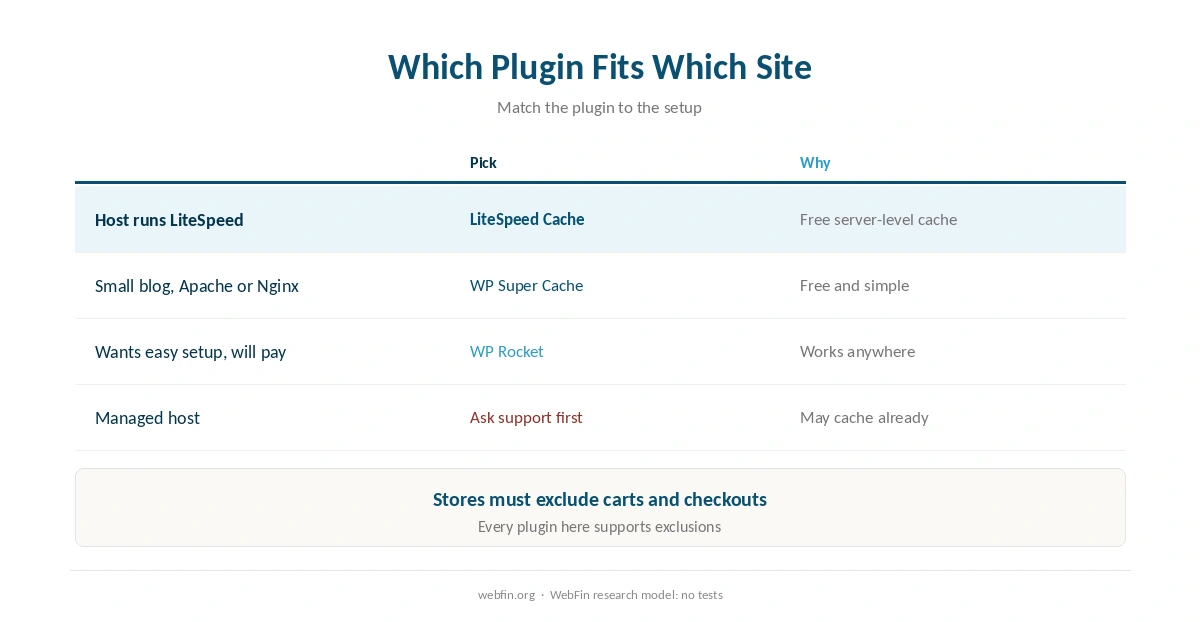
If your host runs LiteSpeed, use LiteSpeed Cache. If it runs Apache or Nginx, use WP Super Cache for a free, simple cache, or WP Rocket if you prefer to pay for an easier setup. On a managed host with built-in caching, you may not need a plugin at all.
Check Your Host’s Web Server First
Every recommendation below starts from one fact: which web server your host runs. The plan page or a support chat will tell you, and some hosts show it in the control panel.
That matters because a server-level cache works below WordPress and PHP, before the slow work begins. A plugin-level cache, by contrast, still starts PHP for every request. Our guide on reducing TTFB explains why that difference shows.
LiteSpeed Cache: Free, If Your Host Runs LiteSpeed
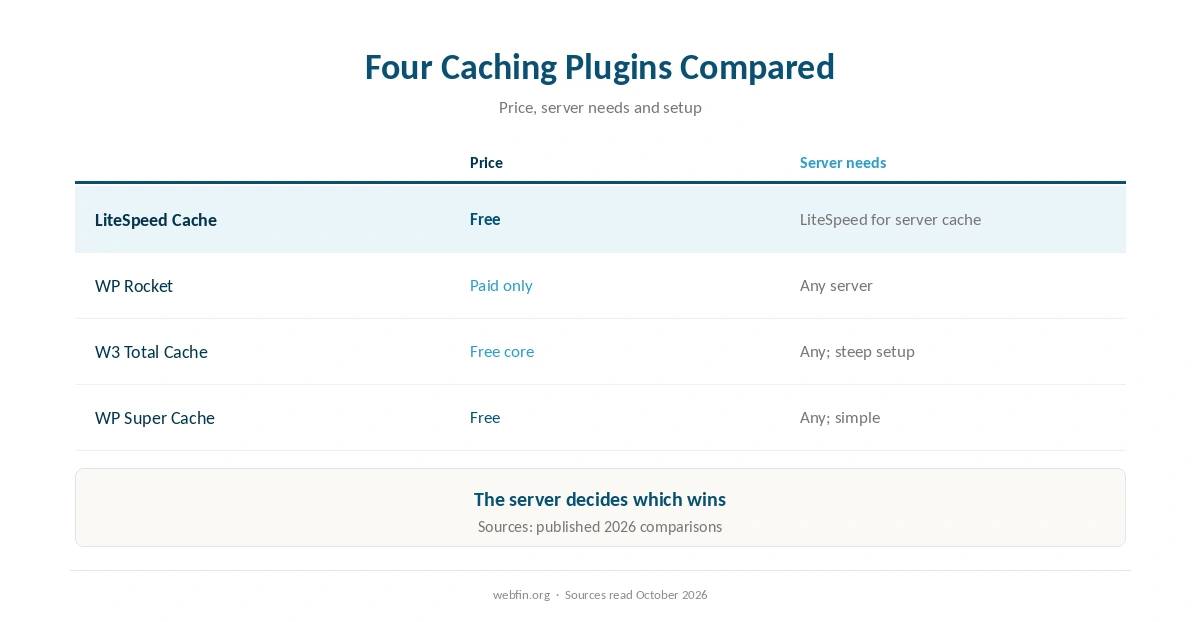
LiteSpeed Cache comes from LiteSpeed Technologies, the company behind the LiteSpeed web server. On a LiteSpeed or OpenLiteSpeed host, it hands page caching to the server itself.
On Apache or Nginx, however, it runs in a plugin-only mode, and the comparisons we read put it roughly level with simpler free plugins there. So check the server before choosing it.
WP Rocket: Paid, Works Anywhere
WP Rocket has no free version. In return, it works on any web server and applies sensible defaults without a long setup, which the reviews we read consistently note.
It is the easy choice on Apache or Nginx if you would rather pay than configure. On a LiteSpeed server, though, it uses its own file cache instead of the faster server cache.
W3 Total Cache: Free and Highly Configurable
W3 Total Cache is free at its core and supports more cache types than the others: page, object, database and browser caching, plus minification and CDN links.
That flexibility has a cost. The settings run across many tabs, and the wrong combination can break a site, so test changes on a staging copy, as our guide on setting up a staging site explains.
WP Super Cache: Free and Simple
WP Super Cache, maintained by Automattic, the company behind WordPress.com, does one job: it turns pages into static files and serves those instead of running PHP.
It has no minification or image tools. A slow database also needs its own fix, as our guide on fixing a slow database explains. Even so, for a small blog on Apache or Nginx, that single job is often all a WordPress caching plugin needs to do.
| Host | Measurement | Source and date |
|---|---|---|
| WP Engine | Global TTFB 65 ms, 1st of 34 hosts | Hostingstep, 2025 ranking, 40 locations |
| WP Engine | US TTFB 365 ms across 22 locations | Hostingstep, 2025 ranking |
| WP Engine | TTFB 355 ms, 349,920 checks | Hostingstep, Oct 2025 – May 2026 |
| WP Engine | Uptime 99.976%, 10th of 14 managed hosts | Study of 14 managed hosts, 2026 |
| WP Engine | Load 27 ms at 0% errors | Hostingstep, 2026 benchmarks |
| Rocket.net | Cached TTFB 85 ms globally | 12-month test, Mar 2025 – Mar 2026 |
| Rocket.net | Origin TTFB 310 ms; checkout bypasses cache | Same 12-month test |
| Rocket.net | Uptime 99.97%, seven outages in the window | Hostingstep, Oct 2025 – May 2026 |
| Rocket.net | Hardware score fell 8.5 → 7.5; not recommended | Hostingstep, 2026, tracked since Oct 2020 |
| Hostinger Business | Global TTFB 223 ms, 5th of 34 hosts | Hostingstep, 2026 |
| Hostinger Premium | Global TTFB 495 ms, 28th of 34; no CDN | Hostingstep, 2026 |
| Hostinger | TTFB 707 ms; server response 246 ms | Cybernews, June 2026 |
| Hostinger | Uptime 99.99%, 33 min down in 2025 | Hostingstep, continuous since 2021 |
| Hostinger | Uptime 99.93%, 6-month window | HostPro Reviews, 2026 |
| Hostinger | LCP 0.607 s, 2nd of 15 hosts | TechRadar, 10-week window, 2026 |
| Bluehost | Hardware score 9.6 of 10 | Hostingstep, 2026 |
| Bluehost | Load 41 ms at 0% errors after the Oracle move | Hostingstep changelog, 9 Jul 2026 |
| Bluehost | Response 411 ms; uptime 99.99% across 9 outages | Hostingstep, Nov 2025 – Aug 2026 |
| Bluehost | Global TTFB 224 ms across 40 locations, cached | Hostingstep Bluehost review, Jul 2026 |
| HostGator | Global TTFB 1.23 s; uptime 99.68%; 762 ms at 500 users | Hostingstep HostGator review, 2026 |
| HostGator | Hardware joint-highest in the field after the Oracle move | Hostingstep, 1 Sep 2026 update |
| ChemiCloud | US TTFB 531 ms; global 460 ms | Hostingstep, Oct 2025 – May 2026 |
| ChemiCloud | Load 1,068 ms at a 4.2% error rate | Hostingstep, same window |
| ChemiCloud | Uptime 99.76%; overall 6.1 of 10, degrading | Hostingstep, tracked since 2021 |
| GoDaddy shared | TTFB 751 ms; load test did not complete | Hostingstep, Nov 2025 – Jun 2026 |
| GoDaddy shared | Uptime 99.76% | Hostingstep, Nov 2025 – Jun 2026 |
| GoDaddy Managed WordPress | TTFB 344 ms; hardware 3.8 of 10 | Hostingstep, 2026 |
| GreenGeeks | TTFB 395 ms North America, 447 ms Europe | Long-term independent testing, 2026 |
| GreenGeeks | TTFB 580–610 ms Asia and Australia | Same testing window |
| GreenGeeks | Load 26 ms at 0% errors; WPBench 5.0 of 10 | Hostingstep, 2026 |
| GreenGeeks | 25 outages in the window; no integrated CDN found | Hostingstep, 2026 |
| Kinsta | Origin TTFB 525 ms; edge figures differ | Hostingstep, 2026 |
| Kinsta | Load 40 ms at 0% errors; WPBench 8.8 of 10 | Hostingstep, 2026 reviews |
| DreamHost | TTFB 450–500 ms band | Hostingstep, 2026 benchmarks |
| Scala Hosting | Uptime 99.97% across twelve months | Live site, 40,000 monthly visitors, UptimeRobot |
| Scala Hosting | 29 ms at the 95th percentile, 50 users | k6 load test, 2026 |
| InterServer | Uptime 99.98% across eighteen months | Six production sites, UptimeRobot |
| InterServer | Load under 700 ms; under 1.5 s by another source | Two 2026 reviews |
| A2 Hosting | TTFB 150–198 ms | 2026 studies; LiteSpeed on Turbo tiers |
| IONOS | Global TTFB 480 ms; WPBench 7.2 of 10 | Hostingstep, 2026 benchmarks |
| IONOS | Uptime 99.99%; load test failed at 65.4% errors | Hostingstep, 2026 benchmarks |
| Namecheap | TTFB 461 ms; global 448 ms; WPBench 5.0 | Hostingstep, Q4 2025; monitoring paused 30 Jun 2026 |
| InMotion | TTFB 300–500 ms shared | Published measurement, 2026 |
| InMotion | Uptime 99.97–99.99%; one account near 99.5% | Several 2026 sources |
| Hostwinds | No independent measurement found | 99.9999% is the company's own claim |
| Liquid Web | Not covered by the benchmarks we cite | VPS and dedicated are outside their scope |
| SiteGround | TTFB 632 ms; 22nd of 34 hosts | Hostingstep, 2026 benchmarks |
| SiteGround | Uptime 99.96% in 2025; 193 min over 44 outages | Hostingstep, full year 2025 |
| SiteGround | WPBench 8.4 of 10; load 170 ms at 0% errors | Hostingstep, Oct 2025 – May 2026 |
| Scala Hosting | TTFB 465 ms; global 501 ms | Hostingstep, 2026 benchmarks |
| Scala Hosting | WPBench 8.8 of 10; load 48 ms at 0% errors | Hostingstep, 2026 benchmarks |
| Scala Hosting | Uptime 99.98% across the year | Hostingstep, 2026 benchmarks |
| Cloudways | Vultr HF: load 288 ms at 1.7% errors; WPBench 7.6 | Hostingstep Cloudways review, 2026 |
| Cloudways | Uptime 99.996% to 99.999% across five plans | Hostingstep, Oct 2025 – May 2026 |
| Bluehost VPS NVMe 2 | Stable performance, storage over 3,000 MiB/s, Feb 2026 trial | VPSBenchmarks |
| Contabo | Cloud VPS 10: price-weighted score 22; delivers advertised bandwidth | VPSBenchmarks trial, Dec 2025 |
| Contabo | Performance 60/100 | LearnWithHasan profile, 2026 |
| FatCow | Slow in a six-month speed test | WebsiteSetup review |
| HostPapa | Uptime 100% over six months; about 99.94% in a month-long test | LarryLudwig; WPHive 2026 |
Stores Need Exclusions
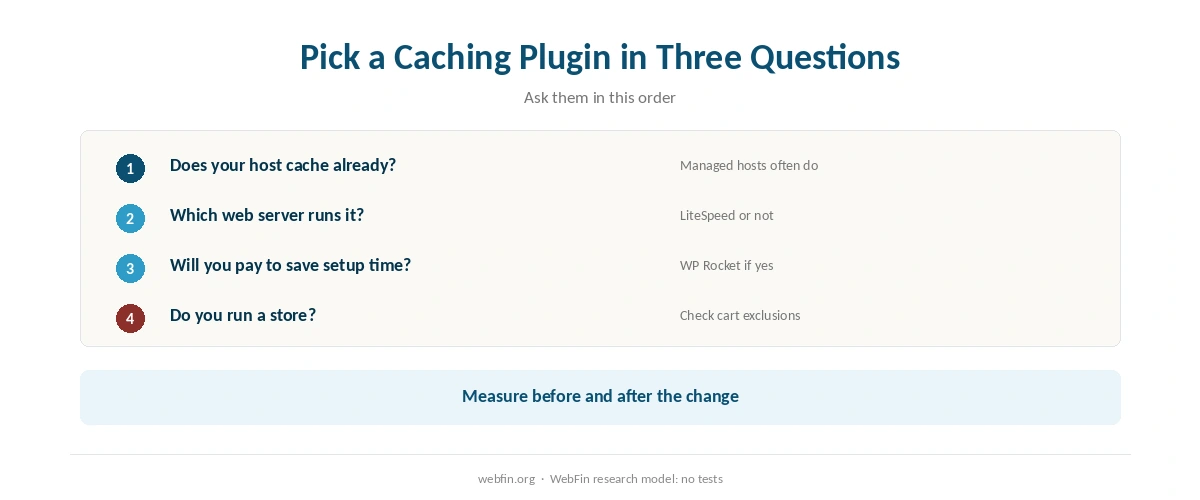
Carts, checkouts and account pages must never be cached, or shoppers see each other’s carts. Every plugin here supports exclusions, and some set WooCommerce ones automatically, but check them after setup.
Our guide to WooCommerce hosting covers the host side of a fast store. When a sale brings a crowd, our guide on handling a traffic spike covers the rest.
Managed Hosts and Caching Plugins
Managed WordPress hosts often cache at the server already. Kinsta lists built-in caching on its managed plans, as our Kinsta WordPress guide explains, and adding a page-cache plugin can then cause conflicts.
Our best WordPress hosting guide compares managed hosts more broadly.
Some managed hosts also restrict caching plugins, as our WP Engine WordPress guide notes. Ask support before installing one.
Measure Before and After
Test the same uncached and cached pages before and after the change, from the same location. Our guide to website speed test tools covers the tools, and our guide on what TTFB is explains the first number to watch.
If TTFB stays high on cached pages, a CDN may help more than another plugin. Our guide on setting up a CDN covers it, and our Cloudflare free vs Pro comparison covers a common choice.
Similarly, this guide may be useful next: Free WordPress Hosting.
How We Research
We run no tests. The plugin descriptions come from comparisons published in 2026, including Ultra Web Hosting’s caching guide, which agree on the server requirements we describe. We read every source in October 2026.
We do not print plugin prices, because they change often and we do not track them in our tables. The criteria behind our host scores are on our about page.
WordPress Caching Plugin FAQ
It depends on your host. On LiteSpeed, LiteSpeed Cache; on Apache or Nginx, WP Super Cache for free or WP Rocket if you prefer to pay.
It installs anywhere, but its server-level page cache works only on LiteSpeed or OpenLiteSpeed servers.
No. WP Rocket is paid only, though it works on any web server.
Often not. Many managed hosts cache at the server; ask support before adding one.
Yes, if carts, checkouts or account pages get cached. Check the exclusions after setup.
The Verdict
The right WordPress caching plugin follows your host’s web server. LiteSpeed Cache wins on LiteSpeed; WP Super Cache or WP Rocket fits Apache and Nginx; W3 Total Cache suits those who want every setting.
Check what your host already does, exclude store pages and measure before and after. Then the plugin earns its place.