Disclosure: WebFin is reader-supported. If you buy hosting through links on this page, we may earn a commission at no extra cost to you. Commissions vary between providers and our ratings do not — here’s our full disclosure.
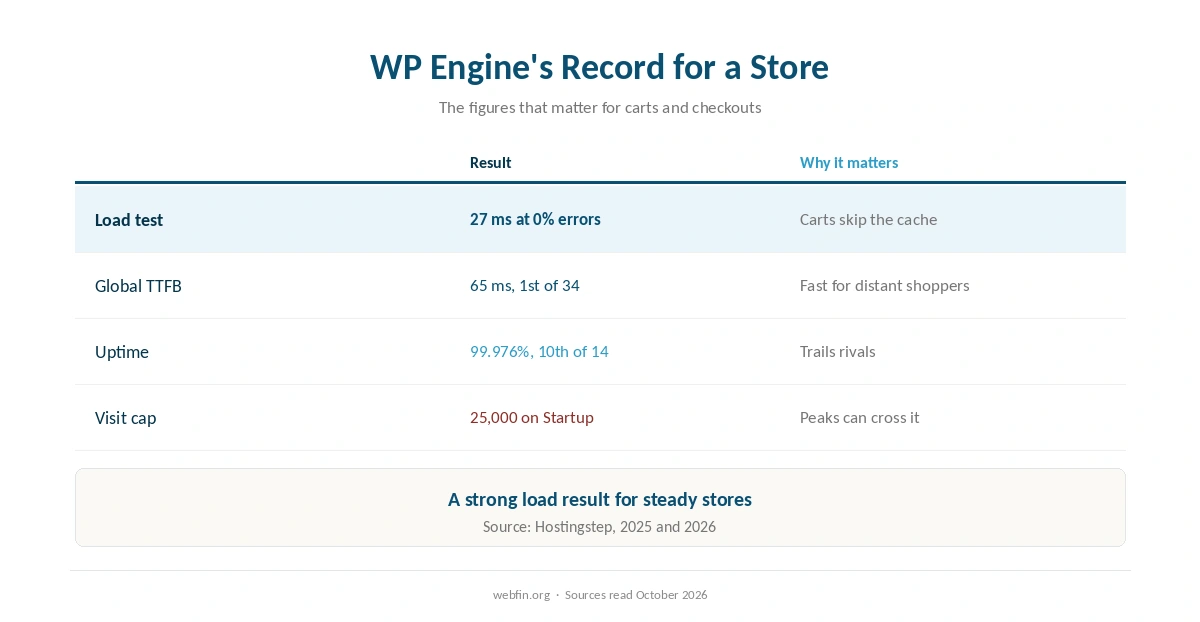
WP Engine WooCommerce hosting is a product of its own. According to TechRadar, WP Engine sells WooCommerce hosting alongside its WordPress and headless plans. For a store, the platform’s strongest figure is the one that matters most: 27 ms under load with 0% errors in Hostingstep’s 2026 benchmarks.
This guide looks at WP Engine through a store owner’s eyes: load, the visit cap, plugins and what happens when traffic spikes.
WP Engine and WooCommerce: The Short Answer
WP Engine suits a store with steady, predictable traffic and a budget for managed hosting. Its load result is strong. However, the visit cap and the plugin rules need checking before you move, and a seasonal spike can push a store past its tier.
Why Load Matters More Than Speed for a Store
Carts, accounts and checkouts skip the page cache, so the server does real work for every shopper. That is why a load test says more about a store host than a cached-page speed figure.
On that measure, WP Engine does well: 27 ms at 0% errors in Hostingstep’s 2026 benchmarks. Our guide on configuring caching explains which store pages a cache can serve.
The Visit Cap on a Store
WP Engine counts visits on WooCommerce hosting too, and Startup covers 25,000 a month before overage handling begins. The tiers run up to 400,000, so a growing store moves up a plan as its traffic grows.
Seasonal peaks are the risk. A store that sells mostly in November and December can cross its cap in those weeks, so check how overage works before the busy season. Our guide on handling a traffic spike covers the rest.
Check Your Plugins Before Moving
TechRadar notes that WP Engine restricts some WordPress plugins. A store often relies on several payment, shipping and caching plugins, so compare that list with WP Engine’s rules before you migrate.
Test the whole checkout on a staging copy first, as our guide on setting up a staging site explains. A failed payment plugin costs more than a slow page.
What a WP Engine Store Costs
Startup costs $27.00 a month for the first 12 months on annual billing, then $35.00, or $1,164.00 across 36 months. We hold no separate figures for WP Engine’s WooCommerce plans, so check those on its own page.
Billing is monthly or annual, and on monthly billing you cancel before the next cycle rather than claim a refund. Our page on hidden hosting fees lists other charges to check, such as overage.
| Host and plan | How it builds | 36-month total |
|---|---|---|
| ChemiCloud Starter, 36-month term | 36 prepaid months at $2.49 | $89.64 |
| InterServer Standard | 36 months at $2.50, price locked | $90.00 |
| DreamHost Launch, 48-month term | 36 of 48 prepaid months at $2.89 | $104.04 |
| Namecheap Stellar, 24-month term | 24 at $1.98, then 12 at $4.88 | $106.08 |
| Hostinger Premium, 48-month term | 36 of 48 prepaid months at $2.99 | $107.64 |
| HostGator Hatchling, 36-month term | 36 months at $3.75, renewal not reached | $135.00 |
| HostGator Hatchling, with daily backups | 36 at $3.75, plus CodeGuard at $35.88 a year | $242.64 |
| Bluehost Starter, 36-month term | 36 months at $3.99, renewal not reached | $143.64 |
| GoDaddy Economy, 36-month term | 36 months at $5.99, renewal not reached | $215.64 |
| GoDaddy Economy, with SSL from year two | 36 at $5.99, plus $119.99 in years two and three | $455.62 |
| Hostwinds Basic, annual | 12 at $4.54, then 24 at $6.99 | $222.24 |
| SiteGround StartUp, 24-month term | 24 at $2.99, then 12 at $14.99 | $251.64 |
| DreamHost Launch, annual | 12 at $2.89, then 24 at $10.99 | $298.44 |
| Scala Hosting Mini, annual | 12 at $2.95, then 24 at $11.95 | $322.20 |
| Bluehost Starter, 12-month term | 12 at $3.99, then 24 at $11.99 | $335.64 |
| IONOS Plus, annual | 12 at $1.00, then 24 at $14.00 | $348.00 |
| GreenGeeks Lite, 36-month prepay | 36 months at $2.95 | $106.20 |
| GreenGeeks Lite, annual | 12 at $2.95, then 24 at $13.95 | $370.20 |
| SiteGround StartUp, 12-month term | 12 at $2.99, then 24 at $17.99 | $467.64 |
| Cloudways, from | 36 months at $14.00, flat | $504.00 |
| A2 Hosting Turbo Boost, annual | 12 at $6.99, then 24 at $20.99 | $587.64 |
| Rocket.net Starter, annual | 12 at $25.00, then 24 at $30.00 | $1,020.00 |
| WP Engine Startup, annual | 12 at $27.00, then 24 at $35.00 | $1,164.00 |
| Liquid Web managed VPS | 36 months at $33.00 | $1,188.00 |
| Kinsta Starter | 36 months at $35.00, flat | $1,260.00 |
| InMotion Core, 36-month term | 36 months at $3.19, renewal not reached | $114.84 |
| InMotion Launch, 36-month term | 36 months at $4.99, renewal not reached | $179.64 |
| Cloudways email, five mailboxes, a month | 5 × $1.50 Rackspace / 5 × $1.99 Titan Pro | $7.50 / $9.95 |
| DreamHost Email, 5 mailboxes, annual | $1.67 × 5 × 12 | $100.20 a year |
| GoDaddy Economy, next 36-month term | Renewal shown in the cart at $15.32 a month | $551.63 |
| Google Workspace or Microsoft 365 middle plan, ten users | $14.00 a user × 10 × 12 months | $1,680 |
| Hostinger Business Starter, five mailboxes, one year after the trial | 5 × $1.59 × 12 | $95.40 |
| Hostinger VPS KVM 1, 24-month term | 24 at $6.49, then 12 at $11.99 | $299.64 |
| Hostinger VPS KVM 2, 24-month term | 24 at $8.99, then 12 at $14.99 | $395.64 |
| Hostinger Website Builder Premium, 48-month term | 36 of 48 prepaid months at $2.99 | $107.64 |
| IONOS VPS L, 1-year term | 6 at $10.00, then 30 at $15.00 | $510.00 |
| IONOS VPS M, 1-year term | 6 at $6.00, then 30 at $8.00 | $276.00 |
| IONOS VPS XS | 36 at $2.00 | $72.00 |
| Suite middle plan, five users | $14.00 a user × 5, a month | $70.00 |
| Zoho Mail Lite, five users | $1.00 a user × 5, a month | $5.00 |

The Update Risk for a Store
In 2024, WordPress.org blocked WP Engine from plugin and theme updates for several months, until a court restored access, according to WP Engine’s own case page. The case is still open.
For a store, a blocked update to WooCommerce or a payment plugin is a security problem, not an inconvenience. Keep a manual update plan and an off-site backup, as our guide to website backup services explains.
Moving a Store to WP Engine WooCommerce Hosting
A store keeps taking orders while you copy it, so plan the cutover for a quiet hour. Our guide on migrating web hosting covers the steps, and our guide on backing up a WordPress site covers the copy you take first.
After the move, test checkout from a location near your customers with the tools in our guide to website speed test tools. A WP Engine WooCommerce store should show its load strength on cart pages, not only on the home page.
When a Different Store Host Fits Better
A store with sharp seasonal peaks may prefer a host that bills by resources rather than visits. Our Kinsta WooCommerce guide covers a close managed rival with its own visit tiers.
For a budget store, our Hostinger WooCommerce guide covers a cheaper route. Our Cloudways WooCommerce guide covers a cloud option.
For a site without a store, our WP Engine WordPress guide applies instead.

In addition, these guides may help: WP Engine for Drupal and WP Engine status guide. Related reading also includes WP Engine Alternatives.
Related reading also includes Does WP Engine offer email?, which covers a closely related question.
How We Research
We run no tests. The product range and plugin restrictions come from TechRadar’s review, and performance figures come from Hostingstep’s 2026 benchmarks. The dispute timeline comes from WP Engine’s case page.
Prices and visit limits come from our TablePress tables, read in October 2026. The criteria behind our scores are on our about page.
WP Engine WooCommerce Hosting: FAQ
Yes. According to TechRadar, WP Engine sells WooCommerce hosting alongside its WordPress and headless plans.
Well on the load test: 27 ms at 0% errors in Hostingstep’s 2026 benchmarks. Watch the monthly visit cap during peaks.
Startup covers 25,000 a month before overage handling; tiers run up to 400,000.
Startup is $1,164.00 across 36 months. We hold no separate figures for its WooCommerce plans.
Not all. TechRadar notes that WP Engine restricts some plugins, so check your store’s list first.
The Verdict
WP Engine’s load result makes it a strong store host for steady traffic, and its WooCommerce product is built for exactly that. Managed updates and round-the-clock chat add to the case.
Check three things before moving: the visit cap against your peak months, your plugins against its rules, and a manual update plan in case the legal dispute flares again.