
Disclosure: WebFin is reader-supported. If you buy hosting through links on this page, we may earn a commission at no extra cost to you. Commissions vary between providers and our ratings do not — here’s our full disclosure.
WebFin runs on Hostinger. We pay for the plan ourselves and have received no discount or other consideration, and that does not change how it scores. This page is a use-case answer rather than a review; the full workings are in our Hostinger review.
WooCommerce asks for the one thing Hostinger’s published record does not cover. Five sources measure it in our tables. They cover cached delivery, uptime and front-end paint. That means 223 ms globally on Business, 99.99% uptime across 2025 and a paint figure of 0.607 seconds. None of them is a load test. A store’s cart, checkout and account pages bypass the cache on every click. So the figure that matters most for WooCommerce is the one we do not have.
Is Hostinger Right for WooCommerce? The Short Answer
Workable for a small store with a handful of orders a day, on Business rather than Premium, and cheap for four years at $2.99 a month. Not the choice for a busy store or a flash sale. With many simultaneous checkouts, no load result is published and the resource limits are not either. Measure the checkout yourself in the first month.
What a Store Asks of a Host
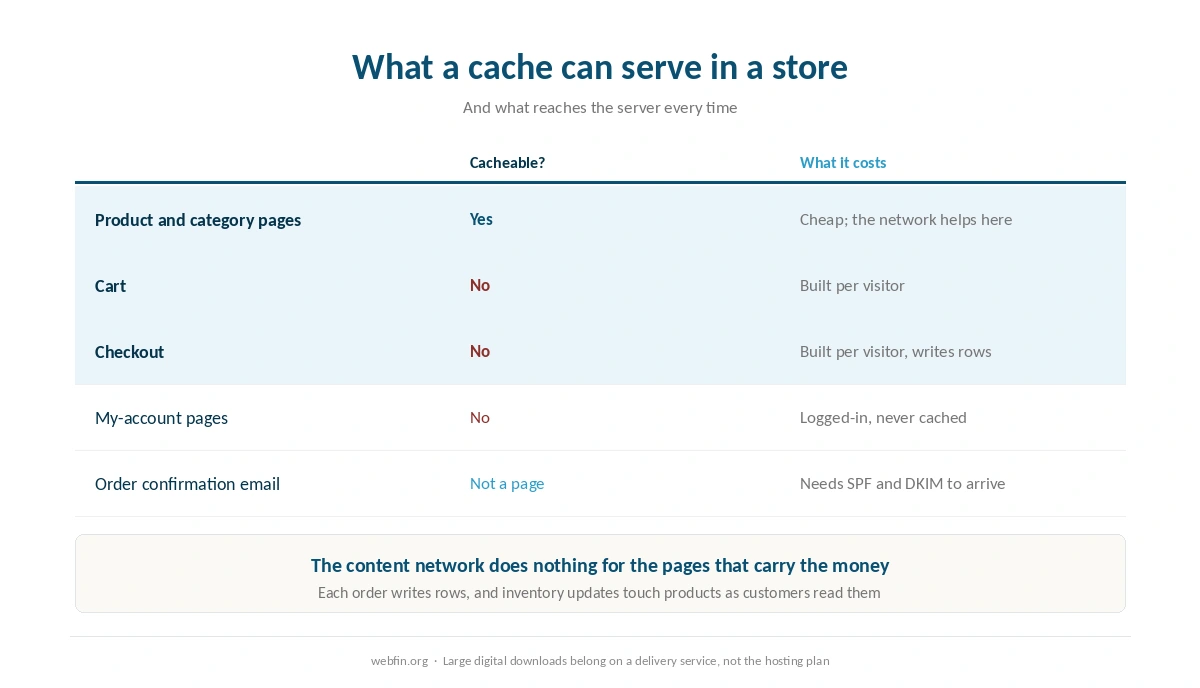
Uncached pages, constantly. Cart, checkout, my-account and any page showing stock are built per visitor. A cache cannot serve them, so the server answers every time.
Database writes. Each order writes rows, and inventory updates touch products while customers are reading them. Our guide to fixing a slow database covers what that turns into over a year of trading.
Concurrency at the worst moment. A sale or a newsletter sends everyone to the checkout at once, which is the exact condition a load test measures.
Email that arrives. Order confirmations and password resets are part of the product. Hostinger includes email, and our guide to setting up email on your domain covers the records that keep receipts out of spam.
| Host and plan | Limit | Where it's stated |
|---|---|---|
| Bluehost shared | 50,000 inodes — soft limit | Hosting Inode Limit article |
| Bluehost shared | 200,000 inodes — AUP threshold | Server Resource Limitations |
| Bluehost shared | 1,000,000 inodes — TOS violation | Hosting Inode Limit article |
| Bluehost shared | 5,000 tables or 10 GB, all databases | Server Resource Limitations |
| Bluehost shared | 5 GB per single database | Server Resource Limitations |
| Bluehost Starter | 100 MB per mailbox | Shared hosting prices page |
| WP Engine Startup | 25,000 monthly visits, then overage handling | Plan pages |
| WP Engine, by tier | 25,000 to 400,000 monthly visits | Plan pages |
| Rocket.net Starter | 25,000 monthly visits, 1 site, 10 GB storage | Plan pages |
| Namecheap EasyWP | 50,000 / 200,000 / 500,000 monthly visits by tier | Plan pages |
| Kinsta Starter | 25,000 monthly visits | Plan pages |
| Scala Hosting VPS | Priced per unit: $3 per core, $1 per gigabyte | Plan pages; adjustable anytime |
| HostGator shared | Weekly backups described as a courtesy, not guaranteed | Hosting terms |
| Liquid Web | Dedicated resources at every tier; no shared plan | Plan pages |
| InterServer Standard | Unlimited storage, bandwidth, email and websites | One plan, no tiers |
| GreenGeeks Lite | One website only | Plan pages |
| IONOS Plus | One email account bundled per plan | Plan pages |
| Hostinger, all plans | Not published | Hostinger support article, 28 Aug 2026 |
| Bluehost Starter | 10 GB NVMe storage | Plan pages, as listed in a 2026 audit |
| InMotion Core | One site, 10 email accounts, SSD storage; NVMe from Launch | TechRadar and a 2026 review |
| SiteGround shared | Shell access by tier — not recorded | Not stated on the plan pages we read, 20 Sep 2026 |
| Bluehost shared | Shell access by tier — not recorded | Not stated on the plan pages we read, 20 Sep 2026 |
| Hostinger, all plans | Shell access by tier — not recorded | Not stated on the plan pages we read, 20 Sep 2026 |
| Cloudways servers | Search service (OpenSearch, Elasticsearch) — not recorded | Not stated on the plan pages we read, 20 Sep 2026 |
What Hostinger Has, and What Is Missing
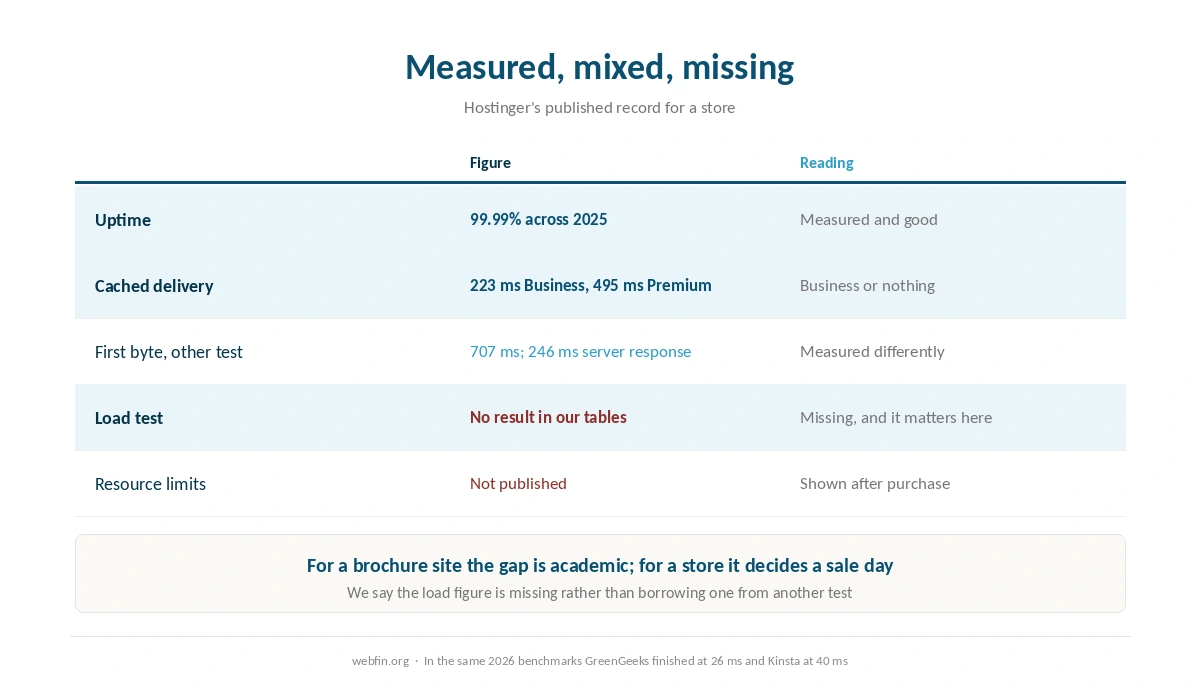
Measured and good. Uptime of 99.99% across 2025, from continuous monitoring since 2021. Cached global delivery of 223 ms on Business, fifth of 34 hosts. A front-end paint figure of 0.607 seconds, second of fifteen.
Measured and mixed. Premium records 495 ms globally, 28th of 34, because it has no content network. A separate test reports 707 ms to first byte with a 246 ms server response.
Not measured at all. There is no load test result for Hostinger in our tables. For a brochure site that gap is academic; for a store it is the missing answer to the only question that decides a sale day.
Not published. Resource limits. A support article dated 28 August 2026 says they are not listed, and the dashboard shows them after purchase. Our piece on what unlimited hosting means puts in context.
Business, Not Premium
For WooCommerce the tier choice matters twice. Product pages, category pages and images cache well. The content network on Business is what makes them quick for a customer in another country: 223 ms against 495 ms.
The checkout is not cached either way, so the network does nothing for it. That is why a store on Premium gets the worst of both: slow catalog pages abroad and the same uncached checkout. Our guide to setting up a CDN covers the bypass rules that keep a cart out of the cache.
How to Tell Whether It Is Enough
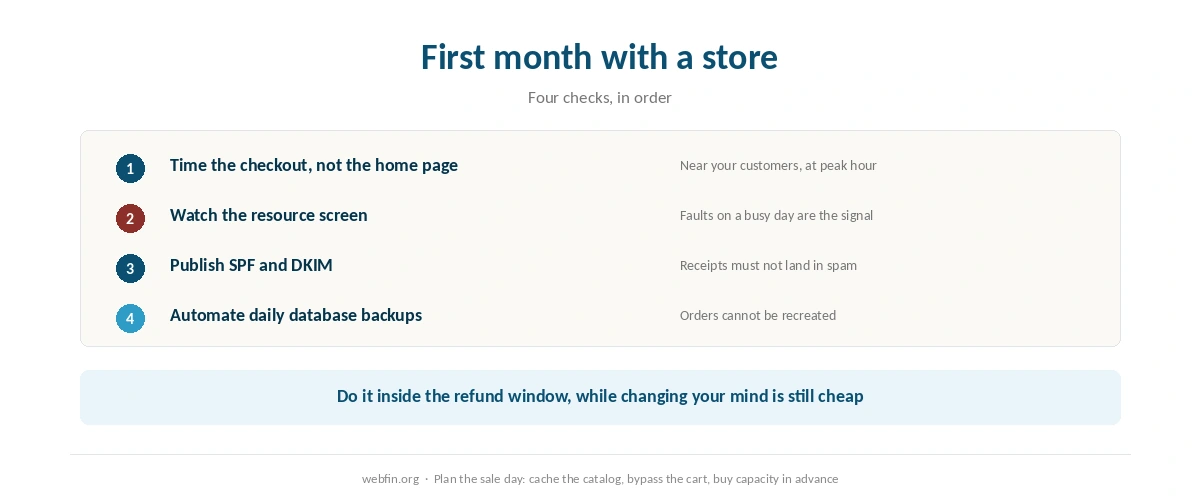
Measure the checkout, not the home page. Add a product, open the cart and time the checkout page, from a location near your customers and at your busiest hour. Our guide to testing your site speed properly covers doing that honestly.
Watch the resource screen on a busy day. The limits appear in the dashboard after purchase, and faults there are the signal, as our guide to checking whether your host is throttling you describes.
Do it inside the refund window. Thirty days on domain registration, and the plan’s own window is the time to find out whether the store feels right.
Then plan the sale day. Caching the catalog, bypassing the cart and buying capacity in advance, as our guide to handling a traffic spike covers.
Which Stores Fit
A small store, a few orders a day. Fine, on Business. The catalog is cached and the checkout is rarely busy.
A store selling digital goods. Fine, with the caveat that large downloads belong on a delivery service rather than the hosting plan.
A local shop with a small catalog. Fine, and the included email is worth more here than a benchmark, as our list of hosting for local business explains.
A store whose traffic arrives in bursts. Look elsewhere. Our list of hosting for ecommerce ranks hosts by the load test, and several complete it cleanly.
Where a Store Would Do Better
Hosts with a clean load result are the alternative, because that is the measurement a checkout depends on. GreenGeeks finished the 2026 test at 26 ms without an error, and Kinsta at 40 ms with every request answered. Bluehost, a Newfold Digital brand, finished at 41 ms and Scala Hosting at 48 ms.
For a sale-driven store, a server billed by the hour is the other shape: enlarge it for the day and shrink it afterward. Our roundup of hosting for high traffic ranks the hosts by that test rather than by cached delivery.
What the Refund Window Buys You
A store is the one case where the trial period is a test rather than a formality. Install WooCommerce, add a few products, place test orders and time the checkout on a weekday evening. That answers the question the published record cannot.
If it feels fine at your real order volume, the missing load result stops mattering, because you have measured the case that applies to you. If it does not, you have learned that while the money is still refundable.
Backups Matter More Here
Orders are data you cannot recreate. A store needs daily database copies at minimum, kept off the host, and a restore you have actually tried. Our guide to setting up automatic backups covers the schedules and the failure alerts.
Automate it rather than relying on the panel alone, and test a restore before your first busy season rather than during it.
How We Research
We run no tests. Hostinger’s figures come from Hostingstep, continuous since 2021, with global first-byte rankings from its 2026 benchmarks; from Cybernews in June 2026; and from a ten-week TechRadar window. The load results for other hosts come from the same 2026 benchmark project.
There is no load test result for Hostinger in our tables, and we say so rather than borrow a figure from another test. Prices and the support article about resource limits come from Hostinger’s own pages, read on 20 September 2026. We host this site on Hostinger and pay for the plan, as disclosed above. The criteria are on our about page.
Hostinger for WooCommerce FAQ
Yes, and for a small store it works: the catalog caches well and Business delivers it at 223 ms globally. The caution is that no load result is published for Hostinger, and a checkout is never cached.
Business. Its content network records 223 ms globally against 495 ms on Premium, and product pages are exactly the kind of page a network helps. The checkout is uncached on either tier.
A load test. Five sources measure uptime, cached delivery and front-end paint. None of them measures how the plan behaves with many simultaneous visitors, which is what a sale day produces.
Time the checkout page at your busiest hour, and watch the resource screen for faults. If either gets worse on good days, the plan is the limit rather than the store.
In the 2026 benchmarks, GreenGeeks finished at 26 ms without errors, Kinsta at 40 ms with every request answered, Bluehost at 41 ms and Scala Hosting at 48 ms. A server billed by the hour is the other route for sale days.
The Verdict
For a small WooCommerce store, Hostinger on Business is a reasonable and cheap home. You get measured uptime, a network in front of the catalog, email included, and $2.99 a month held for 48 months. Nothing in its record argues against a shop with a few orders a day.
For a busy store the missing load result is the problem, not a technicality. If your revenue depends on a hundred people checking out at once, choose a host that has completed that test or a server you can resize for the day. Our page on what web hosting costs prices both routes across three years.