Disclosure: WebFin is reader-supported. If you buy hosting through links on this page, we may earn a commission at no extra cost to you. Commissions vary between providers and our ratings do not — here’s our full disclosure.
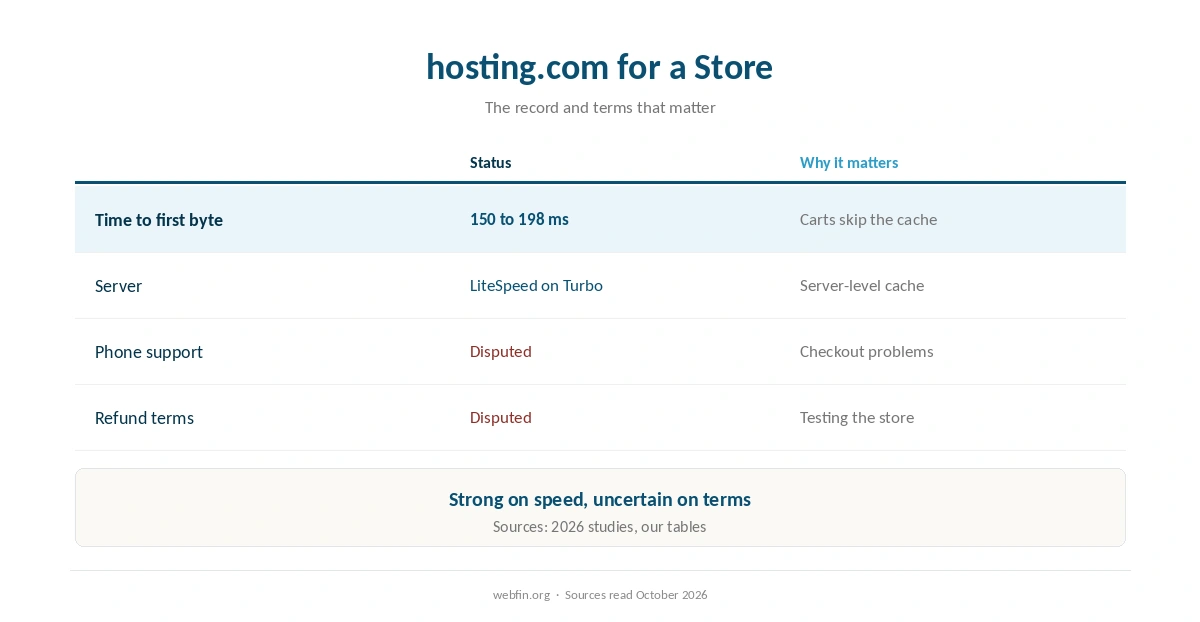
A2 Hosting WooCommerce stores now run on hosting.com, the name World Host Group gave A2 Hosting in April 2025. For a store, the useful part is speed: the Turbo tiers run LiteSpeed, and 2026 studies put the time to first byte at 150 to 198 ms.
A store also depends on support and refunds, and sources disagree on both since the change of owner. This guide covers speed, caching for carts, cost and the questions to ask before the first order.
A2 Hosting and WooCommerce: The Short Answer
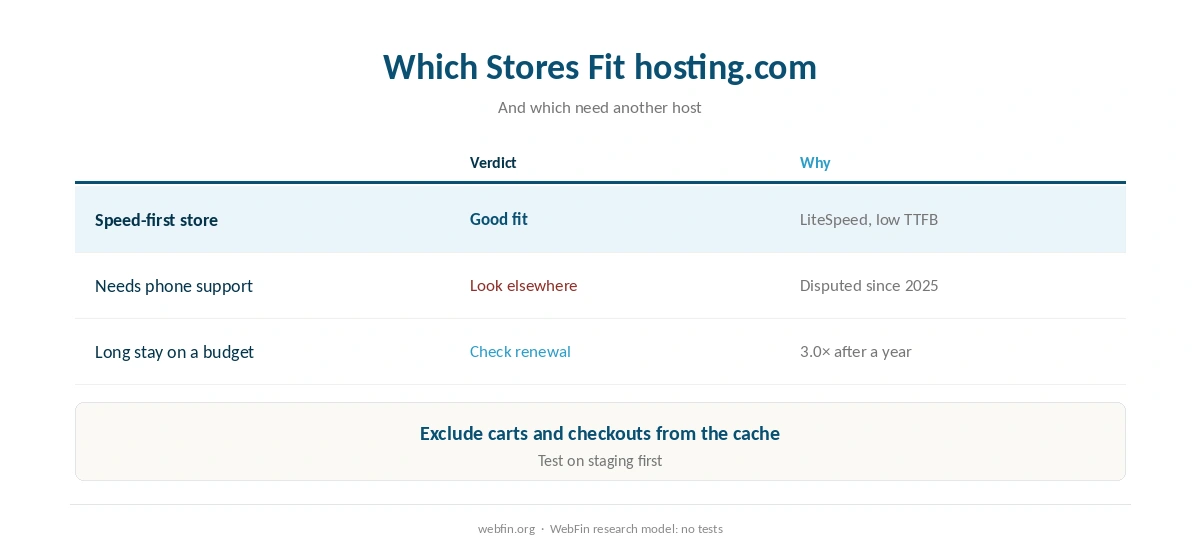
hosting.com’s Turbo tiers suit a store that values speed, especially with LiteSpeed Cache handling cacheable pages. However, the renewal triples after a year, and the disputed support and refund terms matter more for a store than for a blog.
Speed Where a Store Needs It
A low time to first byte helps most on pages the cache cannot serve, such as carts and checkouts. At 150 to 198 ms in 2026 studies, the Turbo tiers start those pages quickly.
Our guide to what TTFB is explains why that number matters for an A2 Hosting WooCommerce store. Our guide on handling a traffic spike covers sales and launches.
Caching a Store on LiteSpeed
LiteSpeed Cache uses the server’s own page cache on LiteSpeed hosts, which suits the Turbo tiers. Our guide to WordPress caching plugins explains the choice.
Exclude carts, checkouts and account pages from the cache, or shoppers may see each other’s carts. Then test the checkout on a staging copy, as our guide on setting up a staging site explains.
Setting Up WooCommerce
Install WordPress through Softaculous in cPanel, as A2’s Softaculous hosting page describes, then add WooCommerce from the WordPress plugin screen.
Add an SSL certificate before you take payments. Our guide on installing an SSL certificate covers the setup.
What a Store Costs
Turbo Boost costs $6.99 a month for the first 12 months on annual billing, then $20.99, which is 3.0× over 12 months. Across 36 months, that is $587.64.
Budget for a backup service too, since a store’s orders change all day. Our guide to website backup services compares the options.
| Host and plan | How it builds | 36-month total |
|---|---|---|
| ChemiCloud Starter, 36-month term | 36 prepaid months at $2.49 | $89.64 |
| InterServer Standard | 36 months at $2.50, price locked | $90.00 |
| DreamHost Launch, 48-month term | 36 of 48 prepaid months at $2.89 | $104.04 |
| Namecheap Stellar, 24-month term | 24 at $1.98, then 12 at $4.88 | $106.08 |
| Hostinger Premium, 48-month term | 36 of 48 prepaid months at $2.99 | $107.64 |
| HostGator Hatchling, 36-month term | 36 months at $3.75, renewal not reached | $135.00 |
| HostGator Hatchling, with daily backups | 36 at $3.75, plus CodeGuard at $35.88 a year | $242.64 |
| Bluehost Starter, 36-month term | 36 months at $3.99, renewal not reached | $143.64 |
| GoDaddy Economy, 36-month term | 36 months at $5.99, renewal not reached | $215.64 |
| GoDaddy Economy, with SSL from year two | 36 at $5.99, plus $119.99 in years two and three | $455.62 |
| Hostwinds Basic, annual | 12 at $4.54, then 24 at $6.99 | $222.24 |
| SiteGround StartUp, 24-month term | 24 at $2.99, then 12 at $14.99 | $251.64 |
| DreamHost Launch, annual | 12 at $2.89, then 24 at $10.99 | $298.44 |
| Scala Hosting Mini, annual | 12 at $2.95, then 24 at $11.95 | $322.20 |
| Bluehost Starter, 12-month term | 12 at $3.99, then 24 at $11.99 | $335.64 |
| IONOS Plus, annual | 12 at $1.00, then 24 at $14.00 | $348.00 |
| GreenGeeks Lite, 36-month prepay | 36 months at $2.95 | $106.20 |
| GreenGeeks Lite, annual | 12 at $2.95, then 24 at $13.95 | $370.20 |
| SiteGround StartUp, 12-month term | 12 at $2.99, then 24 at $17.99 | $467.64 |
| Cloudways, from | 36 months at $14.00, flat | $504.00 |
| A2 Hosting Turbo Boost, annual | 12 at $6.99, then 24 at $20.99 | $587.64 |
| Rocket.net Starter, annual | 12 at $25.00, then 24 at $30.00 | $1,020.00 |
| WP Engine Startup, annual | 12 at $27.00, then 24 at $35.00 | $1,164.00 |
| Liquid Web managed VPS | 36 months at $33.00 | $1,188.00 |
| Kinsta Starter | 36 months at $35.00, flat | $1,260.00 |
| InMotion Core, 36-month term | 36 months at $3.19, renewal not reached | $114.84 |
| InMotion Launch, 36-month term | 36 months at $4.99, renewal not reached | $179.64 |
| Cloudways email, five mailboxes, a month | 5 × $1.50 Rackspace / 5 × $1.99 Titan Pro | $7.50 / $9.95 |
| DreamHost Email, 5 mailboxes, annual | $1.67 × 5 × 12 | $100.20 a year |
| GoDaddy Economy, next 36-month term | Renewal shown in the cart at $15.32 a month | $551.63 |
| Google Workspace or Microsoft 365 middle plan, ten users | $14.00 a user × 10 × 12 months | $1,680 |
| Hostinger Business Starter, five mailboxes, one year after the trial | 5 × $1.59 × 12 | $95.40 |
| Hostinger VPS KVM 1, 24-month term | 24 at $6.49, then 12 at $11.99 | $299.64 |
| Hostinger VPS KVM 2, 24-month term | 24 at $8.99, then 12 at $14.99 | $395.64 |
| Hostinger Website Builder Premium, 48-month term | 36 of 48 prepaid months at $2.99 | $107.64 |
| IONOS VPS L, 1-year term | 6 at $10.00, then 30 at $15.00 | $510.00 |
| IONOS VPS M, 1-year term | 6 at $6.00, then 30 at $8.00 | $276.00 |
| IONOS VPS XS | 36 at $2.00 | $72.00 |
| Suite middle plan, five users | $14.00 a user × 5, a month | $70.00 |
| Zoho Mail Lite, five users | $1.00 a user × 5, a month | $5.00 |

Questions to Ask Before the First Order
First, ask whether phone support is available, since one 2026 review lists it and customers say it has gone. Customer reports on HostAdvice also describe slower support since the acquisition.
Second, ask which refund terms apply, an anytime guarantee or standard terms, and keep the reply. Our guide on reading a hosting agreement shows where to look.
If You Already Run an A2 Hosting WooCommerce Store
Existing A2 Hosting WooCommerce stores now renew through hosting.com. Check the next invoice and the refund rules for your term, since customers report changes after the acquisition.
If you decide to move, plan the cutover for a quiet hour, as our guide on migrating web hosting explains. Take a copy first, following our guide on backing up a WordPress site.
When a Store Host Fits Better
A store that needs guaranteed phone support should look beyond A2 Hosting WooCommerce plans. Our Kinsta WooCommerce guide covers a managed option.
For a budget store, our Hostinger WooCommerce guide covers a cheaper renewal. For a site without a store, our A2 Hosting WordPress guide applies.
Similarly, these guides may be useful next: A2 Hosting Coupon and Promo Codes and A2 Hosting for Drupal.
How We Research
We run no tests. Ownership comes from the company’s announcement, speed from 2026 studies, and prices and the disputed terms from our TablePress tables. Customer reports come from HostAdvice, read in October 2026.
The criteria behind our scores are on our about page.
A2 Hosting WooCommerce Hosting: FAQ
Yes. Install WordPress through Softaculous in cPanel on hosting.com, then add WooCommerce.
On the Turbo tiers, 2026 studies put the time to first byte at 150 to 198 ms, which helps uncached cart pages.
Yes, on the Turbo tiers, but exclude carts, checkouts and account pages from the cache.
Turbo Boost is $587.64 across 36 months: $6.99 a month for a year, then $20.99.
Sources disagree on both since the 2025 acquisition, so confirm them in writing before you pay.
The Verdict
hosting.com’s Turbo tiers give a WooCommerce store real speed, and LiteSpeed Cache makes the most of it. For a store that values speed above all, that is a strong case.
Before the first order, though, confirm support and refunds in writing and budget for the renewal. A store depends on both more than a blog does.