Disclosure: WebFin is reader-supported. If you buy hosting through links on this page, we may earn a commission at no extra cost to you. Commissions vary between providers and our ratings do not — here’s our full disclosure.
Kinsta Joomla hosting does not exist as a managed product: Kinsta’s MyKinsta platform hosts WordPress only. Since February 2, 2026, Sevalla, Kinsta’s separate platform-as-a-service, runs its application, database and static site hosting. To run Joomla with Kinsta, you therefore deploy it yourself as a custom application on Sevalla.
That route suits a developer, but it is not the managed experience that people pay Kinsta for. This guide sets out what changes, what you would maintain yourself and which hosts run Joomla with less work.
Kinsta and Joomla: The Short Answer
For most Joomla sites, choose another host. Kinsta’s managed tools belong to MyKinsta and apply to WordPress: daily backups, staging, built-in caching and expert WordPress support. On Sevalla, by contrast, Joomla runs as an application you package, update and secure yourself.
What Moved to Sevalla in 2026
According to Kinsta, Sevalla took over application hosting, database hosting, static site hosting and object storage on February 2, 2026. Meanwhile, Kinsta now focuses fully on managed WordPress, and nothing changed for WordPress customers.
Kinsta and Sevalla share infrastructure, terms and log-in credentials, according to Kinsta’s Sevalla overview. Sevalla’s own documentation draws the same line. It notes that a WordPress site can technically run as a custom application there, while managed WordPress hosting stays on MyKinsta.
Joomla, in other words, sits on the application side of that line. No managed tier exists for it at all.

Running Joomla on Sevalla in Practice
A Joomla site on Sevalla is a container you build. It holds the web server, PHP and the Joomla files, and you create the database separately. Sevalla then deploys the container from a Git repository and scales it.
As a result, Joomla core updates, extension updates and PHP version changes fall to you. Backups of the site files do too, since a container’s own storage is the wrong place for a CMS to keep uploads.
Our guide on setting up automatic backups applies here. Our managed vs unmanaged guide explains the wider trade.
⚠️ We found no Joomla-specific documentation or one-click Joomla template from Sevalla in the sources we read. Treat the setup as a general PHP deployment, and check Sevalla’s current templates before you plan around one.
What Kinsta Does Well for WordPress
The managed product has a strong named record, which is exactly what a Joomla site gives up. Hostingstep’s reviews, published in 2026, show Kinsta handling load at 40 ms with 0% errors and scored 8.8 of 10 on WPBench. Hostingstep also reports an origin TTFB of 525 ms, with edge figures that differ.
Support runs by chat and tickets around the clock, with no telephone line, and refunds come within 30 days. All of that describes MyKinsta and WordPress, however, not a Joomla container on Sevalla.
What a Joomla Site Loses Off MyKinsta
The features that justify Kinsta’s price are the WordPress ones. Kinsta lists staging, automatic daily backups, the caching layer and WordPress-trained support for MyKinsta. A Joomla site on Sevalla does without them unless you build equivalents.
Our guide to setting up a staging site covers the manual route. The pattern also repeats for other CMSs at Kinsta, as our Kinsta and Drupal guide shows.
Our Kinsta and Magento guide reaches a similar conclusion. For contrast, our Kinsta for WordPress guide shows what the managed product does well.
What It Costs Compared With a Joomla Host
Kinsta’s Starter plan costs $35.00 a month with no promotional term. Across 36 months, that is $1,260.00 in our three-year table. However, the price buys managed WordPress, not Joomla.
Sevalla prices its application hosting separately. We hold no verified figure for a Joomla-sized deployment, so we do not print one.
Hosts that run Joomla on ordinary plans cost far less and include the installer. Our guides to Joomla on Hostinger and Joomla on SiteGround cover two of them.
Bluehost, owned by Newfold Digital, is a third option, covered in our Joomla on Bluehost guide. Before you commit to any of them, our renewal price guide shows what each one renews at.
| Host and plan | How it builds | 36-month total |
|---|---|---|
| ChemiCloud Starter, 36-month term | 36 prepaid months at $2.49 | $89.64 |
| InterServer Standard | 36 months at $2.50, price locked | $90.00 |
| DreamHost Launch, 48-month term | 36 of 48 prepaid months at $2.89 | $104.04 |
| Namecheap Stellar, 24-month term | 24 at $1.98, then 12 at $4.88 | $106.08 |
| Hostinger Premium, 48-month term | 36 of 48 prepaid months at $2.99 | $107.64 |
| HostGator Hatchling, 36-month term | 36 months at $3.75, renewal not reached | $135.00 |
| HostGator Hatchling, with daily backups | 36 at $3.75, plus CodeGuard at $35.88 a year | $242.64 |
| Bluehost Starter, 36-month term | 36 months at $3.99, renewal not reached | $143.64 |
| GoDaddy Economy, 36-month term | 36 months at $5.99, renewal not reached | $215.64 |
| GoDaddy Economy, with SSL from year two | 36 at $5.99, plus $119.99 in years two and three | $455.62 |
| Hostwinds Basic, annual | 12 at $4.54, then 24 at $6.99 | $222.24 |
| SiteGround StartUp, 24-month term | 24 at $2.99, then 12 at $14.99 | $251.64 |
| DreamHost Launch, annual | 12 at $2.89, then 24 at $10.99 | $298.44 |
| Scala Hosting Mini, annual | 12 at $2.95, then 24 at $11.95 | $322.20 |
| Bluehost Starter, 12-month term | 12 at $3.99, then 24 at $11.99 | $335.64 |
| IONOS Plus, annual | 12 at $1.00, then 24 at $14.00 | $348.00 |
| GreenGeeks Lite, 36-month prepay | 36 months at $2.95 | $106.20 |
| GreenGeeks Lite, annual | 12 at $2.95, then 24 at $13.95 | $370.20 |
| SiteGround StartUp, 12-month term | 12 at $2.99, then 24 at $17.99 | $467.64 |
| Cloudways, from | 36 months at $14.00, flat | $504.00 |
| A2 Hosting Turbo Boost, annual | 12 at $6.99, then 24 at $20.99 | $587.64 |
| Rocket.net Starter, annual | 12 at $25.00, then 24 at $30.00 | $1,020.00 |
| WP Engine Startup, annual | 12 at $27.00, then 24 at $35.00 | $1,164.00 |
| Liquid Web managed VPS | 36 months at $33.00 | $1,188.00 |
| Kinsta Starter | 36 months at $35.00, flat | $1,260.00 |
| InMotion Core, 36-month term | 36 months at $3.19, renewal not reached | $114.84 |
| InMotion Launch, 36-month term | 36 months at $4.99, renewal not reached | $179.64 |
| Cloudways email, five mailboxes, a month | 5 × $1.50 Rackspace / 5 × $1.99 Titan Pro | $7.50 / $9.95 |
| DreamHost Email, 5 mailboxes, annual | $1.67 × 5 × 12 | $100.20 a year |
| GoDaddy Economy, next 36-month term | Renewal shown in the cart at $15.32 a month | $551.63 |
| Google Workspace or Microsoft 365 middle plan, ten users | $14.00 a user × 10 × 12 months | $1,680 |
| Hostinger Business Starter, five mailboxes, one year after the trial | 5 × $1.59 × 12 | $95.40 |
| Hostinger VPS KVM 1, 24-month term | 24 at $6.49, then 12 at $11.99 | $299.64 |
| Hostinger VPS KVM 2, 24-month term | 24 at $8.99, then 12 at $14.99 | $395.64 |
| Hostinger Website Builder Premium, 48-month term | 36 of 48 prepaid months at $2.99 | $107.64 |
| IONOS VPS L, 1-year term | 6 at $10.00, then 30 at $15.00 | $510.00 |
| IONOS VPS M, 1-year term | 6 at $6.00, then 30 at $8.00 | $276.00 |
| IONOS VPS XS | 36 at $2.00 | $72.00 |
| Suite middle plan, five users | $14.00 a user × 5, a month | $70.00 |
| Zoho Mail Lite, five users | $1.00 a user × 5, a month | $5.00 |
Questions to Settle Before Deploying on Sevalla
First, decide who will apply Joomla and extension updates, and how quickly. Next, decide where uploads and backups will live, since the container should not hold them.
Finally, check the cost against a Joomla-ready plan before you start. If the answers point to one busy developer, a managed host may well be the cheaper route in practice.
Who Should Still Use Kinsta for Joomla
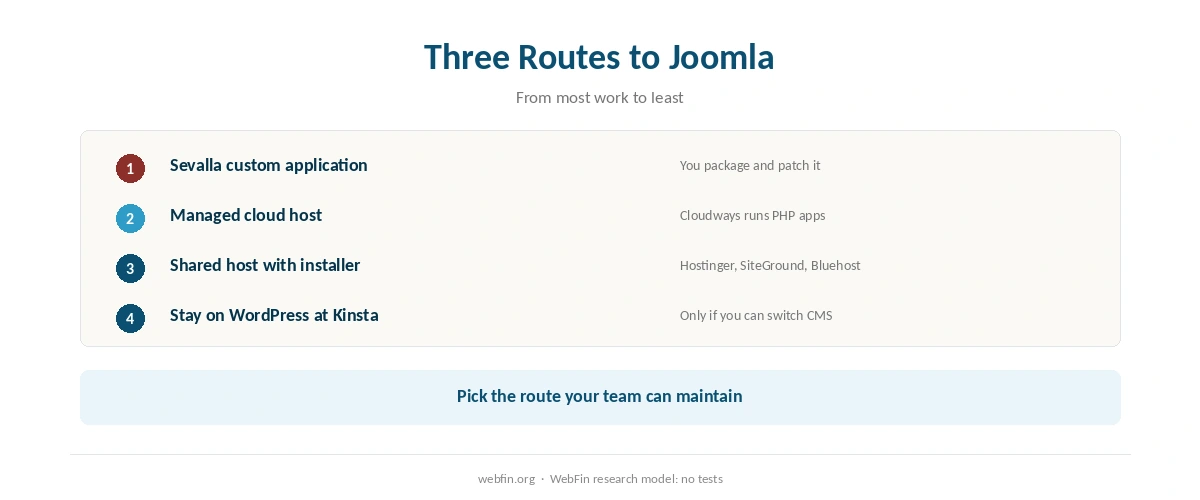
A team that already runs WordPress on Kinsta and has a developer comfortable with containers can host a small Joomla site on Sevalla. In that case, one account and one bill may outweigh the extra maintenance.
For everyone else, another host fits better. A Joomla site with no developer needs an installer, backups and a host that patches the server. Shared and managed cloud plans provide exactly that.
Our guide to hosting for developers covers the case where container control is the point.
Moving a Joomla Site Away From Kinsta
If maintenance on Sevalla has become a burden, move the site as a full migration. First, export the database and the files, including uploads. Then test the copy on the new host before you point the domain.
Our guides on migrating web hosting and pointing a domain to a new host walk through both steps.

Similarly, this guide may be useful next: Kinsta Pricing.
How We Research
We run no tests. The split between MyKinsta and Sevalla comes from Kinsta’s changelog, its Sevalla overview and Sevalla’s own documentation, which we read in October 2026. Kinsta’s price, support, refund and Hostingstep figures come from our TablePress tables, checked against its plan page in September 2026.
Where we found no Joomla-specific source, we say so. The criteria behind our scores are on our about page, and our guide to VPS hosting explains the server side.
Kinsta and Joomla: FAQ
Not as managed hosting. MyKinsta hosts WordPress only, so Joomla can run only as a custom application on Sevalla, Kinsta’s platform-as-a-service.
Kinsta’s separate platform for application, database and static site hosting. Since February 2, 2026, those services run there, with the same log-in.
No. Kinsta lists those tools for managed WordPress on MyKinsta, so a Joomla application on Sevalla needs its own backups and staging.
Starter is $35.00 a month, or $1,260.00 across 36 months, but that buys managed WordPress. We hold no verified Sevalla price for a Joomla site.
A host with a Joomla installer and managed servers. Our Hostinger, SiteGround, Bluehost and Cloudways Joomla guides cover those options.
The Verdict
Kinsta is a strong WordPress host, but it is not a Joomla host. Since February 2026, Joomla at Kinsta means a self-managed application on Sevalla. That route lacks the backups, staging and caching that make Kinsta worth its price.
Choose it only if you already run WordPress there and have a developer who will look after a container. Otherwise, a host with a Joomla installer will cost less and ask less of you.