Disclosure: WebFin is reader-supported. If you buy hosting through links on this page, we may earn a commission at no extra cost to you. Commissions vary between providers and our ratings do not — here’s our full disclosure.
GoDaddy WooCommerce hosting is not a separate product. GoDaddy’s WordPress page states that WooCommerce comes with every Managed Hosting for WordPress plan, so a store runs on the same Basic, Deluxe or Ultimate tiers as a blog. The question for a store is therefore whether those plans handle carts and checkouts, not whether GoDaddy allows WooCommerce.
A store also asks more of a host than a blog does, because carts, accounts and checkouts skip the page cache. This guide looks at GoDaddy through that lens.
GoDaddy and WooCommerce: The Short Answer
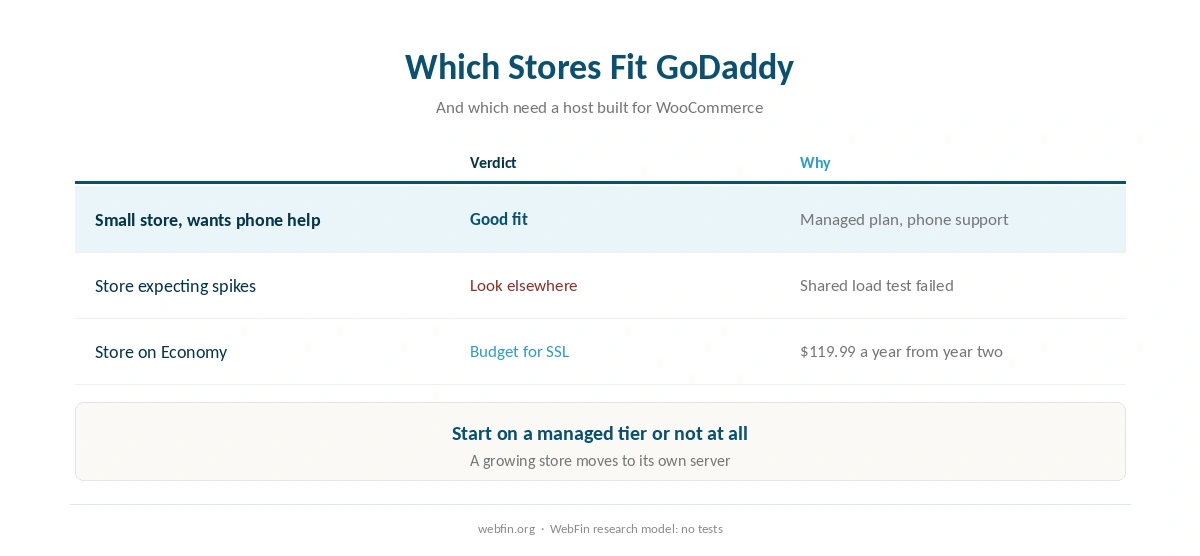
Run a small store on GoDaddy’s managed WordPress plans if phone support matters most to you. However, avoid the shared cPanel route for a store, since its load test did not complete in Hostingstep’s record. A store expecting real traffic will do better on a host built around WooCommerce.
Why a Store Is Harder to Host Than a Blog
A blog can serve most visitors from cache. A store cannot, because every cart and checkout belongs to one shopper. As a result, the server does real work on each of those pages, and the load it can carry matters more than the speed of a cached page.
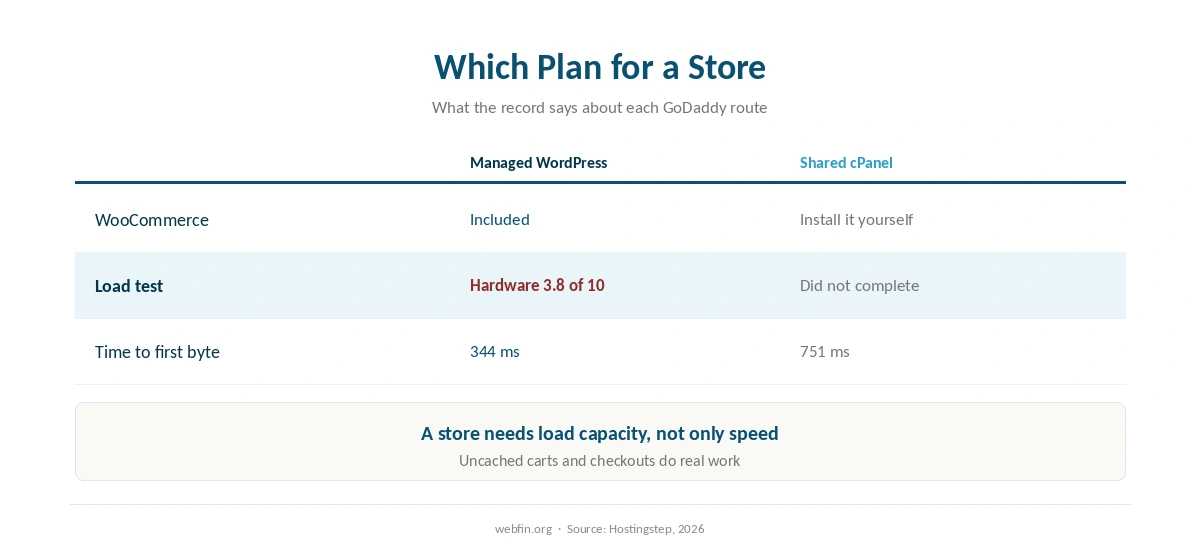
That is why Hostingstep’s load test matters here. On GoDaddy’s shared hosting, the test did not complete between November 2025 and June 2026. Our guide on configuring caching shows which store pages a cache can serve.
Which GoDaddy Plan to Use for a Store
The managed plans are the only sensible starting point. Hostingstep measured them at a 344 ms time to first byte in 2026, with a hardware score of 3.8 of 10. That score is modest, so a store with steady orders may outgrow the entry tier quickly.
If the store grows, the next step is a server of its own rather than a bigger shared plan. Our guide on moving from shared hosting to a VPS covers that move, and our guide to VPS hosting explains what changes.
SSL Is Not Optional on a Store
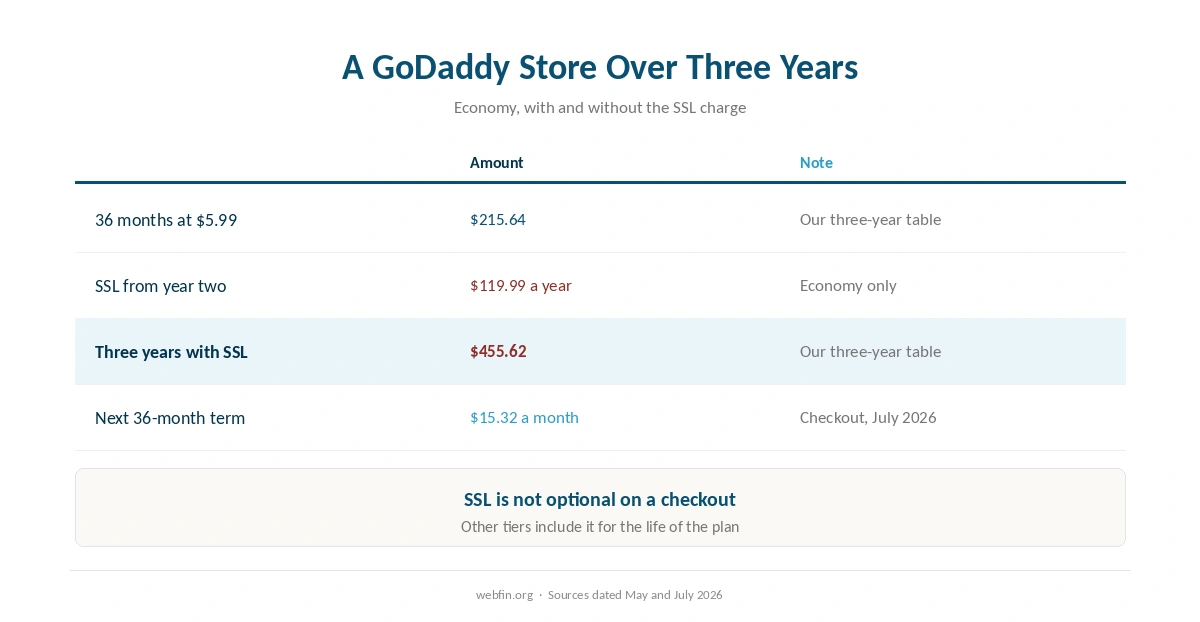
Checkout pages need a valid certificate, so the SSL line matters more for a GoDaddy WooCommerce store than for a blog. On Economy, GoDaddy charges $119.99 a year for SSL from year two, while other tiers include it for the life of the plan.
Economy itself starts at $5.99 a month on 36 months, which is $215.64 up front. Adding the SSL charge brings three years to $455.62. Our guide on installing an SSL certificate covers the free routes other hosts offer.
| Host and plan | How it builds | 36-month total |
|---|---|---|
| ChemiCloud Starter, 36-month term | 36 prepaid months at $2.49 | $89.64 |
| InterServer Standard | 36 months at $2.50, price locked | $90.00 |
| DreamHost Launch, 48-month term | 36 of 48 prepaid months at $2.89 | $104.04 |
| Namecheap Stellar, 24-month term | 24 at $1.98, then 12 at $4.88 | $106.08 |
| Hostinger Premium, 48-month term | 36 of 48 prepaid months at $2.99 | $107.64 |
| HostGator Hatchling, 36-month term | 36 months at $3.75, renewal not reached | $135.00 |
| HostGator Hatchling, with daily backups | 36 at $3.75, plus CodeGuard at $35.88 a year | $242.64 |
| Bluehost Starter, 36-month term | 36 months at $3.99, renewal not reached | $143.64 |
| GoDaddy Economy, 36-month term | 36 months at $5.99, renewal not reached | $215.64 |
| GoDaddy Economy, with SSL from year two | 36 at $5.99, plus $119.99 in years two and three | $455.62 |
| Hostwinds Basic, annual | 12 at $4.54, then 24 at $6.99 | $222.24 |
| SiteGround StartUp, 24-month term | 24 at $2.99, then 12 at $14.99 | $251.64 |
| DreamHost Launch, annual | 12 at $2.89, then 24 at $10.99 | $298.44 |
| Scala Hosting Mini, annual | 12 at $2.95, then 24 at $11.95 | $322.20 |
| Bluehost Starter, 12-month term | 12 at $3.99, then 24 at $11.99 | $335.64 |
| IONOS Plus, annual | 12 at $1.00, then 24 at $14.00 | $348.00 |
| GreenGeeks Lite, 36-month prepay | 36 months at $2.95 | $106.20 |
| GreenGeeks Lite, annual | 12 at $2.95, then 24 at $13.95 | $370.20 |
| SiteGround StartUp, 12-month term | 12 at $2.99, then 24 at $17.99 | $467.64 |
| Cloudways, from | 36 months at $14.00, flat | $504.00 |
| A2 Hosting Turbo Boost, annual | 12 at $6.99, then 24 at $20.99 | $587.64 |
| Rocket.net Starter, annual | 12 at $25.00, then 24 at $30.00 | $1,020.00 |
| WP Engine Startup, annual | 12 at $27.00, then 24 at $35.00 | $1,164.00 |
| Liquid Web managed VPS | 36 months at $33.00 | $1,188.00 |
| Kinsta Starter | 36 months at $35.00, flat | $1,260.00 |
| InMotion Core, 36-month term | 36 months at $3.19, renewal not reached | $114.84 |
| InMotion Launch, 36-month term | 36 months at $4.99, renewal not reached | $179.64 |
| Cloudways email, five mailboxes, a month | 5 × $1.50 Rackspace / 5 × $1.99 Titan Pro | $7.50 / $9.95 |
| DreamHost Email, 5 mailboxes, annual | $1.67 × 5 × 12 | $100.20 a year |
| GoDaddy Economy, next 36-month term | Renewal shown in the cart at $15.32 a month | $551.63 |
| Google Workspace or Microsoft 365 middle plan, ten users | $14.00 a user × 10 × 12 months | $1,680 |
| Hostinger Business Starter, five mailboxes, one year after the trial | 5 × $1.59 × 12 | $95.40 |
| Hostinger VPS KVM 1, 24-month term | 24 at $6.49, then 12 at $11.99 | $299.64 |
| Hostinger VPS KVM 2, 24-month term | 24 at $8.99, then 12 at $14.99 | $395.64 |
| Hostinger Website Builder Premium, 48-month term | 36 of 48 prepaid months at $2.99 | $107.64 |
| IONOS VPS L, 1-year term | 6 at $10.00, then 30 at $15.00 | $510.00 |
| IONOS VPS M, 1-year term | 6 at $6.00, then 30 at $8.00 | $276.00 |
| IONOS VPS XS | 36 at $2.00 | $72.00 |
| Suite middle plan, five users | $14.00 a user × 5, a month | $70.00 |
| Zoho Mail Lite, five users | $1.00 a user × 5, a month | $5.00 |
Renewal and Checkout Surprises
Two renewal figures circulate for Economy. GoDaddy lists it at $11.99 a month, while a July 2026 checkout showed the next 36-month term at $15.32 a month. So budget for the higher figure if you plan to stay.
The checkout itself needs care too. One review counted $345.39 of pre-checked extras, a figure we could not verify, and refunds exclude domains. Our guide on avoiding checkout upsells shows what to untick.
Before Launching a GoDaddy WooCommerce Store
Run three checks before you take the first order on a GoDaddy WooCommerce store. First, test the cart and checkout pages, not only the home page, as our guide on testing your site speed properly explains.
Next, plan for a sale or a mention that sends a burst of shoppers. Our guide on handling a traffic spike covers what caching can and cannot absorb on a store.
Finally, keep a staging copy for plugin and theme updates. Our guide on setting up a staging site shows how, so an update never breaks the live checkout.
Moving a Store Without Losing Orders
A store keeps changing while you copy it, so time the cutover for a quiet hour. First of all, back it up, following our guide on backing up a WordPress site.
Then copy the store, test checkout on the new host and switch the domain. Our guide on migrating web hosting walks through each step, and our ecommerce hosting guide compares the destinations.
When a WooCommerce Host Fits Better
A store that expects traffic spikes should start on a host built for WooCommerce. Our Kinsta WooCommerce guide covers a managed option, and our Hostinger WooCommerce guide covers a cheaper one.
Likewise, our SiteGround WooCommerce guide covers a host with its own store tools. Our Cloudways WooCommerce guide covers a managed cloud route.
For a WordPress site without a store, our GoDaddy WordPress guide applies instead. In short, GoDaddy WooCommerce hosting suits the small end of the market.
Similarly, these guides may be useful next: GoDaddy cPanel and GoDaddy for Joomla. Related reading also includes GoDaddy Alternatives.
How We Research
We run no tests. GoDaddy’s WordPress hosting page is the source for the WooCommerce statement, and performance figures come from Hostingstep’s 2026 benchmarks, each with its window. Prices come from our TablePress tables and a July 2026 checkout report.
We read every source in October 2026. The criteria behind our scores are on our about page.
GoDaddy WooCommerce Hosting: FAQ
Yes. GoDaddy states that every Managed Hosting for WordPress plan comes with WooCommerce.
For a small store on a managed plan, it can work. Its shared hosting load test did not complete in Hostingstep’s record, so avoid the cPanel route for a store.
On Economy, SSL costs $119.99 a year from year two. Other tiers include it for the life of the plan.
Economy is $215.64 for 36 months, or $455.62 with the SSL charge from year two.
A host built around WooCommerce. Our guides to Kinsta, Hostinger, SiteGround and Cloudways for WooCommerce cover the options.
The Verdict
GoDaddy supports WooCommerce on every managed WordPress plan, and its phone support suits an owner who wants to call. For a small store on a managed tier, that can be enough.
For a store that expects real traffic, the record points elsewhere. The shared load test did not complete, and the SSL charge and two renewal figures raise the three-year cost.